ENGLISH
Chapter 5: KGUARD Web Client
DVR User’s Manual
75
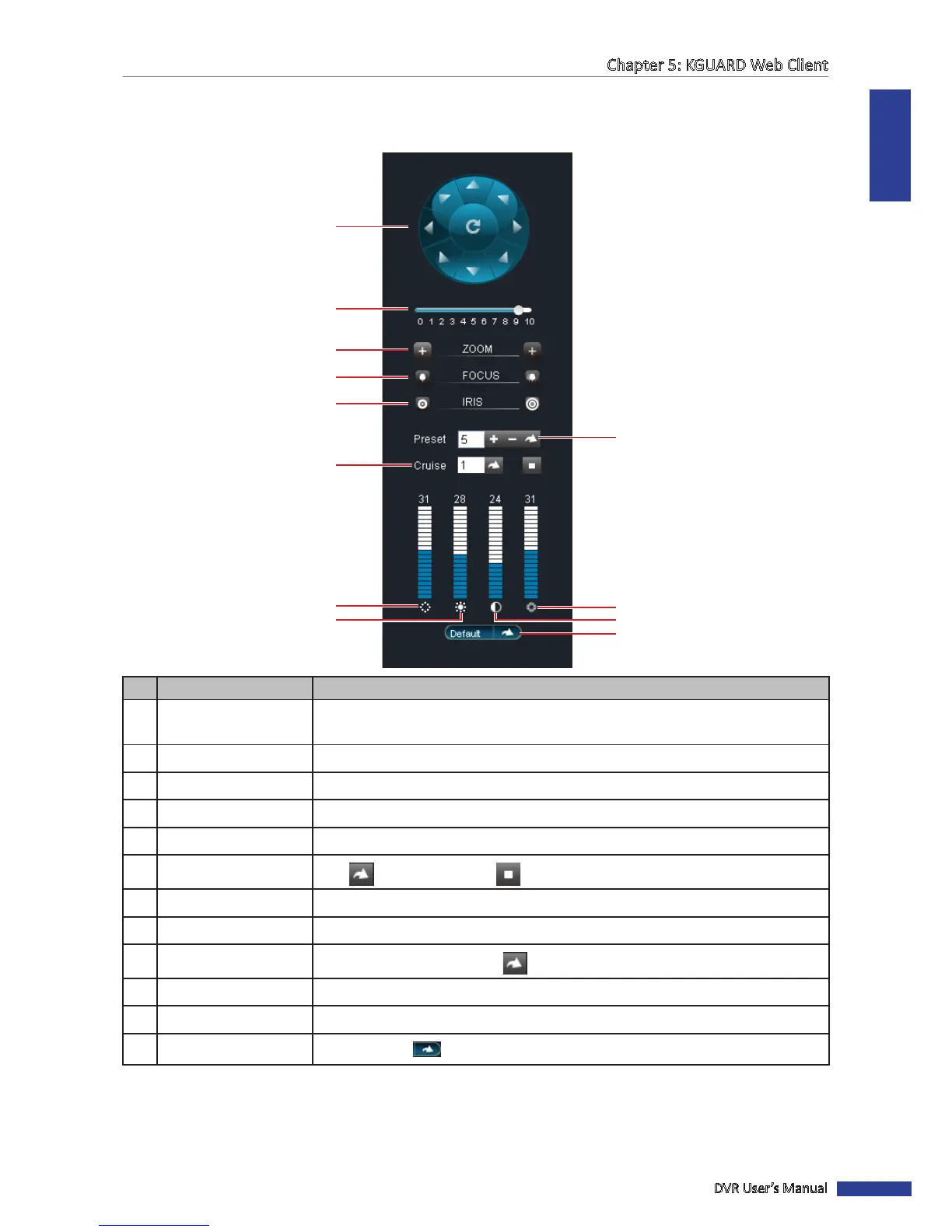
5.3.3 Using PTZ Controls
If you are using a PTZ speed dome camera, use the PTZ Controls to adjust the viewing scope other PTZ sengs.
3
9
10
12
4
5
1
2
6
7
8 11
No. Item Descripon
1
Pointer pan Click the direcon arrows to select the direcon of the PTZ camera.
Click the middle icon to switch to auto pan.
2 Speed Drag the slider to adjust speed.
3 Zoom Click the icons to adjust the zoom seng.
4 Focus Click the icons to adjust the focus seng.
5 Iris Click the icons to adjust the iris seng.
6
Cruise
Click to start cruise. Click to stop cruise.
7 Hue Click on the bars to adjust the hue seng.
8 Brightness Click on the bars to adjust the brightness seng.
9
Preset
Set the preset point, then click to go to the preset point.
10 Saturaon Click on the bars to adjust the saturaon seng.
11 Contrast Click on the bars to adjust the contrast seng.
12
Default
Click Default or to restore the default PTZ camera sengs.



 To Next Page