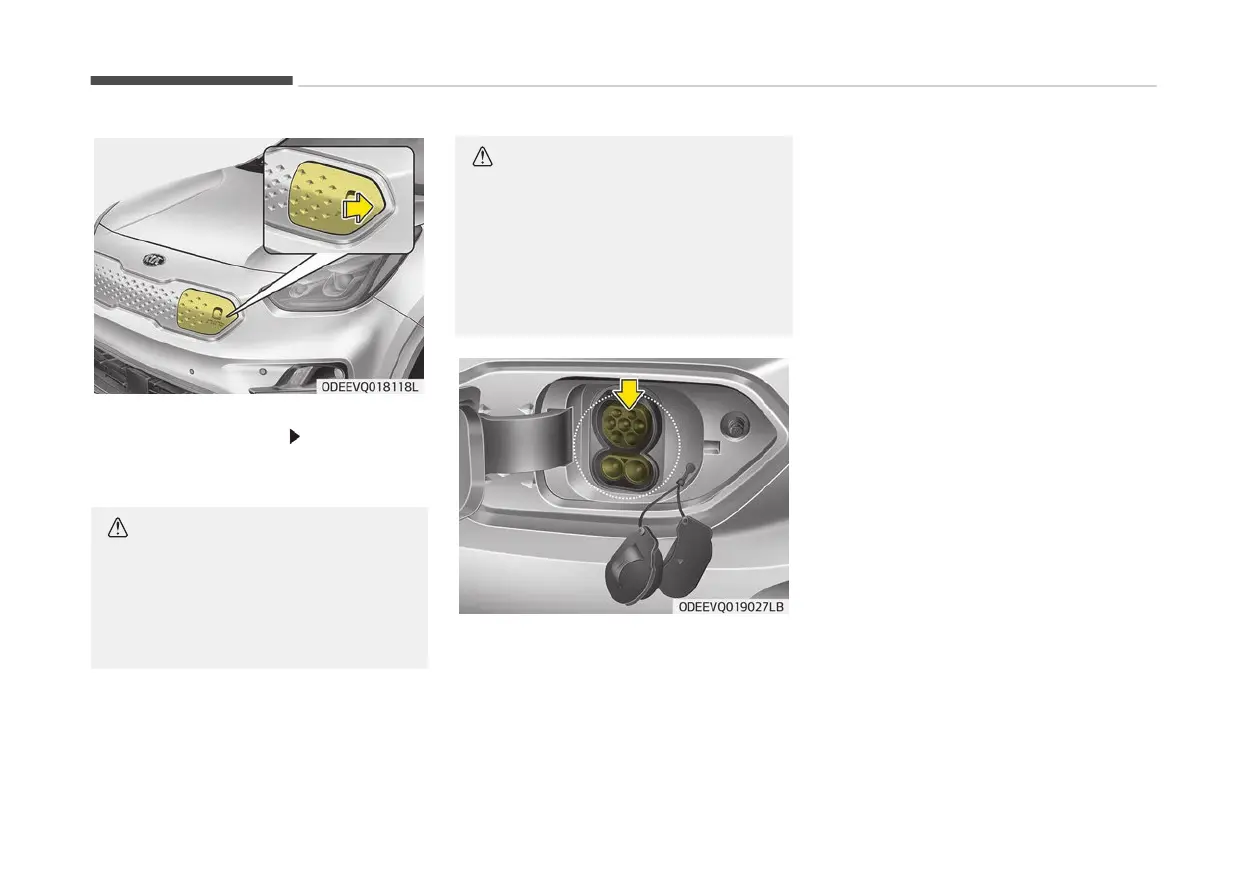
5. Open
the charging door by pressing
the arrow symbol [
] of the charg‐
ing door. The charging door will not
open if the vehicle door is locked.
CAUTION
If you cannot open the charging door
due
to freezing weather, tap lightly
or remove any ice near the charging
door. Do not try to forcibly open the
charging door.
CAUTION
In order to connect the charging con‐
nector
, release the door lock to un‐
latch the charging connector lock
system.
If not, the charging connector and
the vehicle's charging inlet may be
damaged.
6. Open
the charging door and then
open the inlet cover (1).
7. Open the protective cover of the
charging connector and check if
there is dust on the charging con‐
nector and charging inlet.
8. Hold the charging connector handle
and connect it to the vehicle AC
charging inlet. Push the connector
until you hear a "clicking" sound. If
the charging connector and charg‐
ing terminal are not connected
properly, this may cause a fire.
❈ Charging Connector AUTO/LOCK
Mode
When the charging connector and
the charging inlet are connected,
you can choose the mode by press‐
ing button. The charging connector
will be locked at a different time
depending on the selected mode.
LOCK Mode: When the charging
connector is properly connected,
the charging connector will be au‐
tomatically locked.
AUTO Mode: When the charging
connector is properly connected
and charging is initiated, the charg‐
ing connector will be locked.
For more information, refer to the
Charging Connector AUTO/LOCK
Mode.
Electric vehicle guide
1-34



 To Next Page