PCR-M 37
Chapter 3 Operation
3.2 Setting the Voltage Range
The voltage range is switched with the OUTPUT turned off. The selectable voltage
ranges are 135 V, 270 V, and AUTO.
The RANGE key is disabled when the OUTPUT is turned on.
Table 3-2 and Table 3-3 indicate the output voltage setting and
maximum output current.
page 38
The AUTO setting automatically switches between 135 V range and 270 V range.
AUTO cannot be selected in AC+DC mode, EXT-AC mode, or EXT-DC mode.
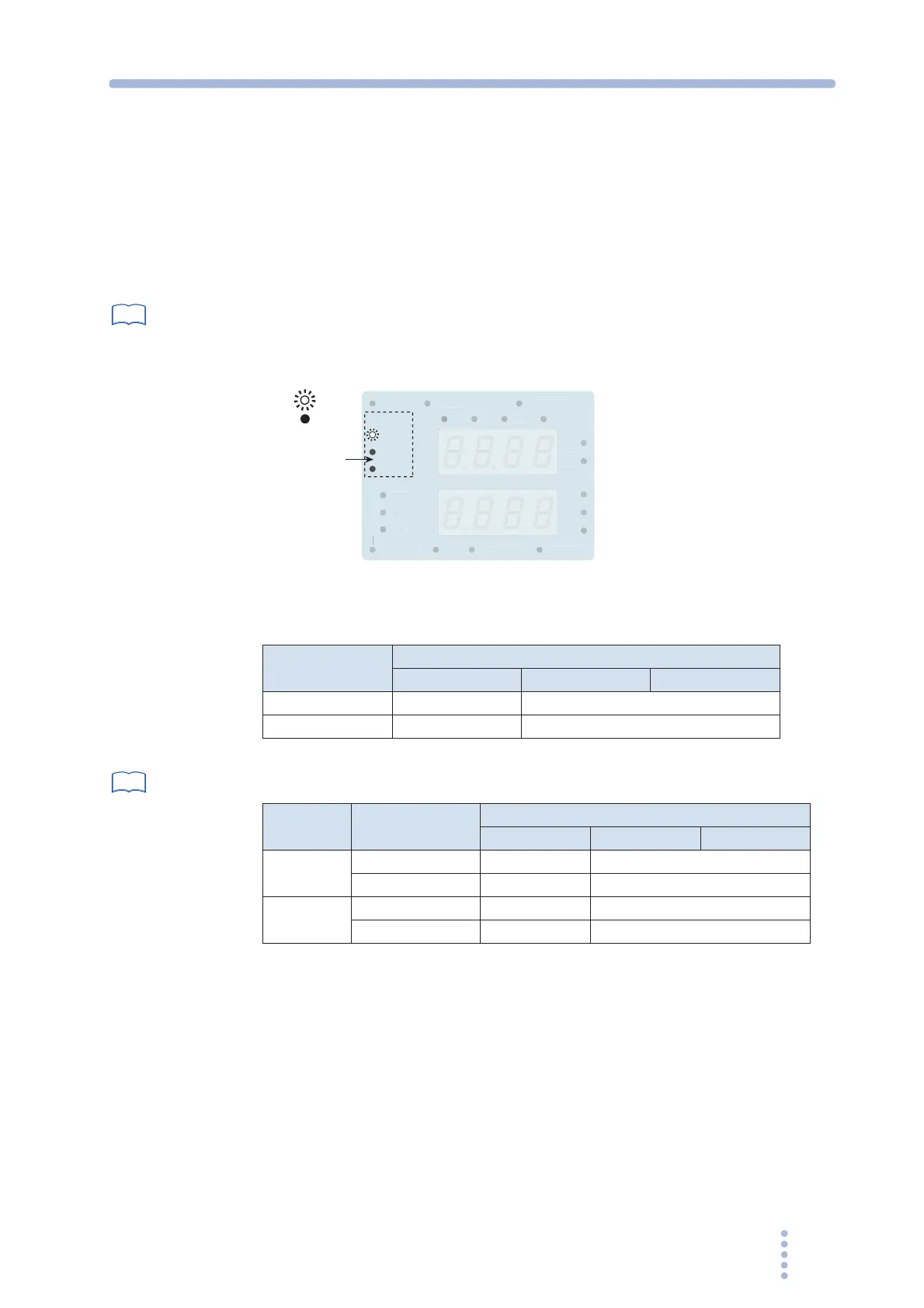
Fig.3-2 Voltage range display
Table 3-2 Voltage range and output voltage setting
page 80, 82
Table 3-3 Voltage range and maximum output current
1.
Press the OUTPUT key to turn the OUTPUT off.
The LED above on the left of the OUTPUT key turns off.
2.
Press the RANGE key (SHIFT+I) to select the voltage range.
The range switches among 135 V, 270 V, and AUTO each time the key is pressed. The
LED corresponding to the range illuminates.
If the voltage is set above 137.5 V in the 270 V range or AUTO setting and the range is
switched to 135 V, the output voltage is set to 0.0 V.
See
z
z
135V
270V
RANGE
V
MS
AUTO
EM
RY
REM
TE
EY L
K
VER L
AD
AC
DC
On
Off
Voltage range
Voltage Range
Output Voltage Setting
AC mode DC mode AC+DC mode
135 V range 0.0 V to 137.5 V -194.0 V to +194.0 V
270 V range 0.0 V to 275.0 V -388.0 V to +388.0 V
See
Voltage Range
Maximum Output Current
AC mode DC mode AC+DC mode
PCR500M
135 V range 5 A 4 A
270 V range 2.5 A 2 A
PCR1000M
135 V range 10 A 8 A
270 V range 5 A 4 A







 To Next Page