24 PCR-M
Chapter 2 Installation and Preparation
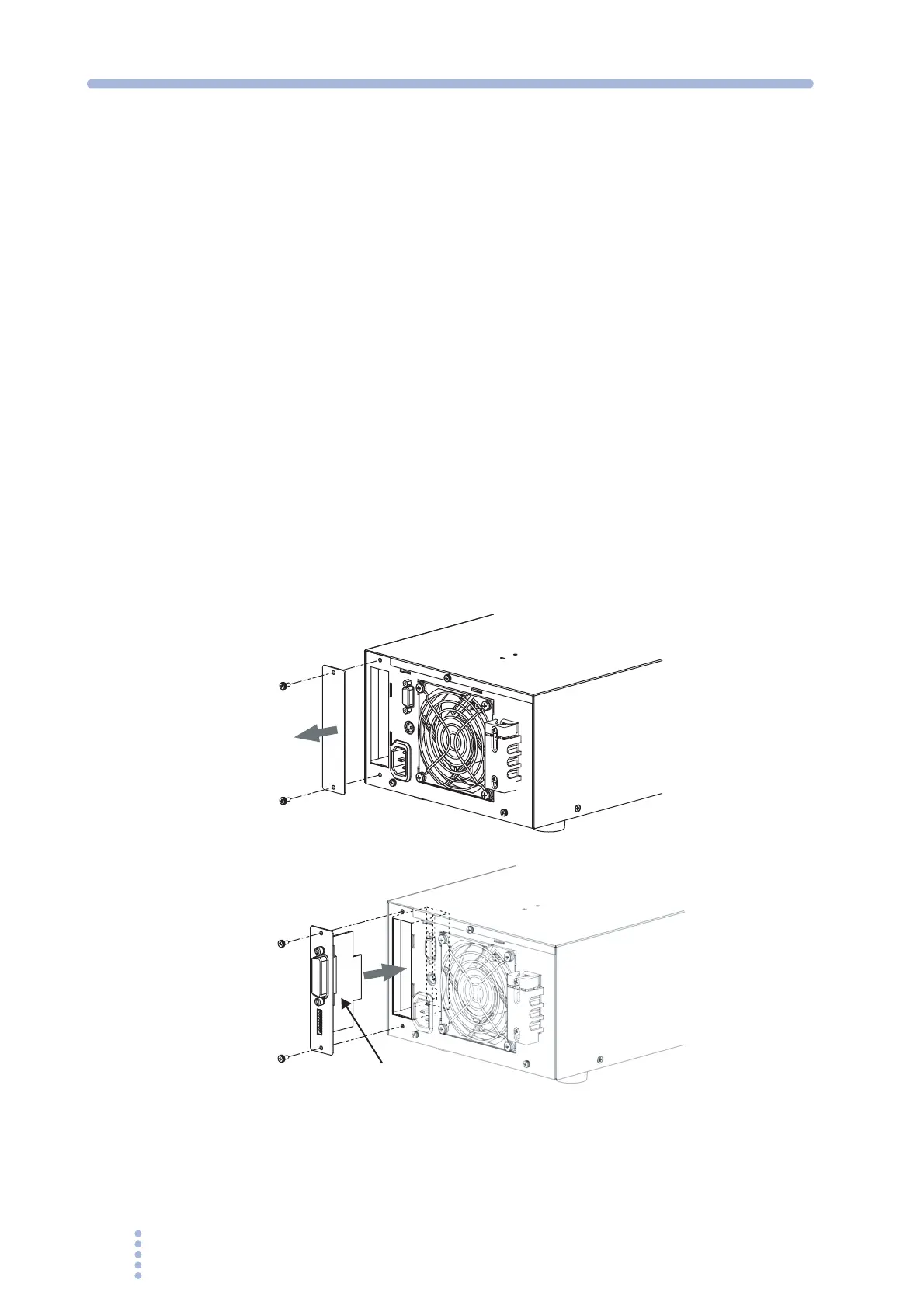
2.5 Attachment of the Optional Interface Board
Install an interface board to the option slot on the rear panel if you wish to control
the PCR-M externally through an interface other than RS232C or control the output
using external analog signals.
1.
Check that the POWER switch is turned off.
2.
Touch the grounded metal to discharge your physical static electricity
3.
Unfasten the screws that are holding the slot cover in place, and
remove the cover from the panel.
4.
Hold the panel section of the board so that the component side of the
printed circuit board is facing right.
5.
Slide the board into the slot so that the connector section of the printed
circuit board is inserted into the connector at the back of the slot.
6.
Push the board all the way in.
7.
Use the screws that were holding the slot cover in place to fix the board
to the panel.
Fig.2-4 Attaching the option board
(GPIB interface board example)
The switch at the back of the slot is set to the high side. Do not change the switch
setting.
Component side
Remove the cover
Insert the board







 To Next Page