50 PCR-M
Chapter 3 Operation
Alarm or error number, description, and remedy
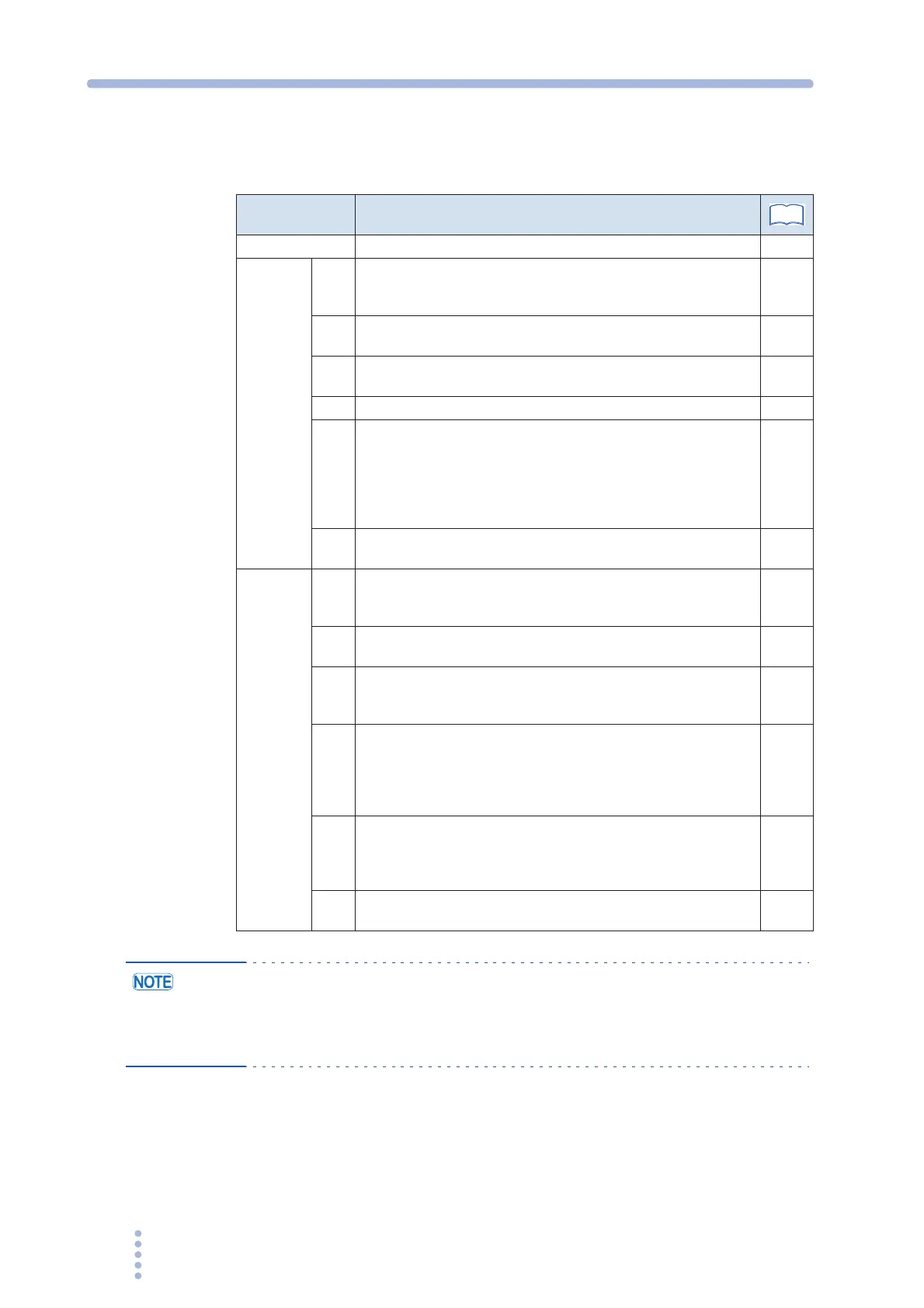
Table 3-13 Alarm or error number, description, and remedy
• If you cannot clear the alarm even when all of the causes of the alarm are
eliminated, the PCR-M may have malfunctioned. Stop using the PCR-M and
contact your Kikusui agent or distributor. When making an inquiry, please
provide us with the displayed alarm or error number.
Alarm Number or
Error Number
Description and Remedy
nOEr No alarm or error –
Alarm
A-00
Detected more than 8 V of measured voltage against the setting
voltage (OVP, Current limit function: TRIP) or the external signal
which exceeds maximum value of the range is applied.
–
A-01
The overload protection function (overcurrent (RMS or AVE)
protection) tripped (OCP).
44
A-02
The overload protection function (overcurrent (PEAK)
protection) tripped (OCP).
–
A-03 Power protection function tripped (OPP). –
A-04
The overheat protection function tripped (OHP).
The internal temperature may be abnormally high. If the alarm
continues to occur after 10 minutes with the POWER switch
turned on, it may be caused by an inappropriate installation of
the PCR-M or the ambient temperature being outside the
operating temperature specifications.
21
74
A-06
Detected less than 8 V of measured voltage against the setting
voltage (LVP, Current limit function: TRIP).
–
Error
E-09
An error is occurring in the internal communication. Turn the
POWER switch off, wait at least 5 seconds, and then turn the
POWER switch back on.
–
E-10
The input voltage is outside the rated range when the power is
turned on. Check the input voltage.
–
E-11
A voltage error occurred in the internal power unit. Turn the
POWER switch off, wait at least 5 seconds, and then turn the
POWER switch back on.
–
E-12
While the operation, the error has been occurred either the
input voltage becomes out of the rated range or the abnormal
state is detected in the input circuit. Check the input voltage.
Turn off the POWER switch and wait for more than 5 seconds,
then turn on the POWER switch again.
–
E-13
An error occurred inside the PCR-M. Turn the POWER switch
off. Wait at least 5 seconds, and then turn the POWER switch
on while holding down the RECALL key. The PCR-M is reset to
factory default settings.
–
E-15
An error occurred in the calibration data. The error cannot be
cleared. Contact your Kikusui agent or distributor for repairs.
–
See







 To Next Page