PCR-M 67
Chapter 5 Maintenance
2.
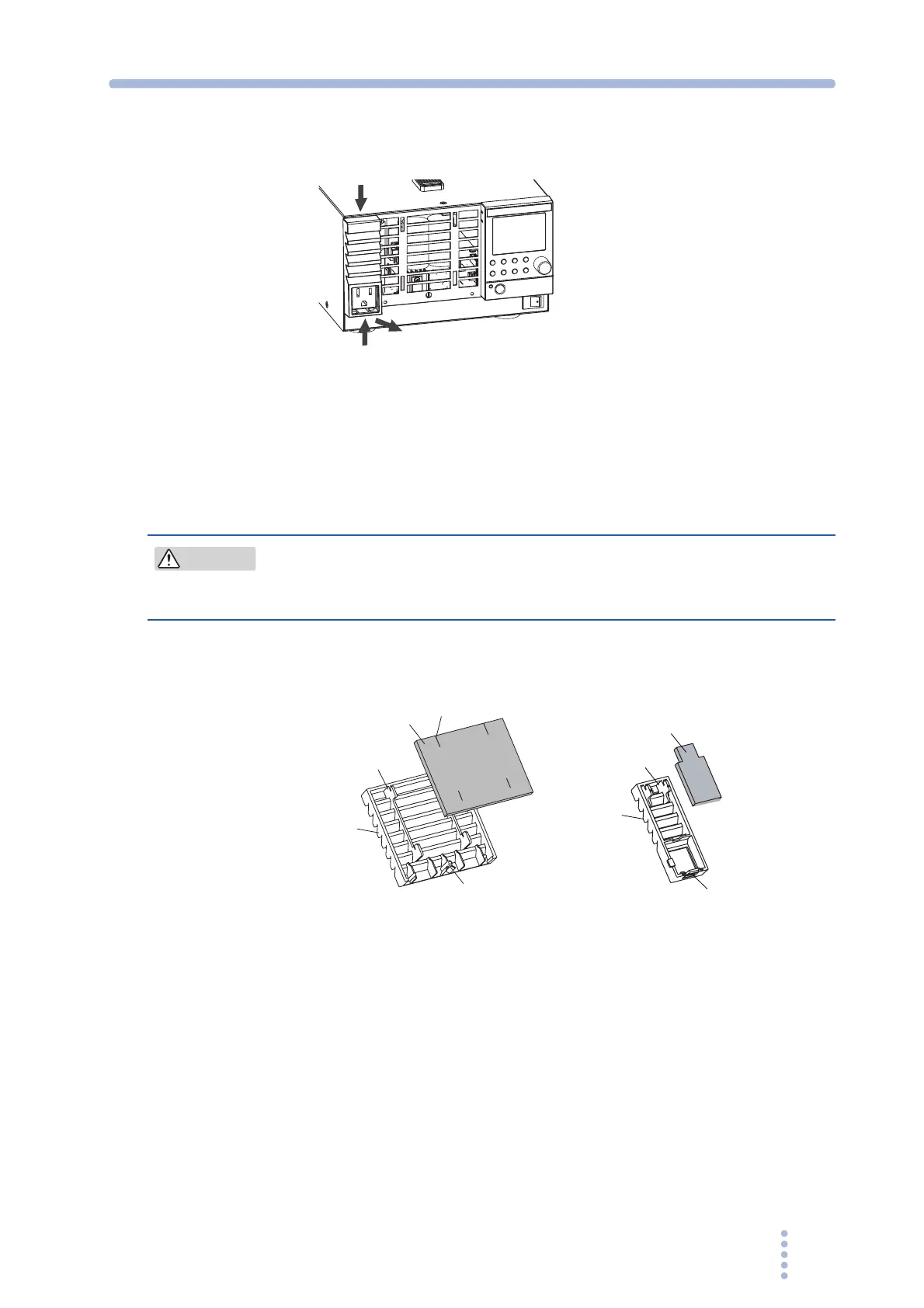
Pull the lower tab of louver B while pressing it upward, slide the entire
louver downward, and remove the louver from the panel.
Fig.5-2 Louver B removal
3.
Remove the dust filter from the inside of the louver and clean it.
Dispose of foreign particles and dust from the dust filter using a vacuum cleaner. If the
filter is extremely dirty, clean it using a water-diluted neutral detergent and dry it
completely.
• When the PCR-M is in operation, air is sucked through the dust filter to
cool the inside. If moisture is present in the dust filter, the temperature or
humidity inside the PCR-M increases and may cause a malfunction.
4.
Attach the dust filters to the louver.
Attach them so that the tab on the louver fits into the cut on the dust filter.
Fig.5-3 Dust filter attachment
Lower tab
CAUTION
Dust filter
Louver A
Tab
Pin
Cut
Tab
Lower tab
Dust filter
Louver B







 To Next Page