12. Perform a pressure measurement
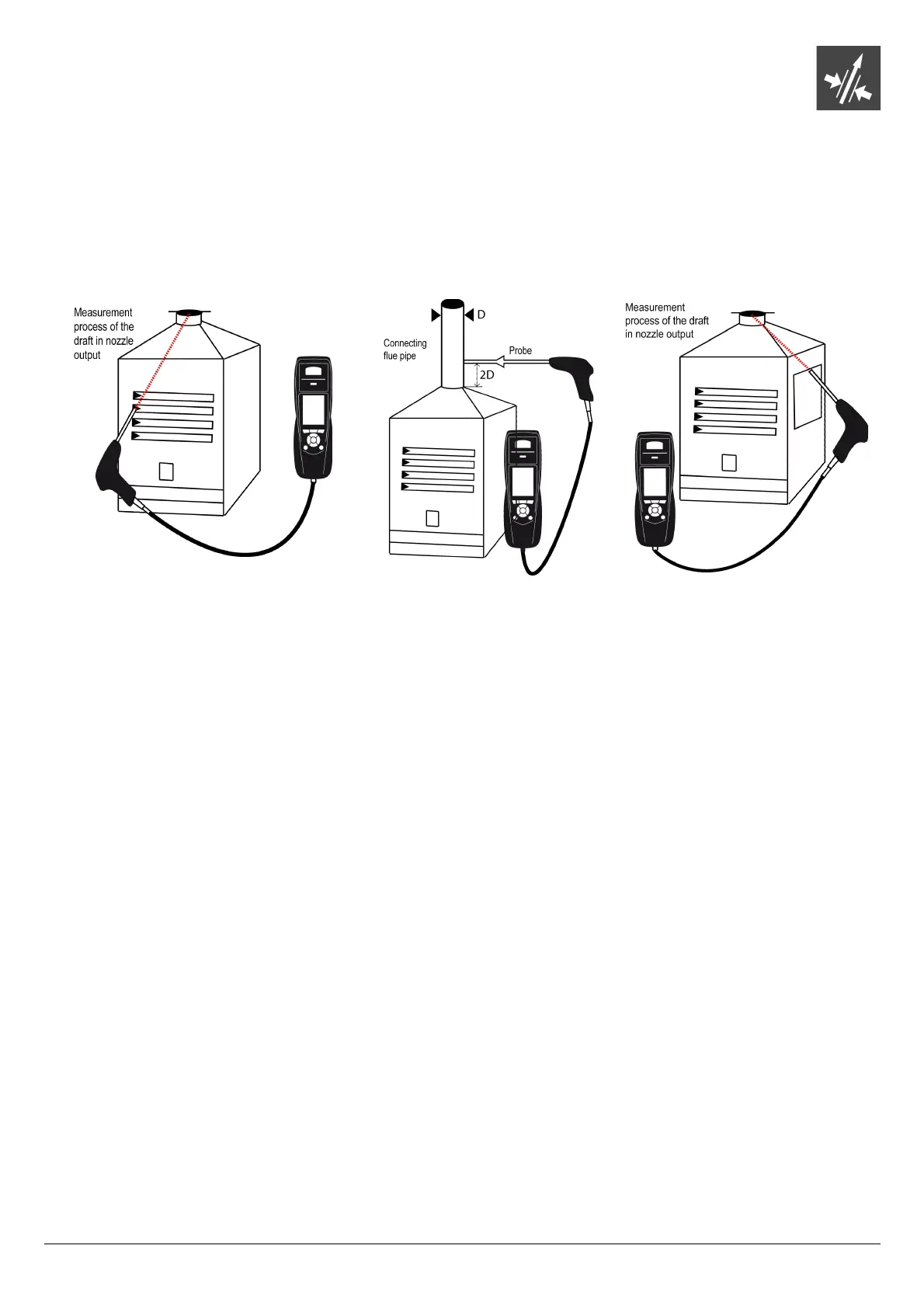
The draft measurement allows to check if the flue of the boiler correctly clears flue gas caused by the combustion.
12.1. Perform the measurement
➢ Connect the flue gas probe on the analyser.
➢ Turn on the analyser.
➢ Go to the “Measurement” menu with the keypad then press OK.
The analyser performs the gas autozero: remaining time and a progress bar display on the screen.
➢ Go to “Pressure” with the keypad then press OK.
➢ Go to “Draught pressure” with the keypad then press OK.
Measurement launches and the analyser displays the draft.
12.2. Perform a differential pressure measurement
➢ Connect the flue gas probe on the analyser.
➢ Turn on the analyser
➢ Go to the “Measurement” menu with the keypad then press OK.
The analyser performs the gas auto-zero: remaining time and a progress bar display on the screen. The pressure
measurement remains possible.
➢ Go to “Pressure” with the keypad then press OK.
➢ Go to “Diff. Press.” with the keypad then press OK.
➢ Press “Auto-zero”.
Measurement launches and the analyser displays the differential pressure.
12.3. Perform a flue gas velocity measurement
➢ Connect the flue gas probe on the analyser.
➢ Turn on the analyser.
➢ Go to the “Measurement” menu with the keypad then press OK.
The analyser performs the autozero: remaining time and a progress bar display on the screen.
➢ Go to “Pressure” with the keypad then press OK.
➢ Go to “Flue gas velocity” with the keypad then press OK.
The measurement launches and the analyser displays the differential pressure.
12.4. Link the measurement to a customer
When the measurement has been performed, it is possible to link it to a customer registered in the analyser or to a customer
unregistered in the analyser that must be created.
➢ Press the “Save” function button.
The analyser displays the list of recorded customers.
➢ Select a customer with up and down arrows then press OK or create a customer (see page 23) then select it.
The analyser displays the list of available boilers.
➢ Select the boiler with up and down arrows then press OK or create a boiler (see page 24) then select it.
The analyser backs to the measurement screen.
Perform a pressure measurement 29
Put the probe of the KIGAZ 210 in the
draft hood, going through the front face
of the boiler
Put the probe of the KIGAZ 210 in the
nozzle output, from the beginning of the
connecting flue
Put the probe of the KIGAZ 210 in the
draft hood, going through the side
openings of the boiler



 To Next Page