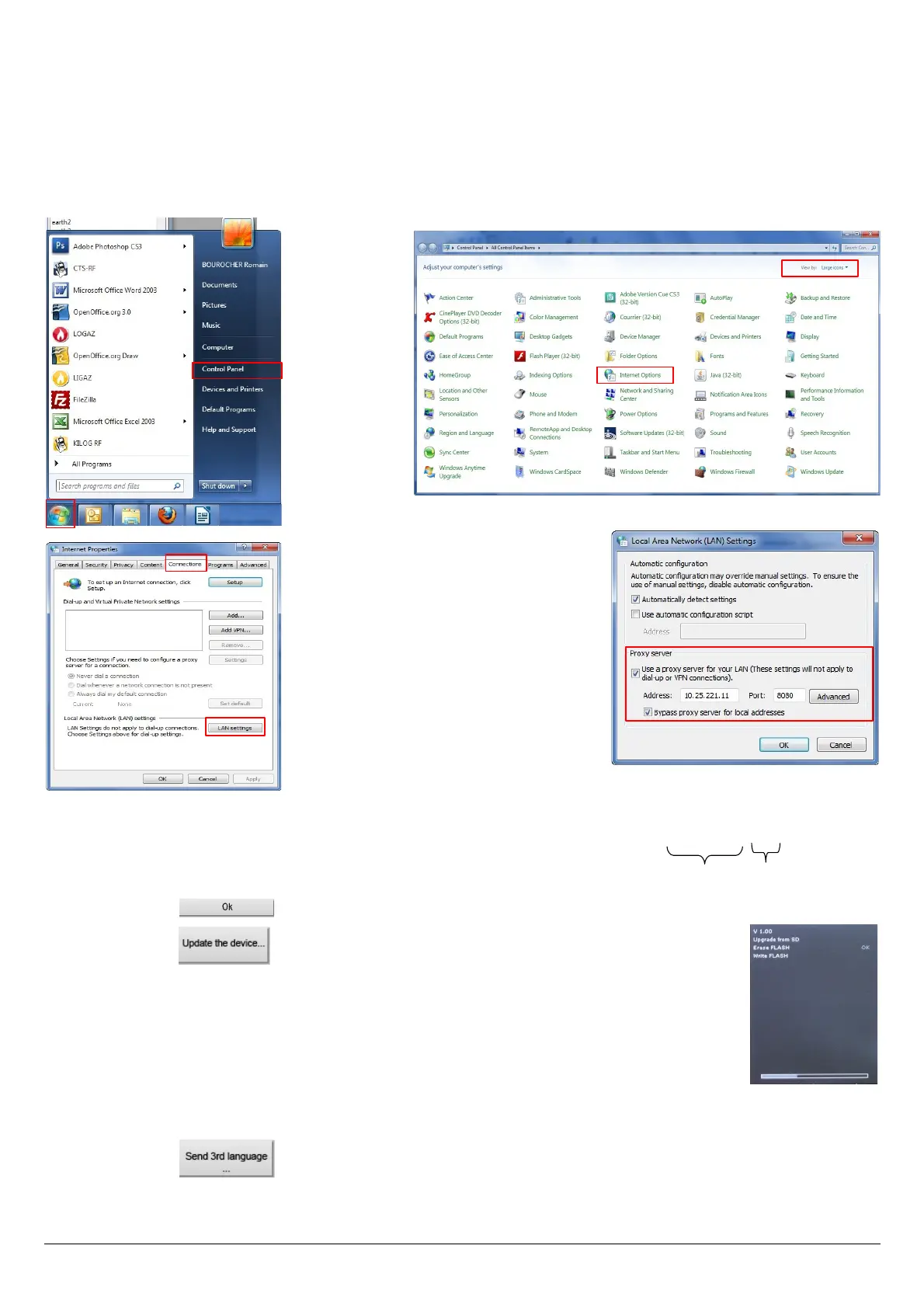
• The Internet connection is protected by a proxy
Address and serial number of the proxy, user name and corresponding password must be entered.
To get them into Windows 7:
➢ Click on “Start” (1) then on “Control panel” (2).
➢ In “Control panel” window, click on the up right on “Large icons” in “View by” (3).
➢ Click on “Internet Options” (4):the “Internet Properties” window opens.
➢ Click on “Connections” tab (5) then on “LAN settings” button (6): the “Local Area Network (LAN) Settings” window
opens with the information about the proxy server (7).
➢ Copy the address and the port in the “Address” line of the connection window as follows: 00.00.000.00:0000
➢ Enter the user name and the corresponding password: data entered at the starting of the computer when the user logins.
➢ Click on the button.
➢ Click on the button.
The update lasts for a few minutes.
Turn off then turn on the device.
A black screen with a progress bar are displayed (see opposite) then the device turns off itself.
➢ Turn on the device then go to “Information” menu of the analyser to check if the update has been
taken into account.
6.8.3. Install a 3
rd
language
➢ Select the language to send in the drop-down list box.
➢ Click on the button.
54 Set the analyser
1
2
3
4
7
5
6
Address
Port



 To Next Page