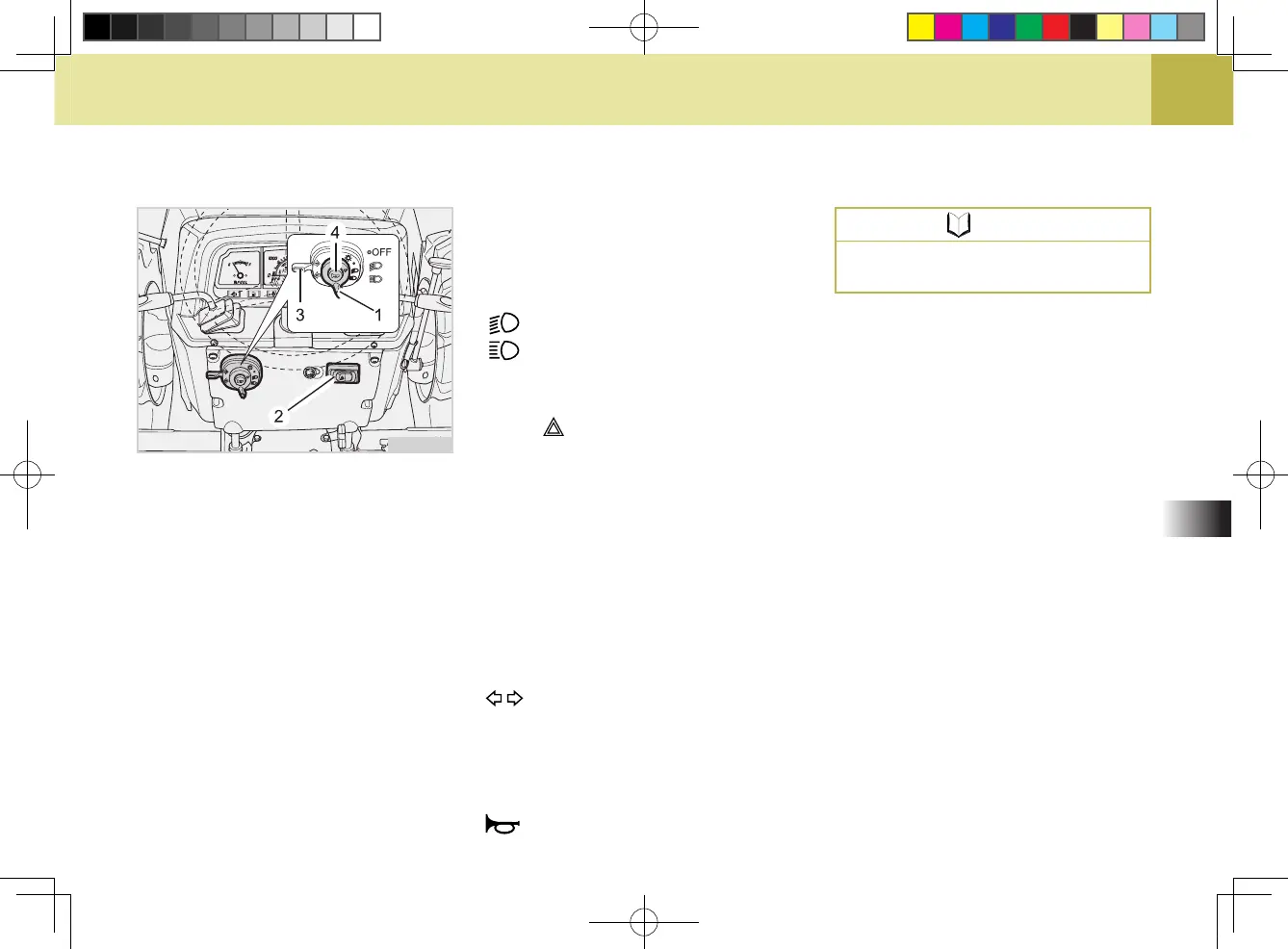
2. SELECTING LIGHT SWITCH
POSITIONS
(1) HEAD LIGHT SWITCH
OFF
: Head lights OFF.
: Head lights - Low Beam ON.
: Head lights - High Beam ON.
(2) HAZARD LIGHT SWITCH
When hazard light switch is pushed
to the position, the hazard lamps
blink.
(3) TURN SIGNAL LIGHT SWITCH
To indicate a right turn, pull to up-
ward.
To indicate a left turn, push down turn
to downward.
When the left or right turn signal is
activated in combination without the
hazard lights, the indicated turning
light will ash and the other will be off.
: Turn signal light and tail light ON
(4) HORN SWITCH
The horn switch can be operated
without the key inserted. Pressing
this switch sounds the horn.
: Horn switch
(1) Head Light Switch
(2) Hazard Switch
(3) Turn Signal Light Switch
(4) Horn Switch
621O516A
NOTE
Be sure to return switch to center
position after turning.



 To Next Page