E02016 2/02 Electrical Propulsion Components E2-33
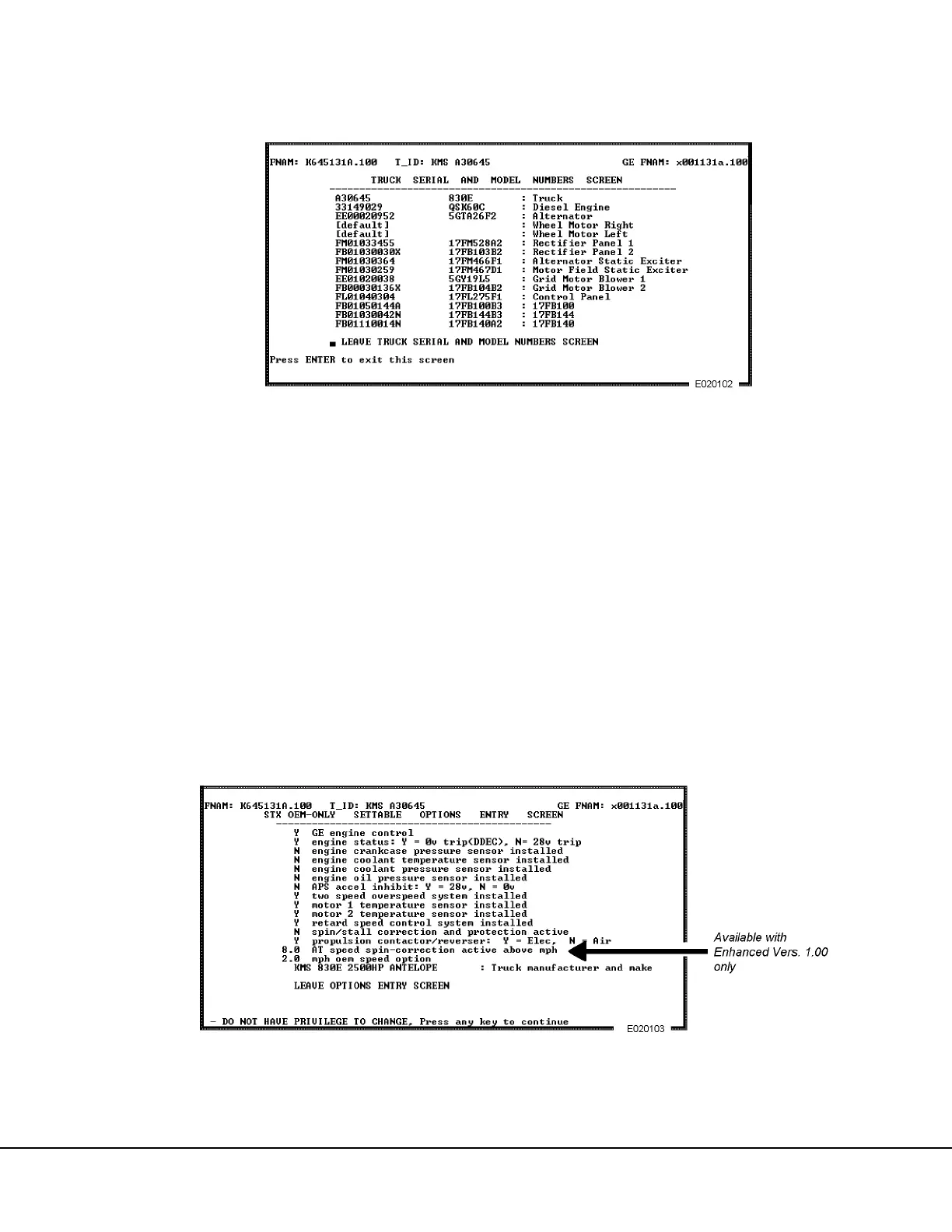
“3) Change/View Serial and Model Numbers . . .”
1. Use the down arrow key to move the cursor to the
menu position “CHANGE/VIEW SERIAL AND
MODEL NUMBERS SCREEN”, or press [3]. All of
the major component serial numbers will be dis-
played, or serial number information can be typed
in. Refer to the screen shown in Figure 2-12. If a
serial number is changed, an asterisk (*) will
appear next to it.
2. To insert new serial numbers, move the cursor to
the desired location, type in the information, and
press [ENTER]. When finished entering serial
numbers, exit the screen by moving the cursor to
the “leave truck serial numbers screen” selection
and press [ENTER].
“4) View Options . . .”
NOTE: The options on this screen can be changed
only by the manufacturer.
1. Use the Down arrow to move the cursor to the
menu position “VIEW OPTIONS” and press
[ENTER], or press [4]. The screen shown in Fig-
ure 2-13 will appear.
2. Several codes are used to indicate the status of
various options and equipment.
The Y, N and X codes are described as follows:
Y = OEM has selected YES
N = OEM has selected NO
X = Not available to OEM
FIGURE 2-12. TRUCK COMPONENT SERIAL NUMBERS
FIGURE 2-13. OPTIONS ENTRY SCREEN (View Only)



 To Next Page