ADU UNIT
3-N-13
3 DIS./ASSEMBLY
[9] Cleaning the ADU Paper Reverse PS
(PS45)/Reverse/Exit PS (PS46)
Warning:
The interlock which is turned OFF when
the front right or left door opens or closes
should never be turned ON forcibly with
the ADU stand drawn out.
Caution:
Be sure the power cord has been
unplugged from the wall outlet.
a. Procedure
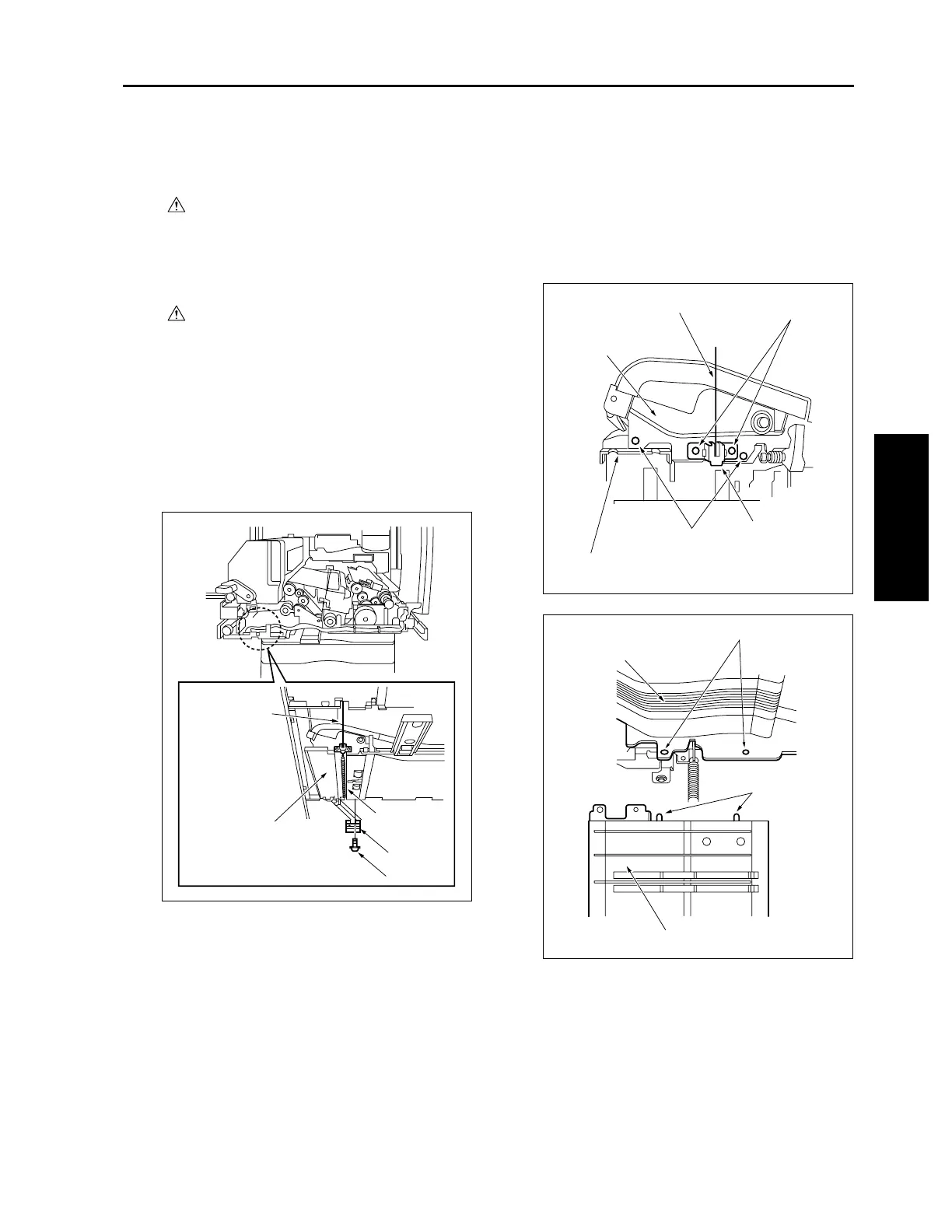
(1) Draw out the ADU stand from the main body.
(2) Remove the fixing unit. (See "FIXING UNIT.")
(3) Remove the ADU cover.
(4) Remove one screw to remove the ground plate.
(5) Remove the open/close spring from the paper
exit side open/close wire.
(6) Remove two screws to remove the open/close
wire assembly.
(7) Remove two screws to remove the ADU reverse
guide assembly.
Caution: When reinstalling, align the projection
on the rear of the ADU reverse guide
assembly with the hole on the ADU
bottom plate assembly.
Open/close
wire
ADU reverse guide
assembly
Screw
Open/close
spring
Ground plate
ADU reverse guide assembly
Open/close wire
ADU bottom plate
assembly
Screws
Screws
Open/close
wire assembly
Holes
Projections
ADU reverse guide assembly
ADU bottom plate assembly
3-N-7










 To Next Page