OTHER ADJUSTMENT
1 ADJUSTMENT
4
4
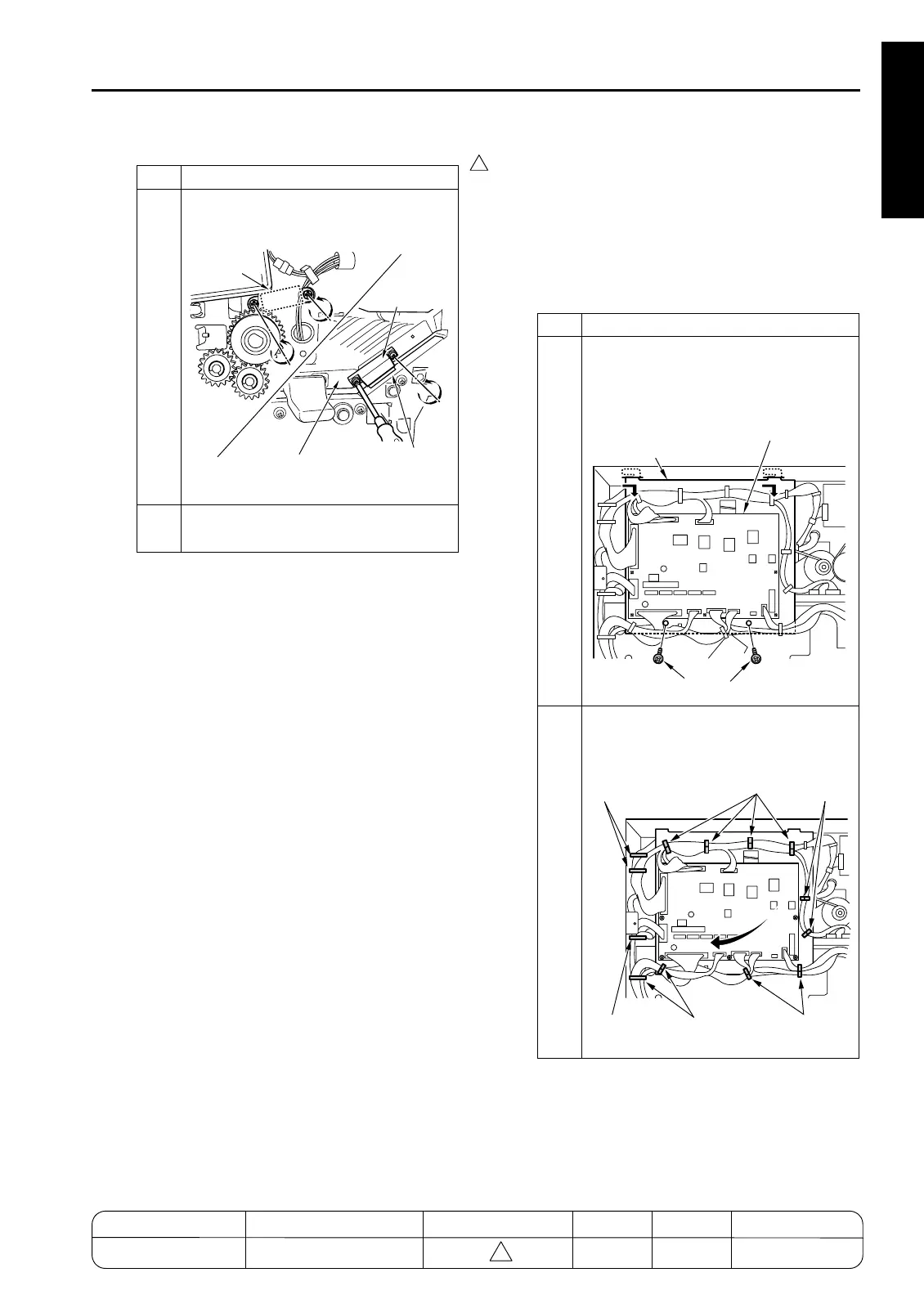
[36] FNS Adjusting the Sub-tray Paper
Exit Gate (FS-111)
1. Tool
• Screwdriver (Phillips)
•Scale
2. Adjustment method
a. Preparation
Step Operation
4
Adhere the magnets to conveyance
guide plate A and retighten the screws.
5
Reassemble in opposite sequence to
removal.
7272fs1018
Magnet
(rear)
Magnet
(front)
Conveyance
Guide Plate D
Conveyance
Guide Plate C
Step Operation
1
Remove the 2 set screws holding the
FNS CB (FNS control board) in place.
Remove the FNS CB together with its
bracket.
2
Remove the wirings from the clamps,
and move the FNS CB together with its
bracket.
7272fs1019
Screws
Bracket
FNS CB (Finisher Control Board)
7272fs1020
Clamps
Clamps
Clamps
Clamps
Clamp
Clamps
MODEL MANUAL REVISED EDITION DATE PAGE METHOD
SERVICE MANUAL Dec. 2003
7155/7165/7255/7272
1-139 ADDITION










 To Next Page