36 MODE
1 ADJUSTMENT
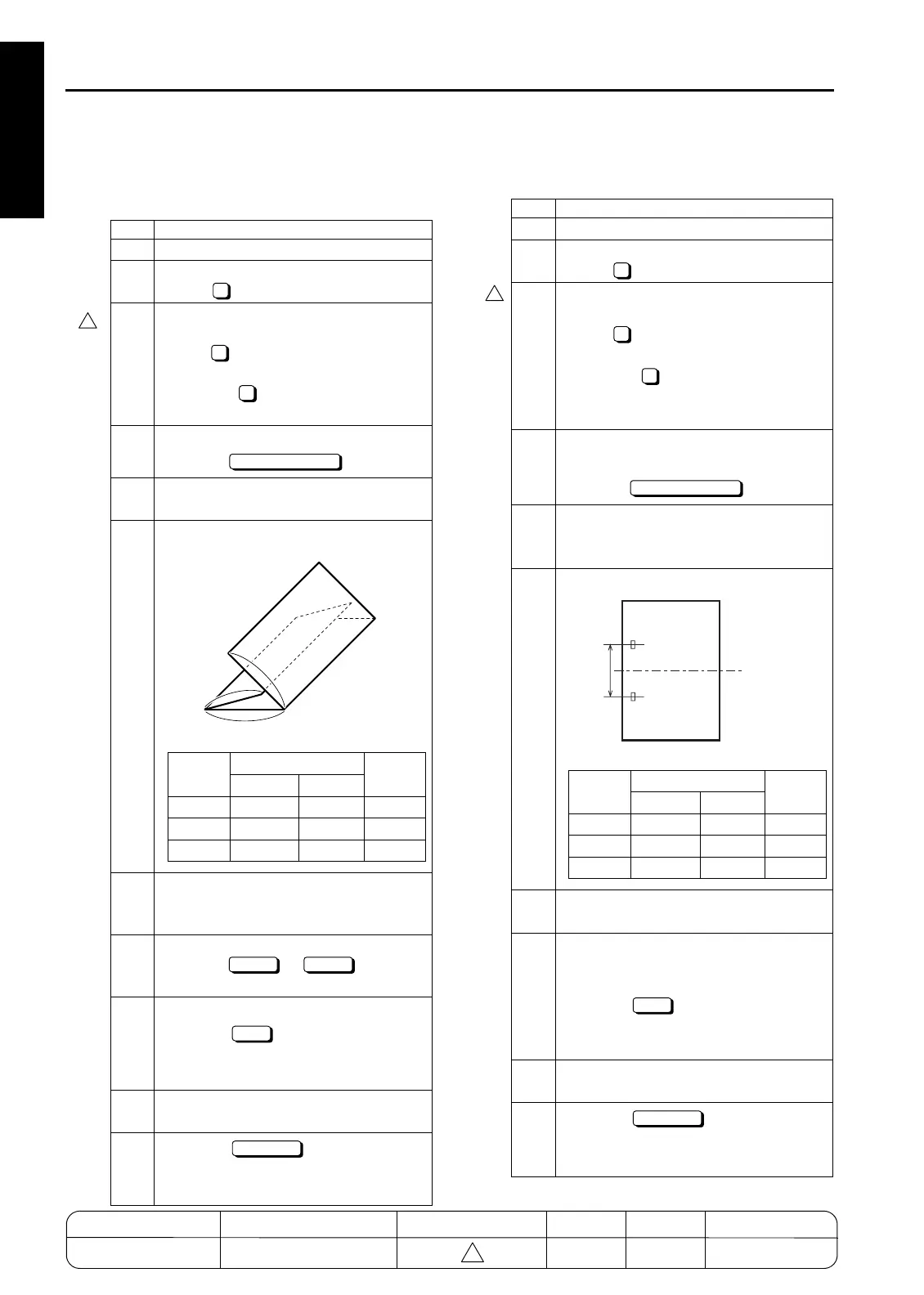
7. Three-folding adjustment (FS-210 only)
Adjusting the folding positions during the three-
folded copy.
8. 2 positions staple pitch adjustment
Adjusting the pitch of the 2 positions staple.
Step Operation
1
Enter the 36 mode.
2
[Adjustment mode menu Screen]
Press " Finisher adjustment".
3
[Finisher Adjustment mode Menu
Screen]
Press " Three-folded positions
adjustment" in the case of the 7155/7165,
and press " Three-folded positions
adjustment" in the case of the 7255/7272.
4
[Three-Folding adjustment Screen]
Press the key.
5
Load papers in the tray, place the original on
RADF, and then press the START button.
6
Check the three-folded positions of
paper.
7
If the folded positions are not within the
specification, press the C button while
pressing the P button.
8
[Three-Folding adjustment Screen]
Press the or key to
select the item to be adjusted.
9
Enter a value with numeric keys and
press the key.
Setting range: -128 to +127
1 step=0.1mm
10
Repeat steps 4-9 until the folded posi-
tions are within the specification.
11
Press the key to return to
the Finisher adjustment mode menu
Screen.
6
7
6
COPY SCREEN
a
b
c
Folded
positions
Reference value
Specifi-
cation
A4R 8.5x11R
a 93mm 86.4mm
±
2mm
b 102mm 97mm
±
2mm
c 102mm 97mm
±
2mm
NEXT BACK
SET
RETURN
Step Operation
1
Enter the 36 mode.
2
[Adjustment mode menu Screen]
Press " Finisher adjustment".
3
[Finisher Adjustment mode Menu
Screen]
Press " 2 positions staple pitch
adjustment"
in the case of the
7155/7165,
and press " 2 positions staple pitch
adjustment"
in the case of the
7255/
7272.
4
[2 positions staple pitch adjustment
Screen]
Press the key.
5
Load papers in the tray, place the origi-
nal on RADF, and then press the START
button.
6
Check the pitch of the 2 positions staple.
7
When changing the dimension A, press
the C button while pressing the P button.
8
[2 positions staple pitch adjustment
Screen]
Enter a value with numeric keys and
press the key.
Setting range: 120 to 160
1 step=1mm
9
Repeat steps 4 to 8 until the dimension
A is improved.
11
Press the key to return to
the Finisher adjustment mode menu
Screen.
6
8
7
COPY SCREEN
A
A:120mm
(Standard)
Folded
positions
Reference value
Specifi-
cation
A4R 8.5x11R
a 93mm 86.4mm
±
2mm
b 102mm 97mm
±
2mm
c 102mm 97mm
±
2mm
SET
RETURN
4
4
MODEL MANUAL REVISED EDITION DATE PAGE METHOD
SERVICE MANUAL Dec. 2003
7155/7165/7255/7272
1-82 REPLACEMENT
4










 To Next Page