Measurement
Operating Procedure
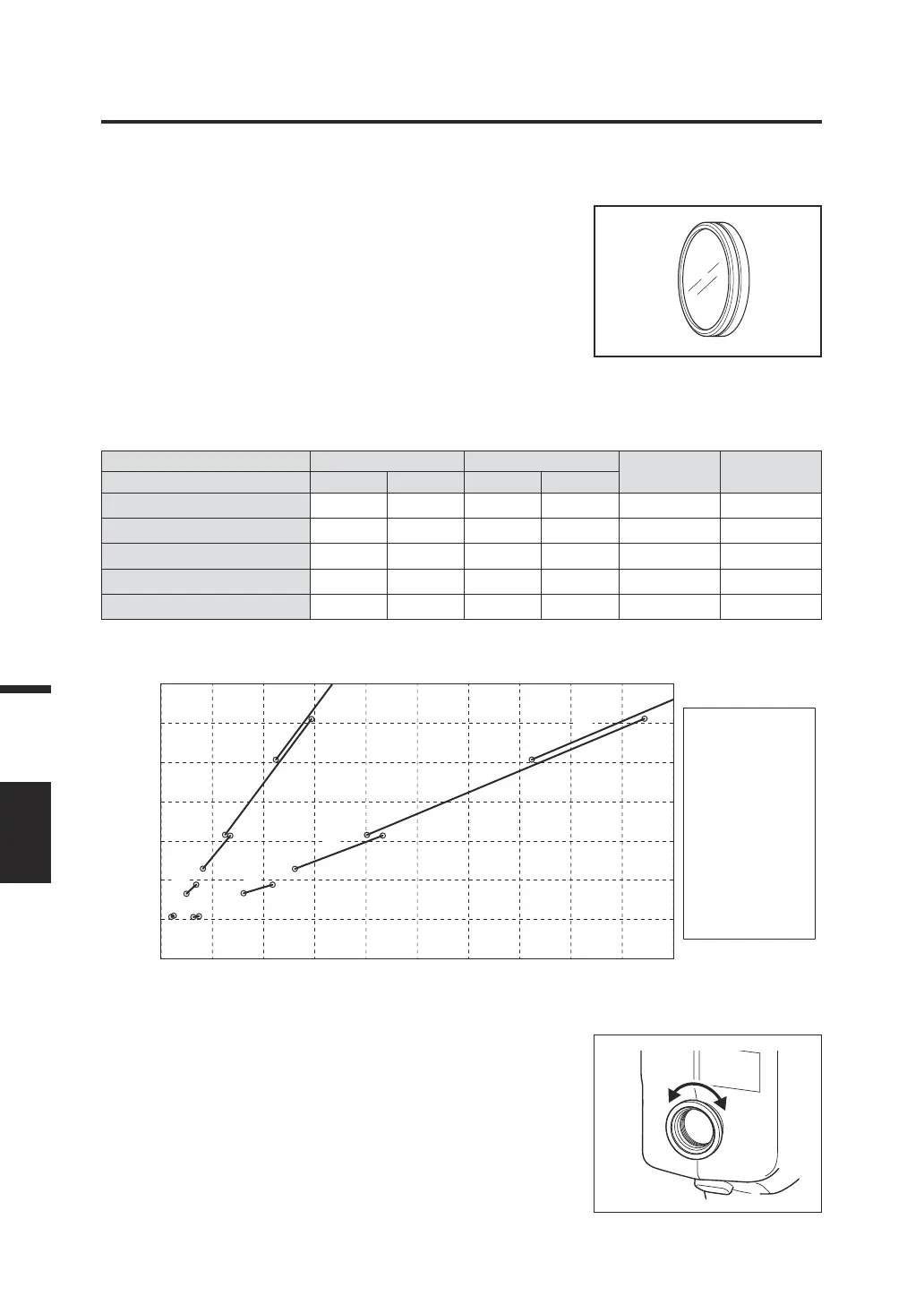
1. Determine whether to use the close-up
lens (optional accessory) by
considering the size of the object to be
measured and the measuring distance.
Refer to the table below for the measuring
distance and circle diameter. When the close-up
lens is attached, you need to set the lens type
on the instrument. (Refer to page 42.)
Measuring distance and area (Unit: mm)
Minimum area ø Maximum area ø
Shortest
distance
Longest
distance
(Measuring angle) 1/3° 1° 1/3° 1°
No close-up lens 4.5 14.4 ∞ ∞ 1012 ∞
Close-up lens No. 153 2.5 8.0 5.9 18.8 627 1219
Close-up lens No. 135 1.6 5.2 2.7 8.6 455 625
Close-up lens No. 122 1.0 3.2 1.3 4.3 331 378
Close-up lens No. 110 0.4 1.3 0.5 1.5 213 215
* The measuring distance is the distance from the measuring distance reference mark on the instrument.
Measuring circle diameter vs. measuring distance
Measuring distance (mm)
Measuring circle diameter (mm)
(1) None (1°)
(2) No.153 (1°)
(3) No.135 (1°)
(4) No.122 (1°)
(5) No.110 (1°)
(6) None (1/3°)
(7) No.153 (1/3°)
(8) No.135 (1/3°)
(9) No.122 (1/3°)
(
10
) No.110 (1/3°)
1400
1200
1000
800
600
400
200
0
0 2 4 6 8 10 12 14 16 18
(1)
(2)
(4)
(5)
(6)
(7)
(8)
(9)
(
10
)
(3)
2. Turn the visibility adjustment ring on
the viewnder to adjust the visibility.
Observe the object to be measured through the
viewnder and adjust the ring so that the
measuring circle is seen clearly. (Refer to
page 14.)
82
Measurement
MEAS.
AREA




 To Next Page