Making Copies
5
Konica 7115/7118 5-17
3
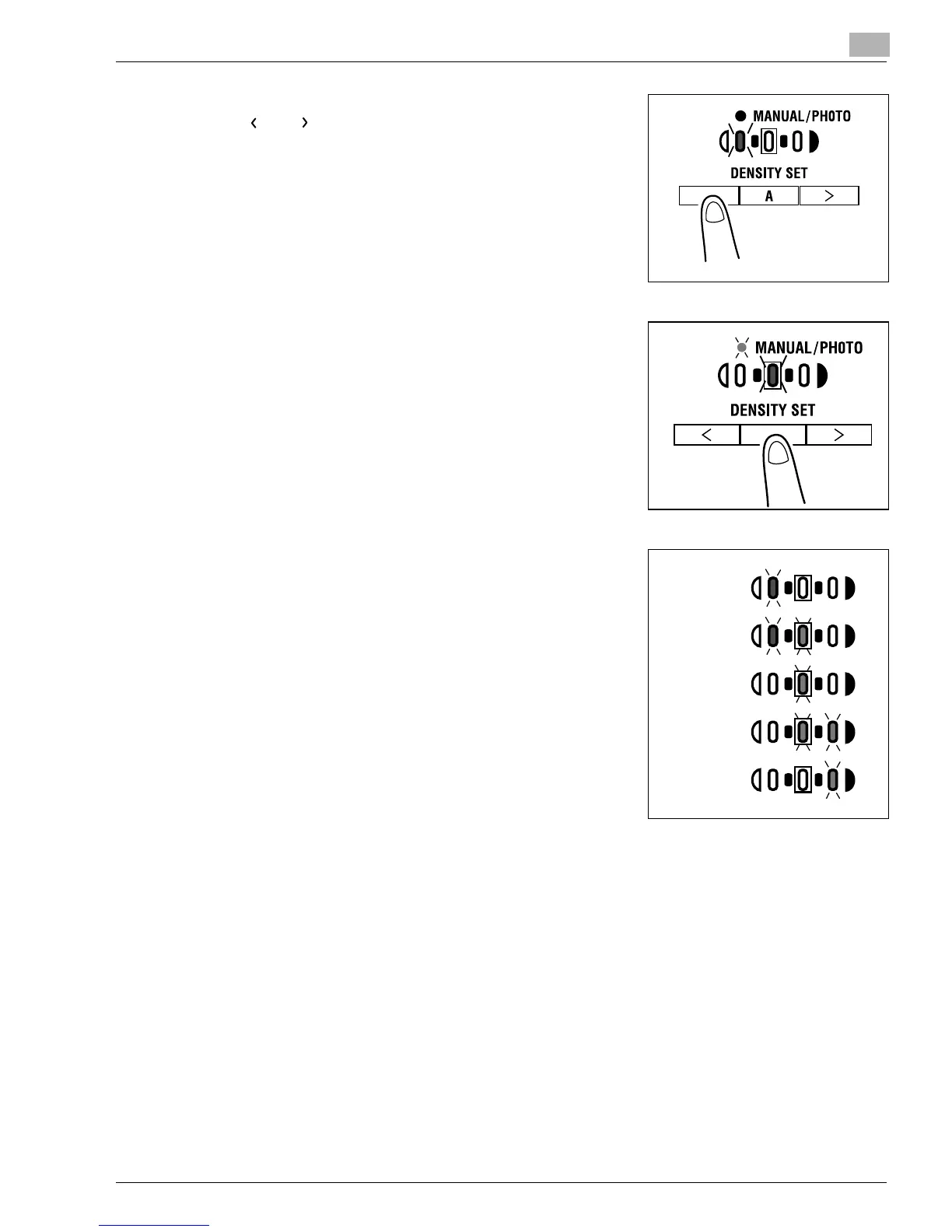
If you want to adjust the image density manually, press
the [ ] or [ ] key to select the desired setting.
?
Do you know how to select Photo?
➜
Light the Photo indicator. In the Photo mode, Auto
cannot be selected.
?
Do you know how to select Photo?
➜
Light the MANUAL/PHOTO indicator. In the Photo
mode, Auto cannot be selected.
?
Do you know what to do after selecting Manual?
➜
Refer to the diagram on the right for the relationship
between the control panel indication and image
density.
4
Make any other necessary settings.
❍
Paper (p.5-3)
❍
Image Density (p.5-16)
5
Enter the number of copies to be made on the KEYPAD and then press the [START] key.
Lightest
Lighter
Medium
Darker
Darkest
(Level -2)
(Level -1)
(Level 0)
(Level 1)
(Level 2)
Konica7115_7118.book Page 17 Friday, October 19, 2001 12:02 PM











 To Next Page