3
Before Making Copies
3-12 Konica 7115/7118
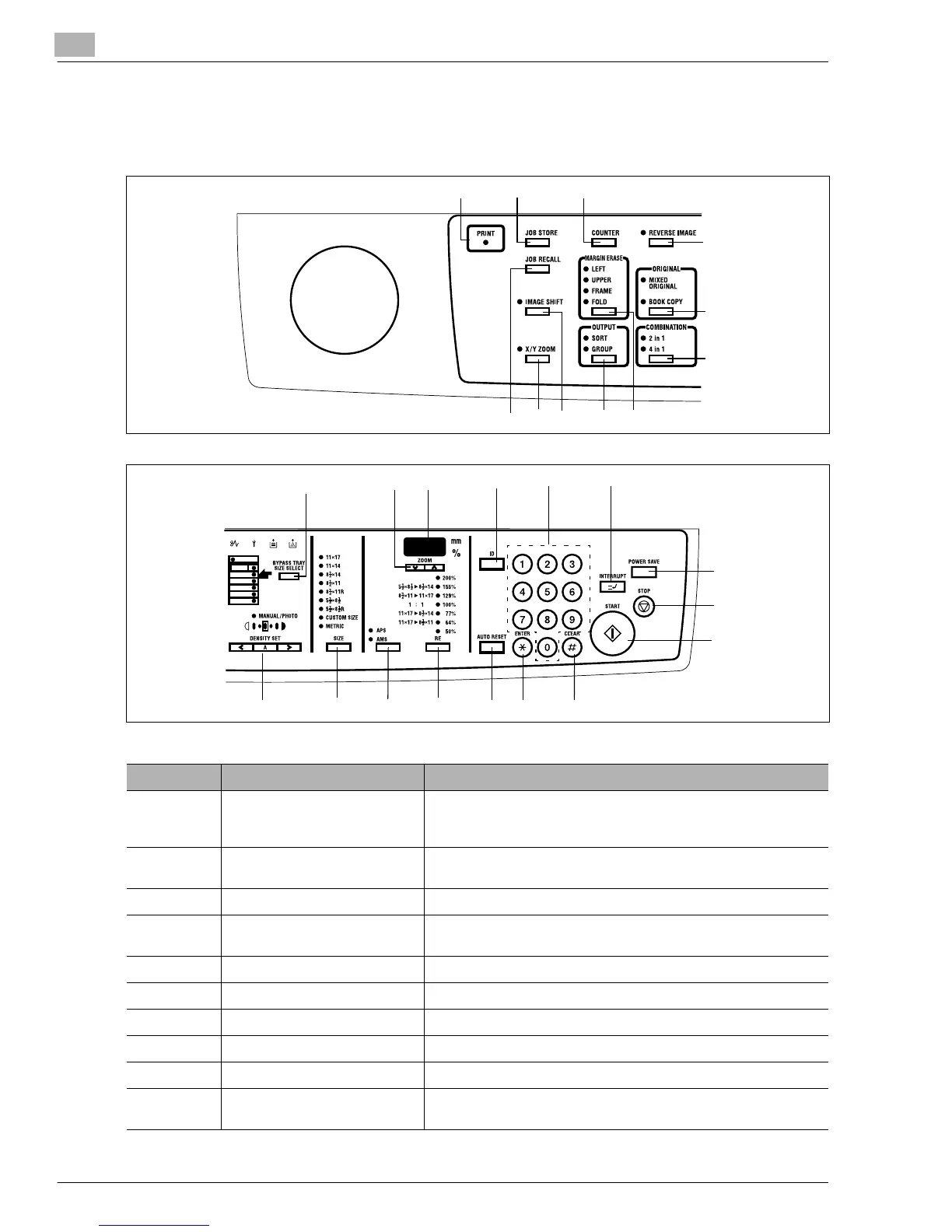
3.4 Control Panel
Names of Control Panel Parts and Their Functions
No. Part Name Description
1 PRINT • Lit while data received from personal computer is being printed.
Blinks while data is being transferred.
For details, refer to the Printer Controller User’s Manual.
2 JOB STORE • Press to select the Job Input mode. Two different jobs can be
programmed.
3 COUNTER • Press to display the Total Counter or Size Counter value.
4 REVERSE IMAGE • Press to copy an original with the original tonal arrangements
reversed.
5 ORIGINAL • Press to select the Mixed Original or Book copy function.
6 COMBINATION • Press to select the 2 in 1 or 4 in 1 function.
7 MARGIN ERASE • Press to select the erase position.
8OUTPUT • Press to select the finishing function.
9 IMAGE SHIFT • Press to select the Image Shift mode.
10 X/Y ZOOM • Press to make a copy with different zoom ratios set for X
(horizontal) and Y (vertical) directions.
1
2
3
4
5
6
78
9
10
11
12
13
14
15
17
21
22
20
23
24
25
26
27
16
18
19
Konica7115_7118.book Page 12 Friday, October 19, 2001 12:02 PM











 To Next Page