Effect
223
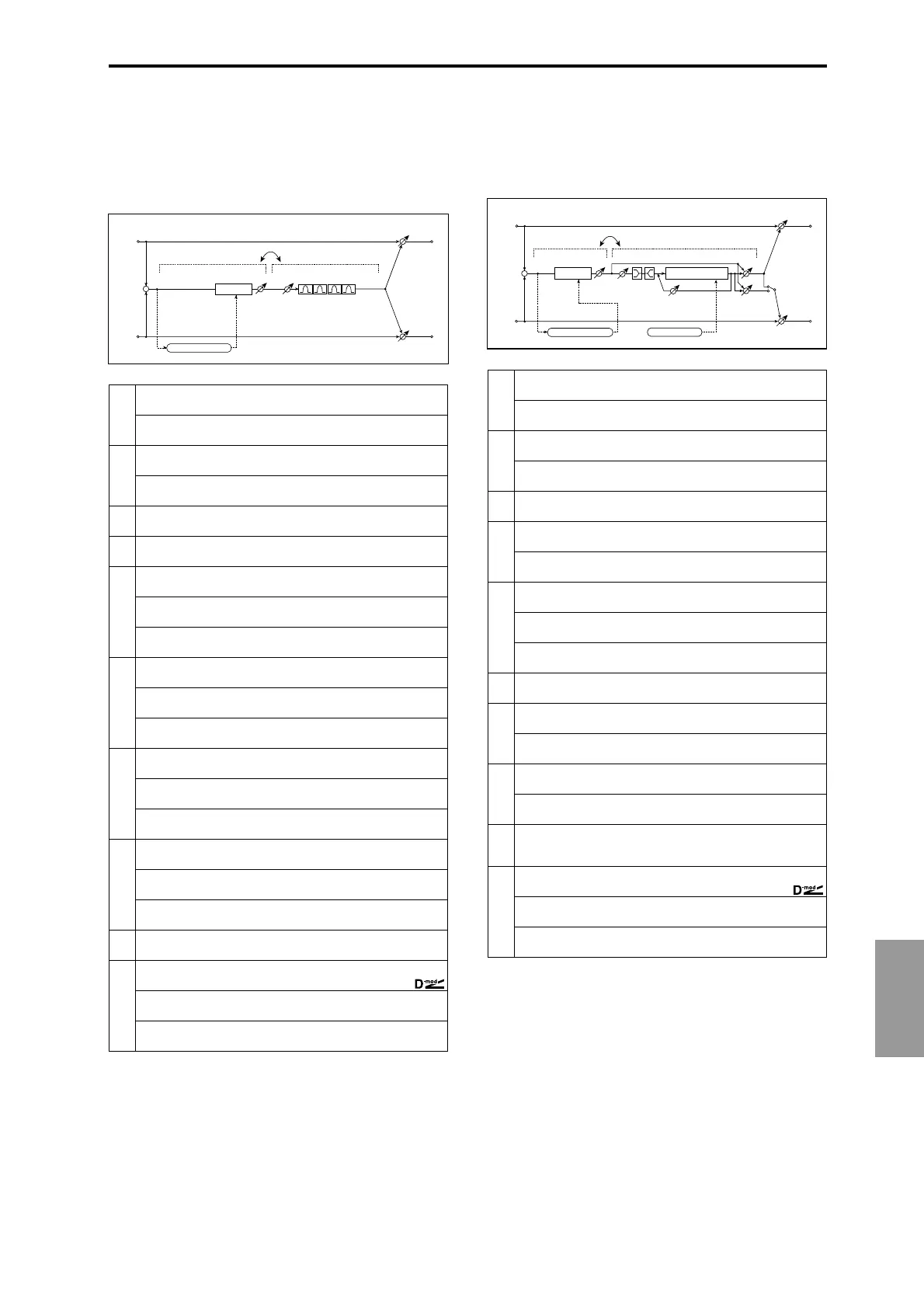
070: Limiter – P4EQ
(Limiter – Parametric 4-Band EQ)
This effect combines a mono-type limiter and a four-band
parametric equalizer. You can change the order of the effect
connection.
071: Limiter – Cho/Flng
(Limiter – Chorus/Flanger)
This effect combines a mono-type limiter and a chorus/
flanger. You can change the order of the effect connection.
a
[L] Ratio 1.0:1...50.0:1, Inf:1
Sets the signal compression ratio
☞ Fx:003
Threshold [dB] –40...0dB
Sets the level above which the compressor is applied
☞ Fx:003
b
[L] Attack
Sets the attack time
1...100
☞ Fx:003
Release
Sets the release time
1...100
☞ Fx:003
c
[L] Gain Adjust [dB]
Sets the limiter output gain
–Inf, –38...+24dB
☞ Fx:003
d
[E] Trim
Sets the parametric EQ input level
0...100
e
[E] Band1 Cutoff [Hz]
Sets the center frequency of Band 1
20...1.00kHz
Q
Sets the bandwidth of Band 1
0.5...10.0
☞ Fx:006
Gain [dB]
Sets the gain of Band 1
–18...+18dB
f
[E] Band2 Cutoff [Hz]
Sets the center frequency of Band 2
50...5.00kHz
Q
Sets the bandwidth of Band 2
0.5...10.0
☞ Fx:006
Gain [dB]
Sets the gain of Band 2
–18...+18dB
g
[E] Band3 Cutoff [Hz]
Sets the center frequency for Band 3
300...10.00kHz
Q
Sets the bandwidth of Band 3
0.5...10.0
☞ Fx:006
Gain [dB]
Sets the gain of Band 3
–18...+18dB
h
[E] Band4 Cutoff [Hz]
Sets the center frequency for Band 4
500...20.00kHz
Q
Sets the bandwidth of Band 4
0.5...10.0
☞ Fx:006
Gain [dB]
Sets the gain of Band 4
–18...+18dB
i
Routing LMT→PEQ, PEQ→LMT
Switches the order of the limiter and parametric EQ connection
j
Wet/Dry Dry, 1:99...99:1, Wet
Sets the balance between the effect and dry sounds
Src Off...Tempo
Selects the modulation source of the effect balance
Amt
Sets the modulation amount of the effect balance
–100...+100
Left
Right
Wet / Dry
Wet / Dry
Wet: Mono In - Mono Out / Dry: Stereo In - Stereo Out
+
Routing
Limiter
Trim
Parametric 4Band EQ
Limiter
Gain Adjust
Envelope - Control
a
[L] Ratio 1.0:1...50.0:1, Inf:1
Sets the signal compression ratio
☞ Fx:003
Threshold [dB] –40...0dB
Sets the level above which the compressor is applied
☞ Fx:003
b
[L] Attack
Sets the attack time
1...100
☞ Fx:003
Release
Sets the release time
1...100
☞ Fx:003
c
[L] Gain Adjust [dB]
Sets the limiter output gain
–Inf, –38...+24dB
☞ Fx:003
d
[F] LFO Frequency [Hz]
Sets the LFO speed
0.02...20.00Hz
LFO Waveform
Selects LFO Waveform
Triangle, Sine
e
[F] Delay Time [msec]
Sets the delay time
0.0...50.0msec
Depth
Sets the depth of LFO modulation
0...100
Feedback
Sets the feedback amount
–100...+100
☞ Fx:020
f
[F] EQ Trim
Sets the EQ input level
0...100
g
[F] Pre LEQ Gain [dB]
Sets the gain of Low EQ
–15...+15dB
Pre HEQ Gain [dB]
Sets the gain of High EQ
–15...+15dB
h
[F] Cho/Flng Wet/Dry –Wet...–2:98, Dry, 2:98...Wet
Sets the effect balance of the chorus/flanger
☞ Fx:010, 020
Output Mode Normal, Wet Invert
Selects the output mode for the chorus/flanger
☞ Fx:067
i
Routing LMT→FLNG, FLNG→LMT
Switches the order of the limiter and chorus/flanger connection
☞ Fx:067
j
Wet/Dry Dry, 1:99...99:1, Wet
Sets the balance between the effect and dry sounds
Src Off...Tempo
Selects the modulation source of the effect balance
Amt
Sets the modulation amount of the effect balance
–100...+100
Left
Right
Wet / Dry
Wet / Dry
Wet: Mono In - Stereo Out / Dry: Stereo In - Stereo Out
+
Routing
Chorus/Flanger
Feedback
Cho/Flng Wet / Dry
Normal
Wet Invert
Output Mode
–
+
Limiter
Limiter
Gain Adjust
Envelope - Control
LEQ
HEQ
EQ Trim
Chorus/Flanger
LFO: Tri / Sine



 To Next Page