PROCESS DESCRIPTION
kortho Hot Quick Coder-D H215 AE Rev.: 10
3-2
TheTESTkeyisonlyenabledinstop‐mode.Pressthiskeytomakeonetestprint.Atestprintwillonlybe
madeifthealarmsignalisnotset.
3.2.2 Indicator icons
TheIndicatoriconsontheLCDdisplay,areprovidedtoshowthestatus:
I‐icon: Indicatesthattheinhibitinputisset.Whentheinhibitissettheprinterwillignorethe
triggersignalandthetestbutton.(Optional)
T‐icon: Indicatesthatthetriggerinputisset.InRUNmode
theprintcyclewillstart
P‐icon: Indicatesthattheprinterisprintingandthebusy‐outputisset(powerMOSFFET).
H‐icon: Indicatesthattheheatingelementsareswitchedon.Thisiconisflashinguntiltheset
temperatureisreached.
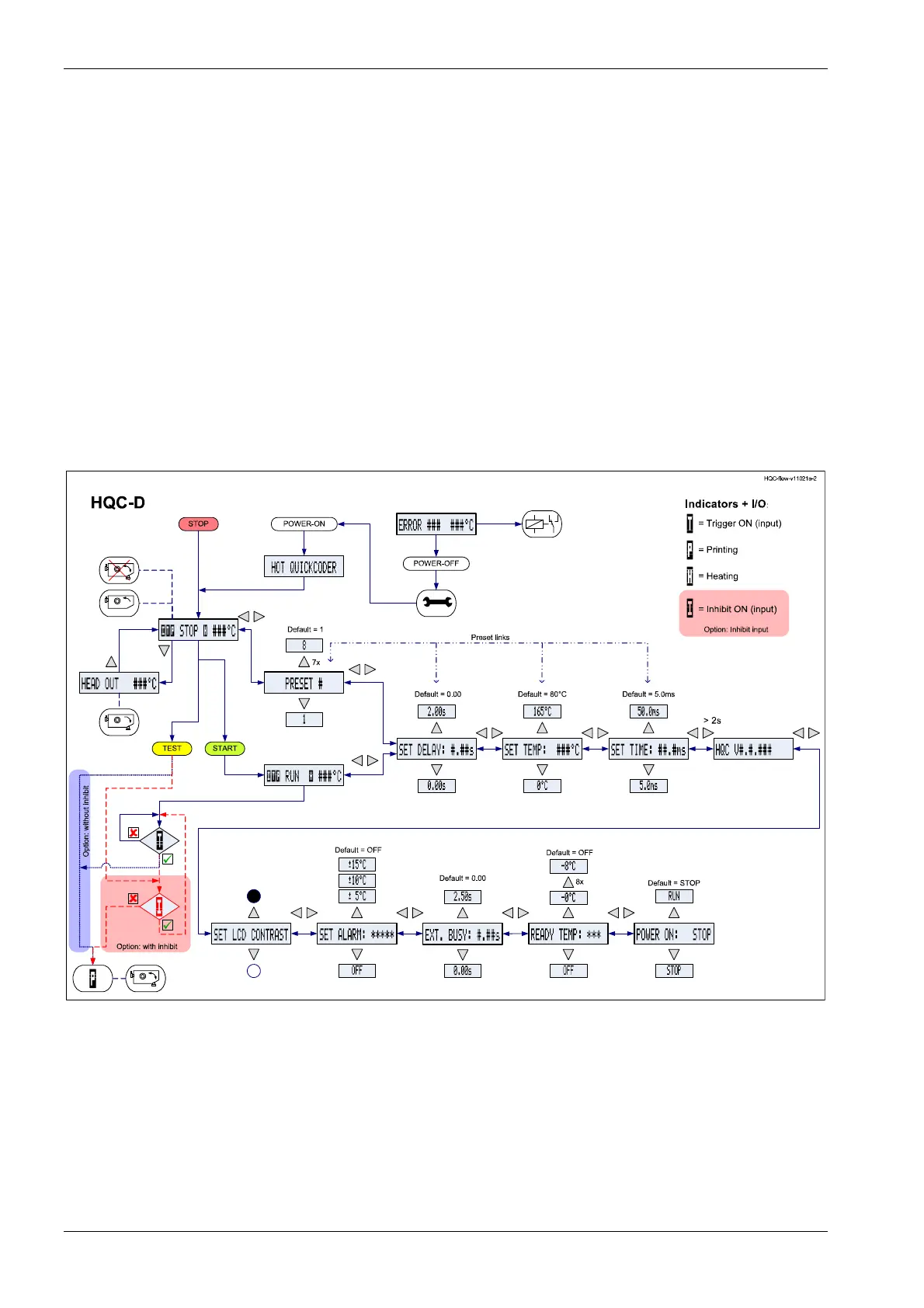
3.2.3 Menu structure
Fig. 3.2 Menustructure
Referto AppendixEforafull‐scalesheetofthebasicmenustructure.
Œ
‹
‰



 To Next Page