26
Operating Instructions 10/2020 2010045v10
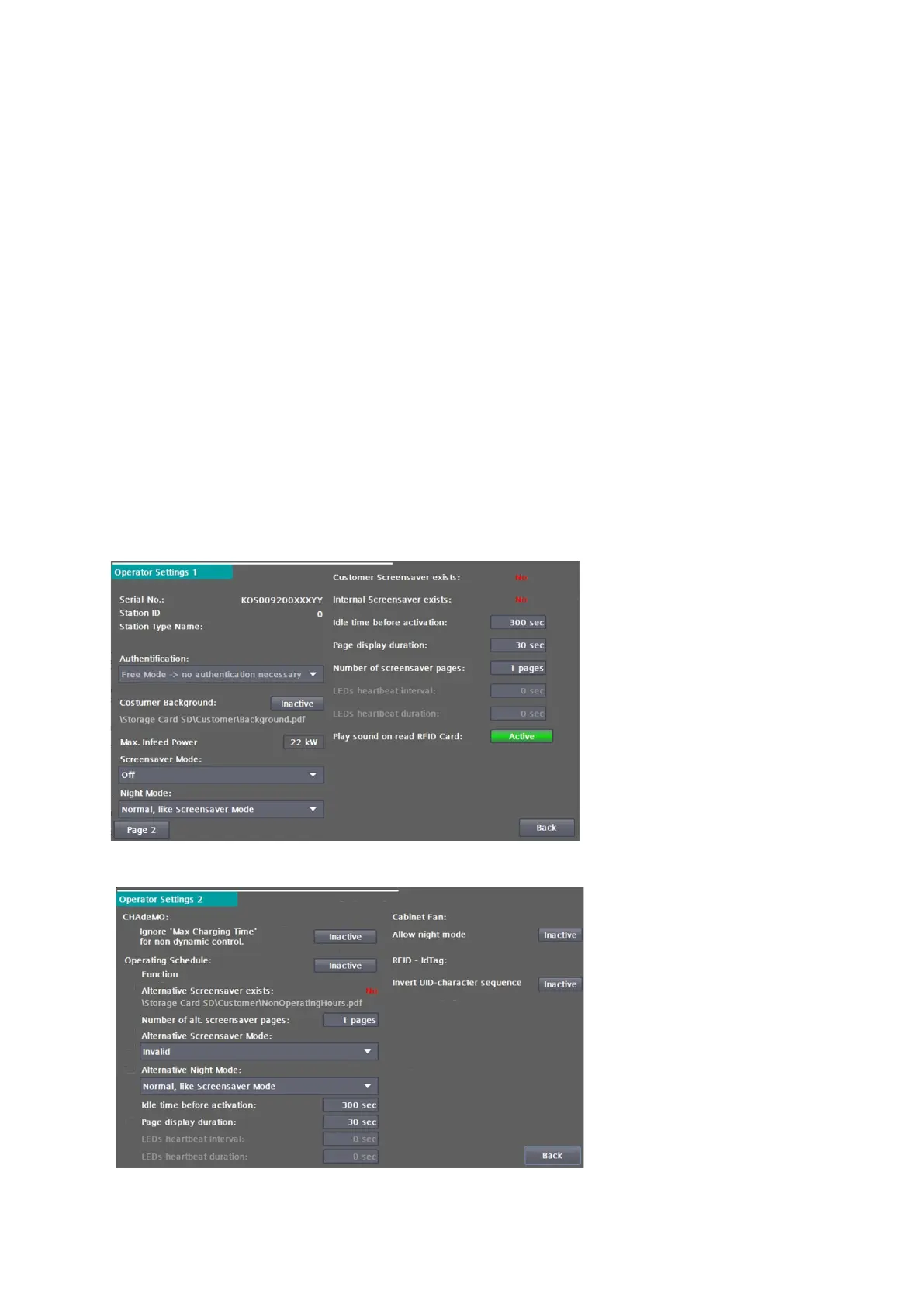
In the service area "Operator settings", set the charging station numbers, the charging station name and the
number of charging points. The serial number and the power are displayed, but cannot be changed. You can
disable or enable the display of the "Info" button and the alternative login.
You can parameterise the behaviour of the charging station in the "Operator settings" service area.
Under Authentication you can set how a user is authorized to load.
The following selection options can be set:
• Out of service: Charging is not possible at this station.
• Free operation / free charging: Start by inserting the charging plug. Stop by pressing the stop button
on the display.
• Free operation / Free charging with RFID any RFID card readable by the system is accepted.
• Internal whitelist with RFID
• Payment Terminal For more information, see the chapter "Payment Terminal".
• OCPP (depending on configuration) If there is an unintentional disconnection of the APN, the
charging station switches internally and automatically to the selection in this mode. After a
successful reconnection, the selection is automatically used again. For more information, see the
chapter "OCCP".
Fig 26: Operator settings 1
Fig 27: Operator settings 2


 To Next Page