Installing a laser inclinometer
Installing a laser inclinometer
The K2 rigging system is compatible with the following laser inclinometers:
• TEQSAS
®
• LAP-TEQ PLUS (part of the L-ACOUSTICS
®
TECH TOOLCASE)
• TEQSAS
®
LAP-TEQ (legacy model)
• KSG
®
RECLINE Compact
• SSE
®
ProSight
LAP-TEQ / LAP-TEQ PLUS sensor and display compatibility
The legacy LAP-TEQ sensors are compatible with the new TEQSAS
®
LAP-TEQ PLUS displays. Conversely, the new
sensors are not compatible with the legacy displays.
TEQSAS
®
LAP-TEQ PLUS / LAP-TEQ / KSG
®
RECLINE Compact
Procedure
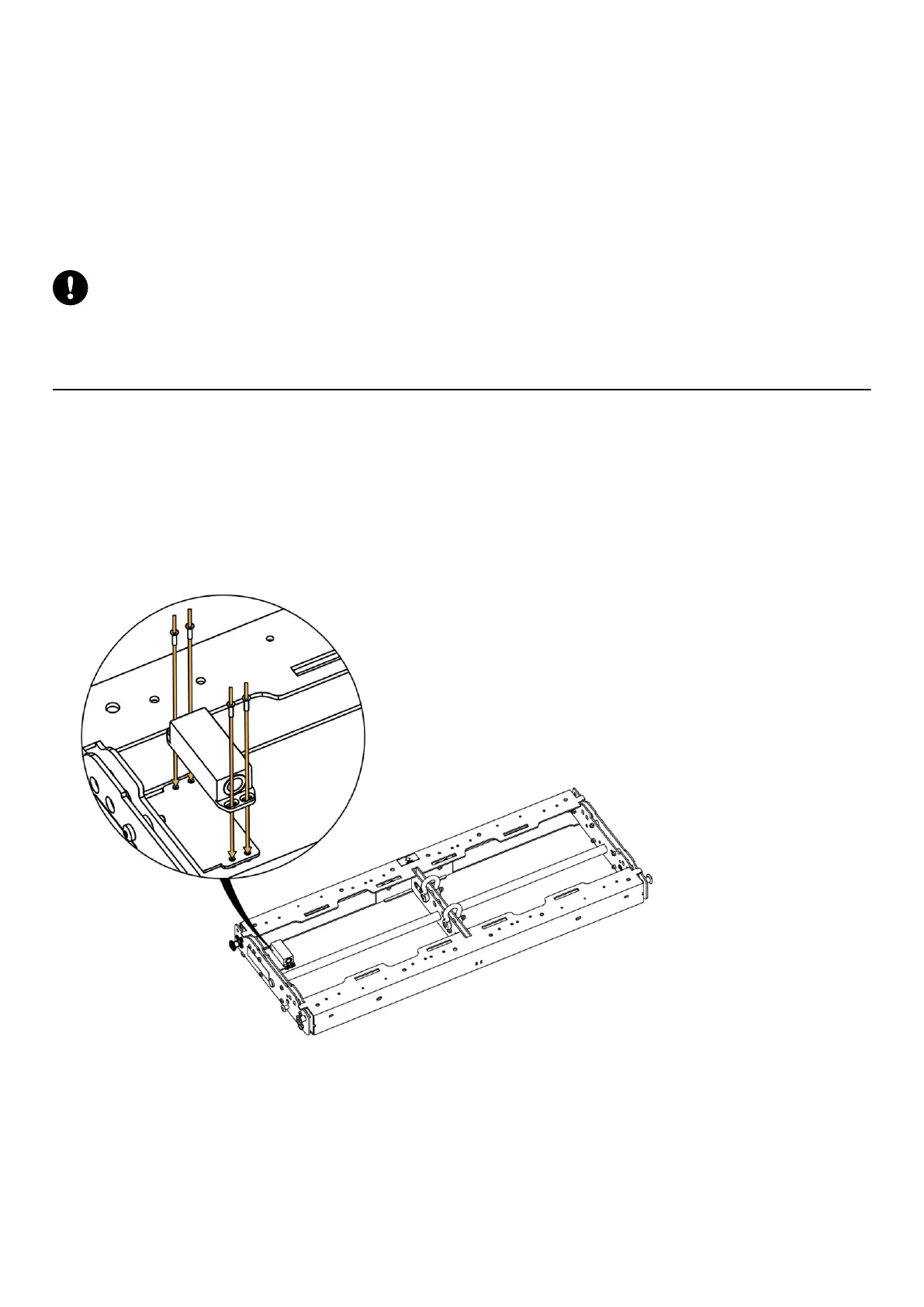
1. Remove the four M4 Torx screws (T20) from the plate.
2. Put thread-locker in the four threaded inserts.
3. Position the sensor so it points toward the front of the K2-BUMP.
4. Secure the sensor with the four screws.
5. Connect the XLR cable to the sensor.
6. Follow the manufacturer instructions to calibrate the inclinometer.
K2 owner's manual (EN) version 1.1 185







 To Next Page