LaCie Internet Space • DESIGN BY NEIL POULTON Administration
User Manual page 52
System9.4.
Setting the Date and Time9.4.1.
Click Notifications under System and set the correct date and
time for your time zone. This will ensure that file upload dates
and times will be accurate and will help you to better manage
your Ethernet disk.
9.4.2. Managing MySafe USB External
Hard Drive
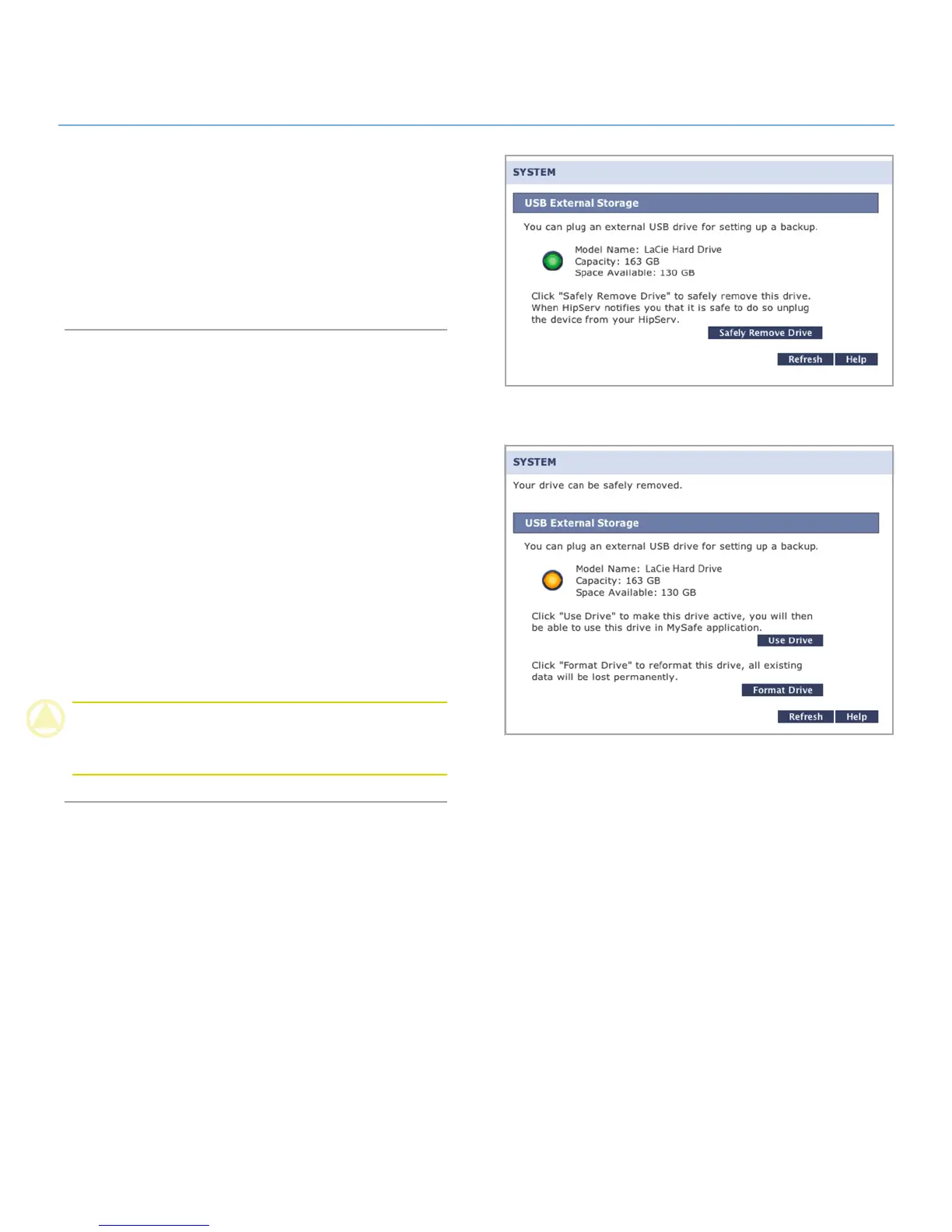
Click USB External Storage to manage your MySafe attached
external USB hard drive (if you have connected one). When your
drive is connected properly, its model name, capacity and space
available are displayed.
To disconnect the drive from your Ethernet disk, click the Safely
Remove Drive button and wait for a message indicating that it
is save to disconnect the device.
To make the drive available again, reconnect it and click Use
Drive.
To format the drive and permanently erase its contents, click
Safely Remove Drive. Click the Format Drive button when it
appears.
CAUTION: Formatting your external USB hard drive will erase
all data on the drive. Back up any data you want to save before
formatting.
Figure 9.4.2
Figure 9.4.1



 To Next Page