LaCie Internet Space • DESIGN BY NEIL POULTON Appendix A: Router Configuration
User Manual page 65
Netgear® Router Configuration
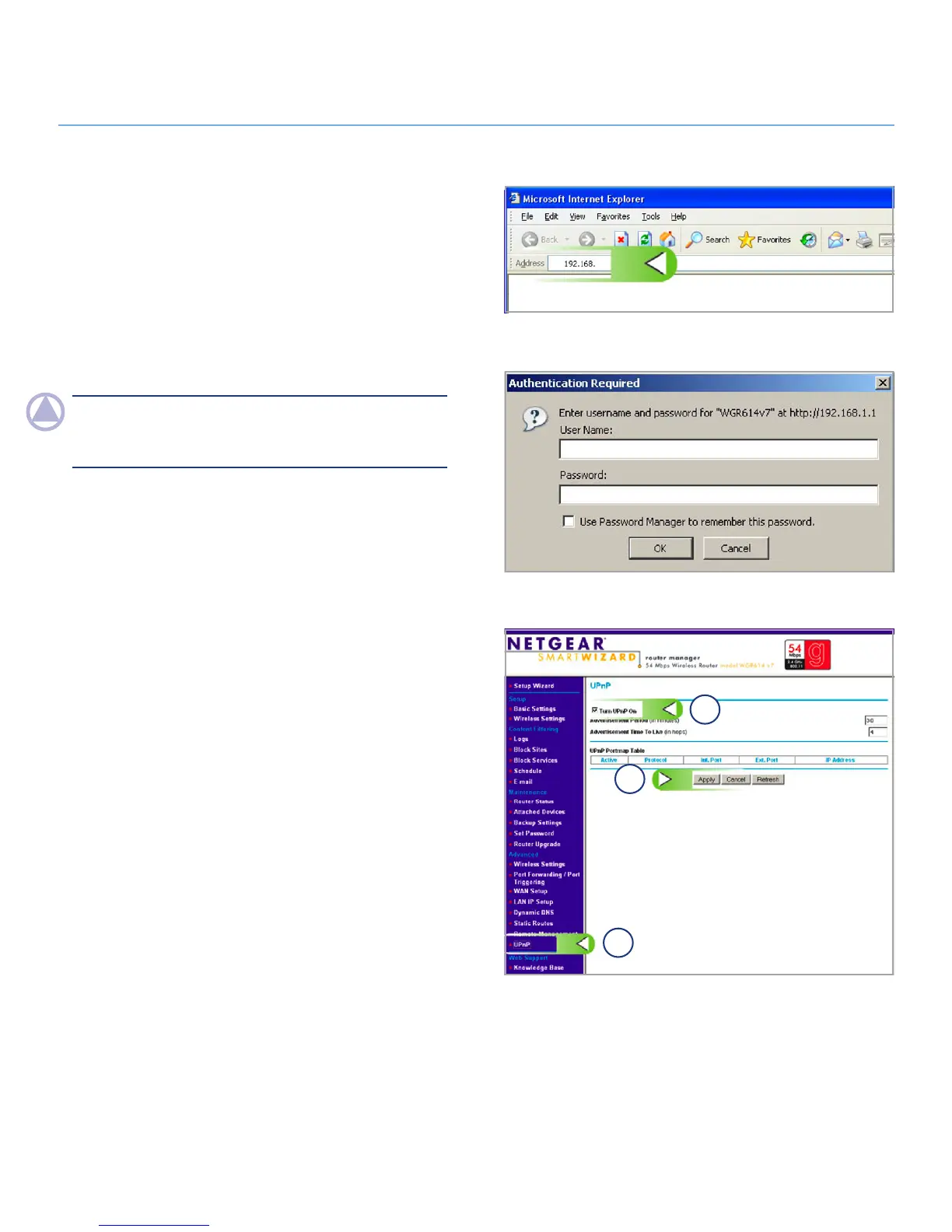
Step 1 – Access your router configuration page
Open a Web Browser and navigate to the IP address for your 1.
Netgear router (Fig. 1). If you don’t know your router’s IP ad-
dress, try http://192.168.1.1 or http://192.168.0.1 (these
are common IP addreses for home networking routers).
Enter your username and password (Fig. 2). Please refer
2.
to your Netgear user manual for the default username and
password.
NOTe: The router name listed in the Authentication Required
dialog may be different depending on your specific Netgear
router model.
Step 2 - Configure your router for UPNP
Click on the 1. UPnP link in menu on the left (a, Fig. 3).
Check the “Turn UPnP on” checkbox (b, Fig. 3).
2.
Click 3. Apply (c, Fig. 3).
(continued on next page)
Fig. 1
Fig. 2
Fig. 3
a
b
c














 To Next Page