2/19/98 Log - Logging Sound Level Meter (Option 01) 6-35
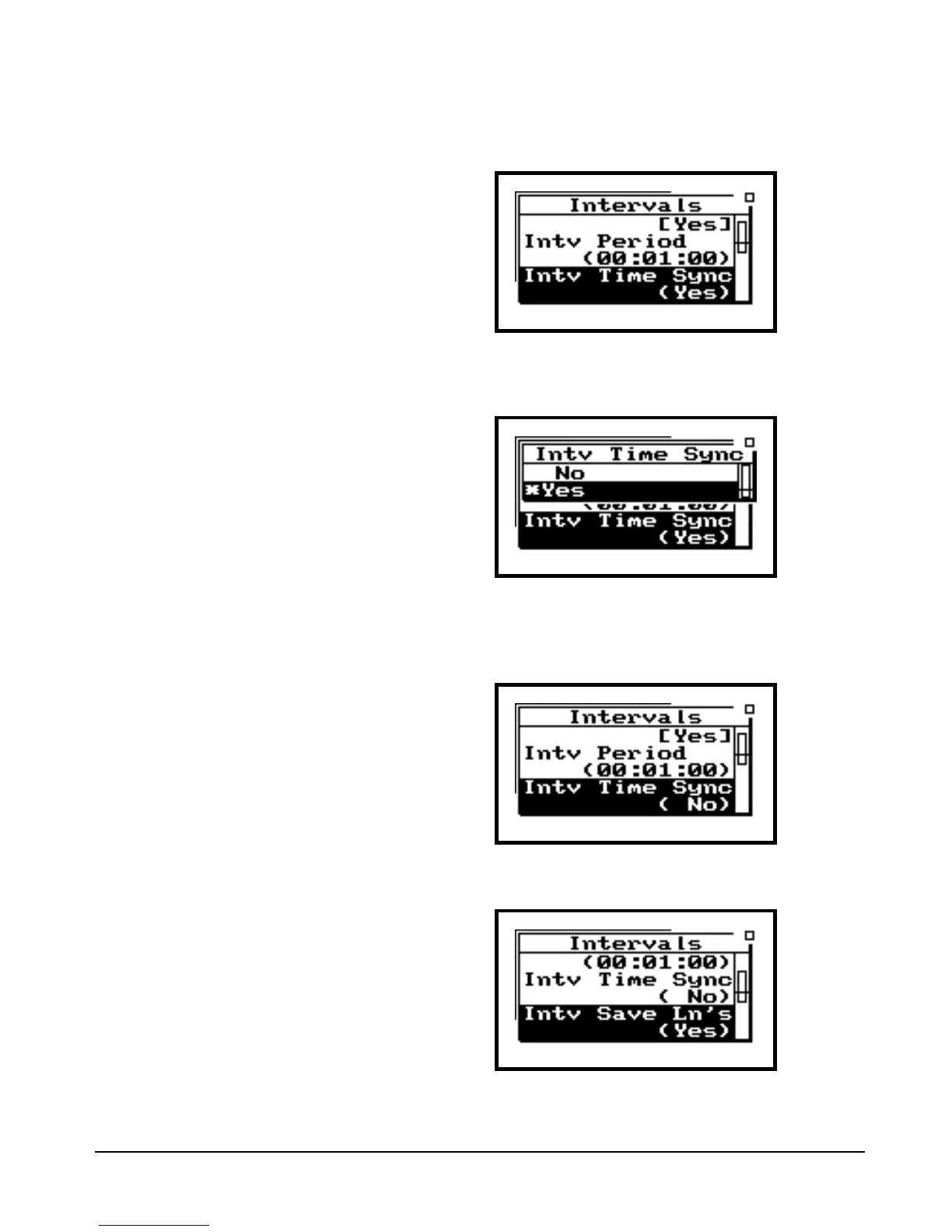
“Intv Time Sync” enables or disables
the capability of synchronizing the
measurement interval with the 824’s
built-in clock. An example would be
if you wanted to have an interval
stored every hour, on the hour. The
synchronization time is dependent
on the Interval Period selected.
Step 10 Press u or d to highlight “Intv Time
Synch”.
Step 11 Now press c (or r) to enter the “Intv Time
Sync” screen.
Step 12 The choices are “Yes” or “No”. For this lesson,
we will choose “No”. Use u or d to high-
light “No”, then push c to enter this choice.
The “Intv Save Ln’s” enables or dis-
ables the storage of Ln statistics with
each Interval. It uses the Ln values
that are established in the SLM set-
tings of the 824.
Step 13 Press u or d to highlight “Intv Save Ln’s”.


 To Next Page
 Loading...






