Laser Technology, Inc. TruPulse 200 User's Manual 6
th
Edition
Page 20
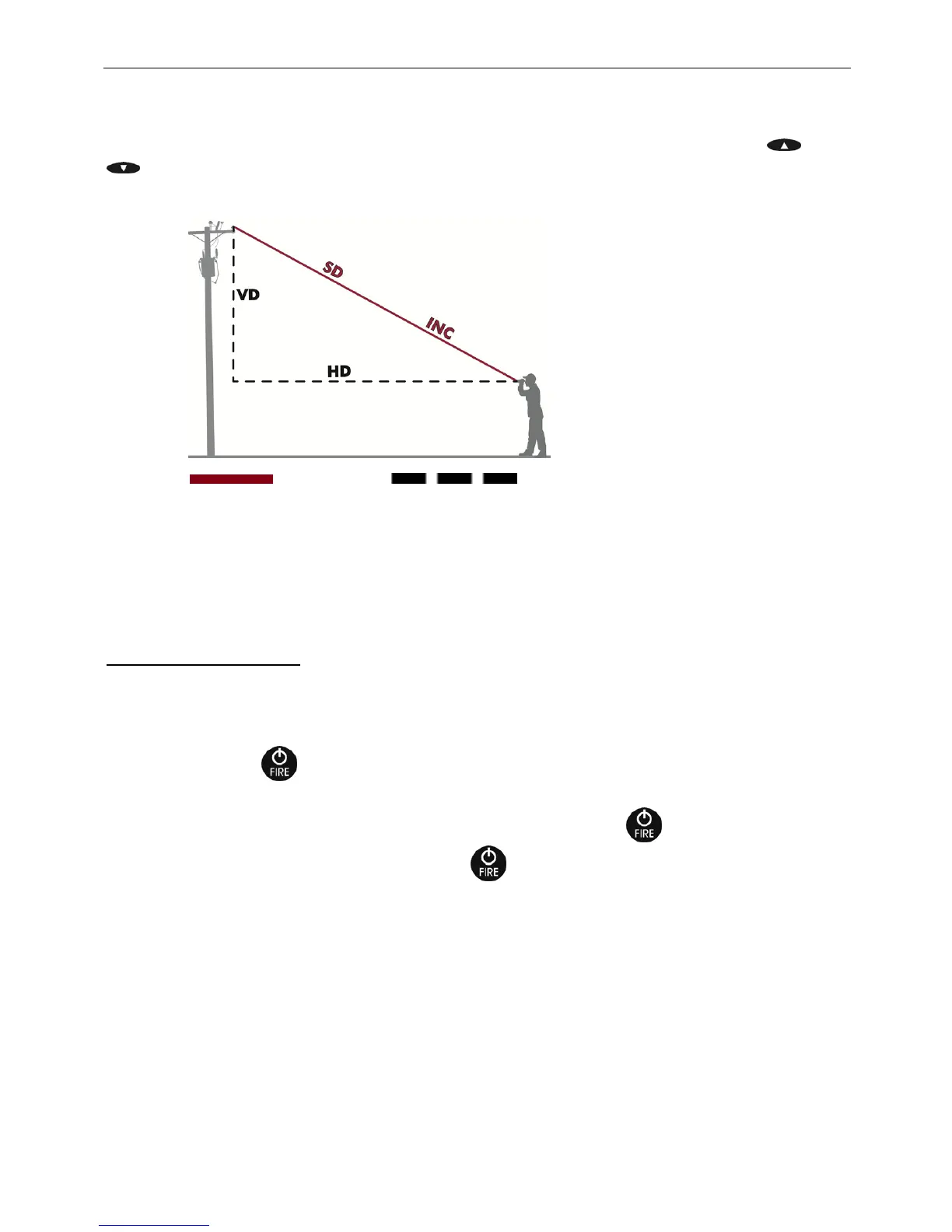
Slope Distance (SD)
Inclination (INC)
Horizontal Distance (HD)
Vertical Distance (VD)
Section 5 - Measurement Modes
When you power ON the TruPulse, the last used Measurement Mode will be active. Press or
to display the previous or next Measurement Mode. Figure #16 shows the four different types
of measurements that the TruPulse can take.
Notes: Figur
e #16 does not include the Height Routine (HT), refer to page 22.
Figure #16 does not include the 2D Missing Line (ML), refer to page 23.
Distance Measurements
The basic steps for taking any distance measurement:
1. Look through the eyepiece and use the crosshair to aim to the target.
2. Press-and-hold
. The LASER status indicator is displayed while the laser is active. The
laser will remain active for a maximum of 10 seconds while acquiring data about the target.
o If the target is not acquired in the 10 second period, release
and repeat this step.
3. Once the measurement is displayed, release
. The measurement will flash one time
indicating the measurement was downloaded. Then the measurement will be displayed steady
until you press any button or the unit powers OFF.
Figure #16
= MEASURED = CALCULATED












 To Next Page