Service Manual JET3
60 Rev. 1.0
2) Cleaning of print head/electrode block with special
cleaner 77001-00020
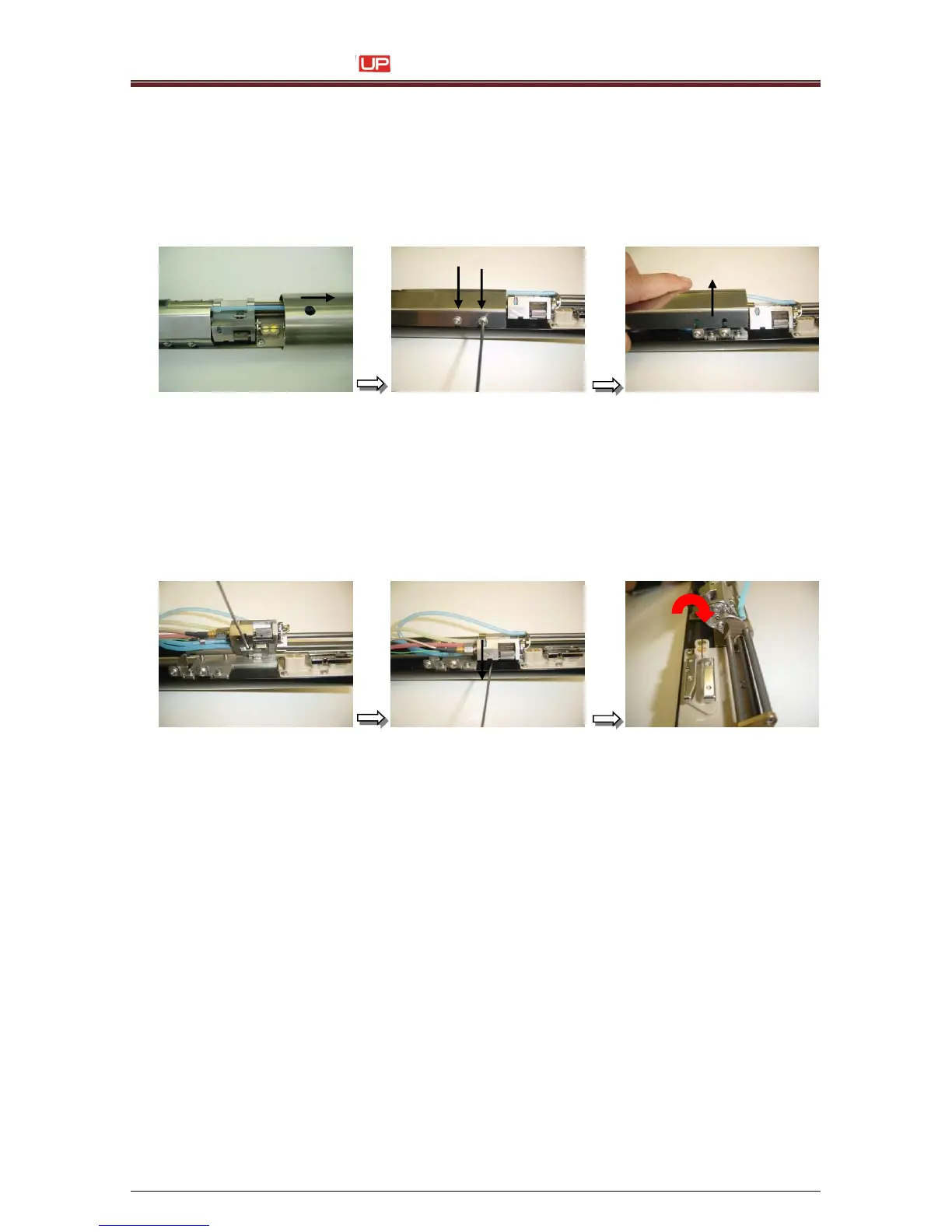
1. Remove the print head cover. Loosen the two allen set screws at the side with an allen
key
2,5 mm (metric) with one turn and remove the inner cover.
Attention:
Don’t use any kind of allen hydraulic settings with a ball head function.
This will damage the screws!
2. At the lower side of the bearing block you have to loose the allen screw with an allen
key1,5mm (metric) until you can turn the bearing block into the upper service position.
To lock this position, tighten the set screw back again.
For some types of ink, a persistent ink deposition at the guiding shaft assembly
and
electrode block would occur. In this case, our company offers a special cleaner
for cleaning
this area.
It is strongly recommended to turn off the printer when you cleaning the print head
with this
kind of cleaner. No cleaner should be enter to the ink loop/hydraulic
system.
Special Cleaner P/N: 77001-00020



 To Next Page