Video Camera
38 M320 Ref. 10734261 / Version 03 M320 Ref. 10734261 / Version 03 39
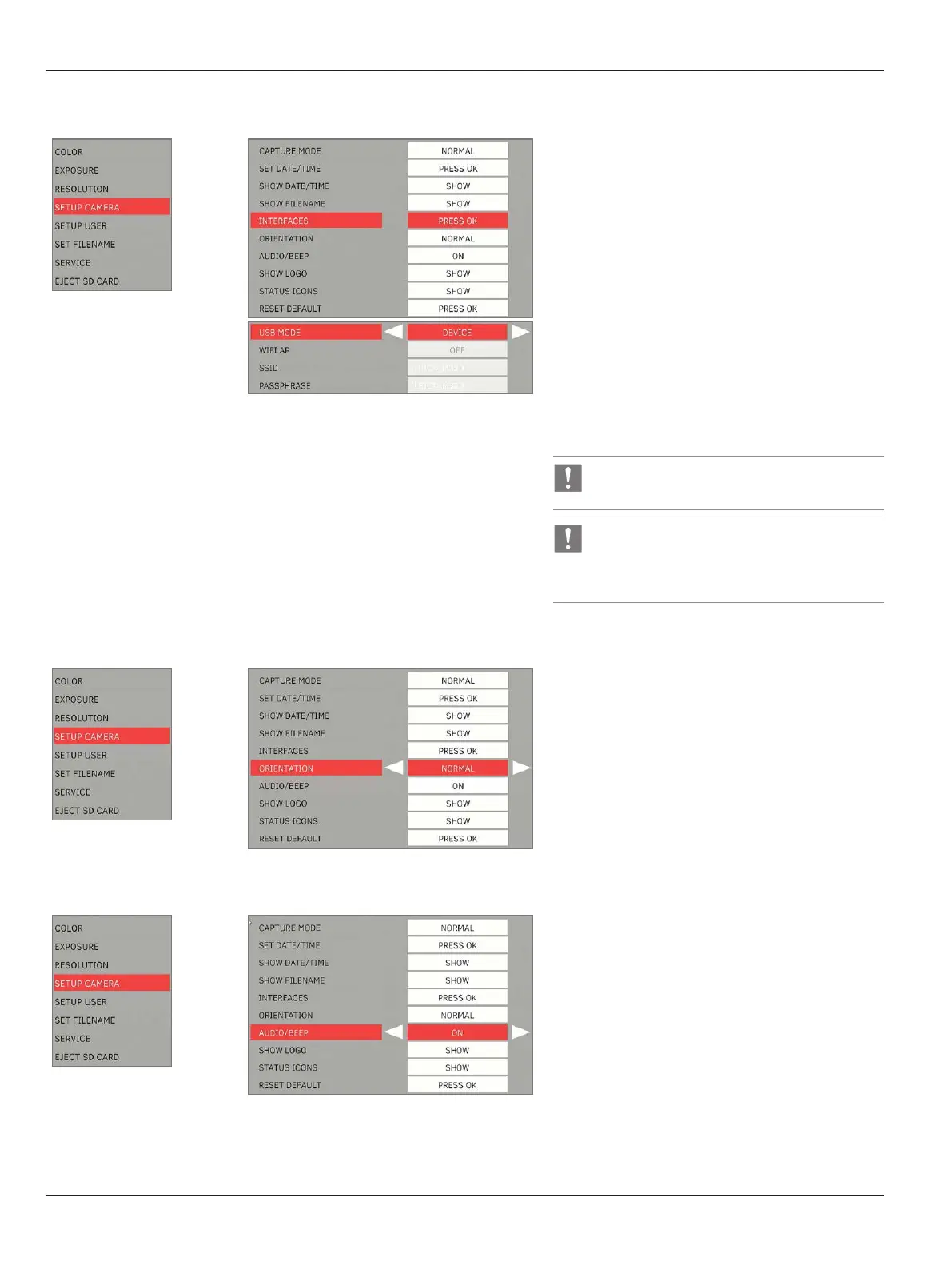
Interfaces
X
Set the USB mode for data transfer or WiFi
function.
USB Mode
•
Device: Set the USB to device mode to connect to
PC for data transfer.
•
Host: Set the USB to host mode to connect to a
WiFi dongle for streaming
WiFi AP:
•
OFF: Disable the camera as a WiFi Access Point.
•
ON: Enable the camera as a WiFi Access Point.
•
SSID: Set the WiFi AP SSID (network name).
•
Passphrase: Set the WiFi AP password.
Default SSID: LEICA_M320
Default Password: LEICA_M320
Device mode is applicable to USB port at horizontal
arm only.
Host mode is applicable to USB port at video
camera only.
Orientation
X
Select the option for the image orientation:
•
Normal: Original orientation
•
Flip Horizontal: Image is mirrored horizontally
•
Flip Vertical: Image is mirrored vertically
•
Flip Both: Image is rotated 180⁰
Audio/beep
X
Select “ON” to have audio signal when capturing
still images or initiating video recordings.


 To Next Page