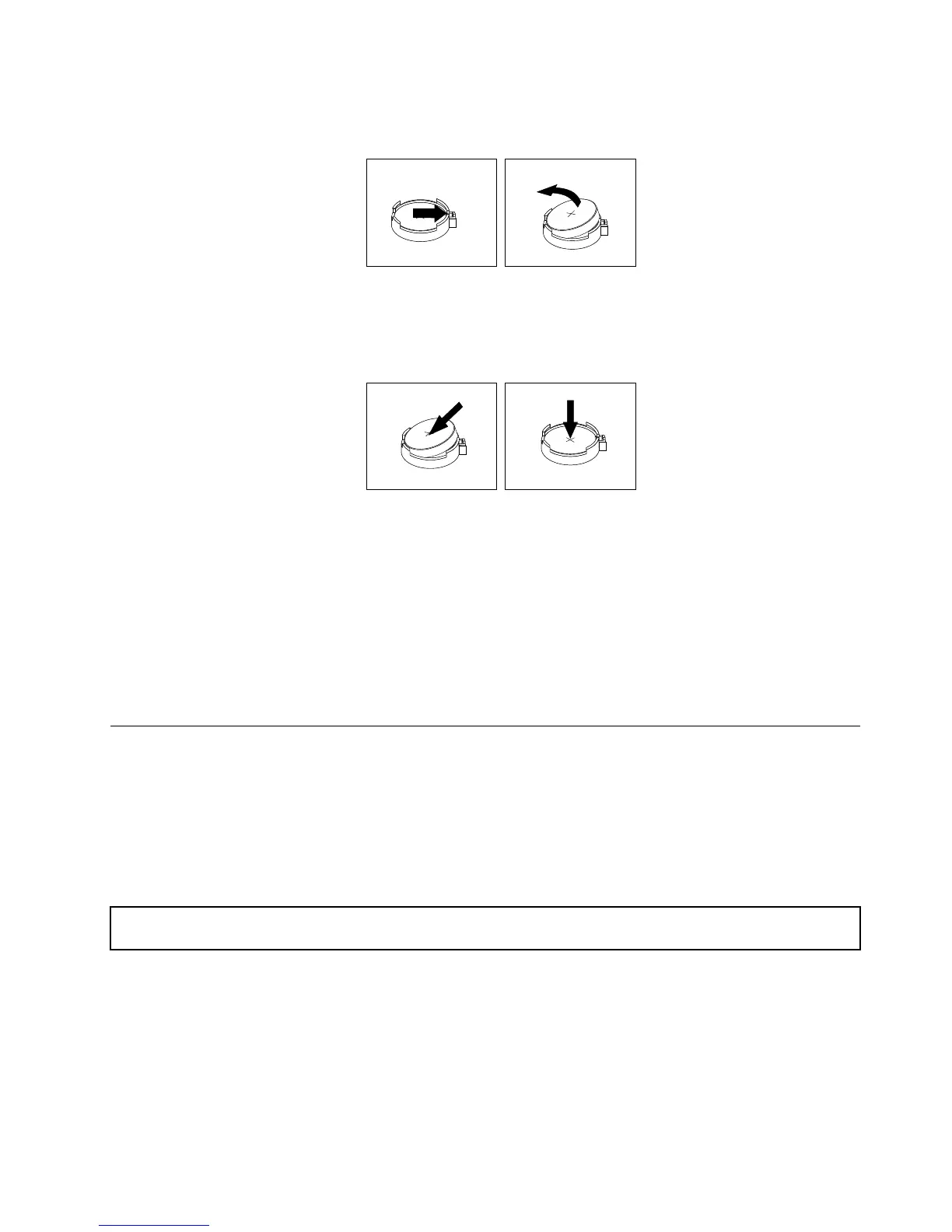
6.Removetheoldsystemboardbattery.
Figure95.Removingthesystemboardbattery
7.Installanewsystemboardbattery.
Figure96.Installingthesystemboardbattery
8.ReinstallthePCIExpresscard(suchastheRAIDcard)thathasbeenremoved.See“Installingthe
RAIDcard”onpage81
.
9.Disposeoftheoldsystemboardbatteryasrequiredbylocalordinancesorregulations.
Whattodonext:
•Toworkwithanotherpieceofhardware,gototheappropriatesection.
•Tocompletethereplacement,goto“Completingthepartsreplacement”onpage141
.
Completingthepartsreplacement
Thistopicprovidesinstructionstohelpyoucompletethepartsreplacementandturnonyourserver.
Tocompletethepartsreplacement,properlyroutethecablesinsidetheserver,reinstalltheservercover,
reconnectalltheexternalcables.Forsomedevices,updatethermwareandruntheSetupUtilityprogram
todofurthersetup.
Reinstallingtheservercoverandreconnectingcables
Attention:Donotopenyourserverorattemptanyrepairbeforereadingandunderstanding“Safetyinformation”
onpageiii
and“Guidelines”onpage63.
Thistopicprovidesinstructionsonhowtoreinstalltheservercoverandreconnectcablestoyourserver.
Attention:Forpropercoolingandairow,reinstalltheservercoverbeforeturningontheserver.Operating
theserverforextendedperiodsoftime(morethan30minutes)withtheservercoverremovedmight
damageservercomponents.
Beforeyoubegin,printalltherelatedinstructionsorensurethatyoucanviewthePDFversiononanother
computerforreference.
Chapter6.Installing,removing,orreplacinghardware141












 To Next Page