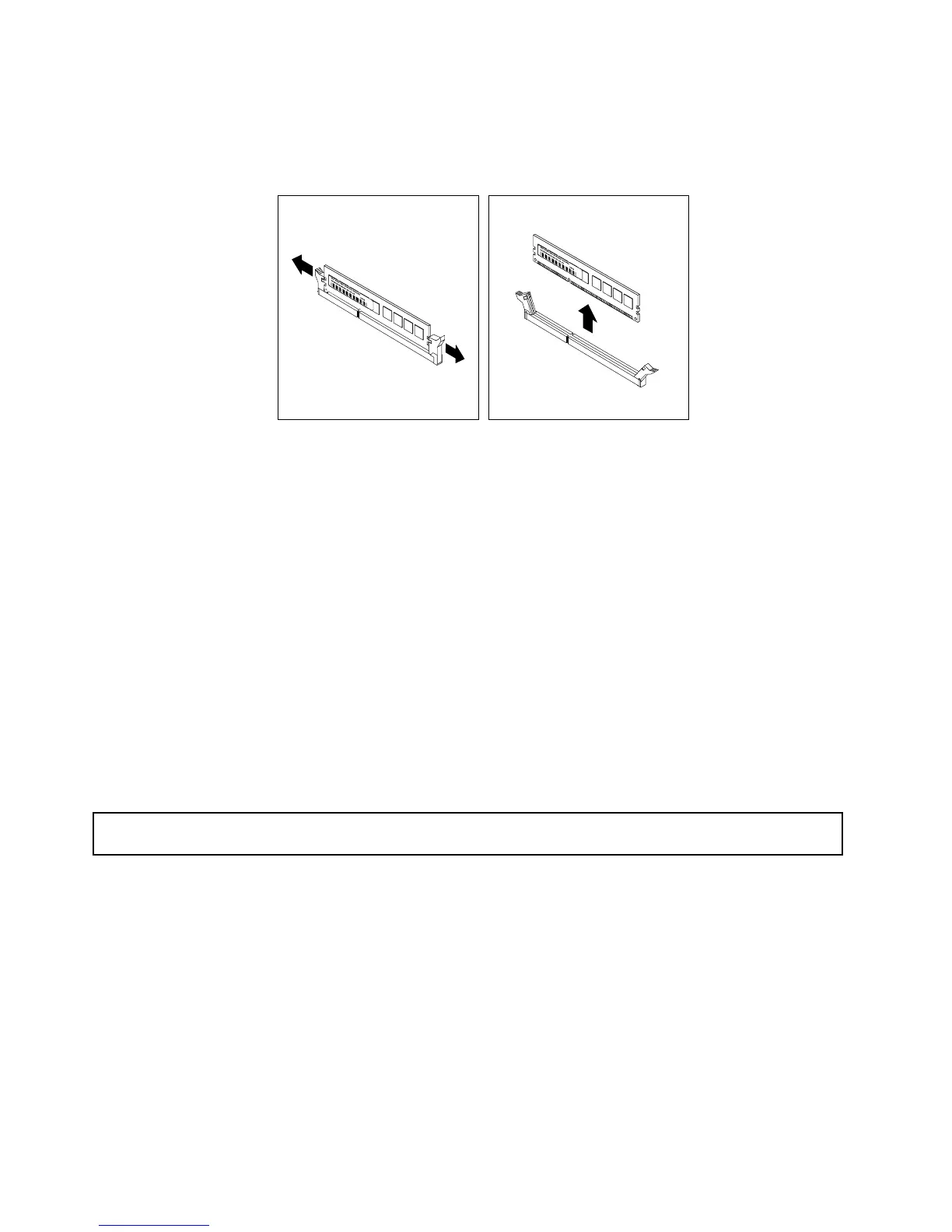
6.Locatethememorymodulethatyouwanttoremoveandopentheretainingclipsonbothendsofthe
memoryslot.Then,graspthememorymodulebyitsedgesandcarefullypullitstraightuptoremoveit
fromthememoryslot.
Figure37.Removingamemorymodule
7.Reconnectanycablesyouhavedisconnected.
8.Ifyouareinstructedtoreturntheoldmemorymodule,followallpackaginginstructionsanduseany
packagingmaterialsthataresuppliedtoyouforshipping.
Whattodonext:
•Toworkwithanotherpieceofhardware,gototheappropriatesection.
•Tocompletetheremovalprocedure,goto“Completingthepartsreplacement”onpage141
.
InstallingorremovingtheEthernetcard
ThistopicprovidesinstructionsonhowtoinstallorremovetheEthernetcard.Ifyouareinstallingor
removinganyothertypesofsupportedPCIExpresscards,theprocedureissimilar.
Note:TheEthernetcardissensitivetoESD.Ensurethatyoureadandunderstand“Handlingstatic-sensitive
devices”onpage64rstandcarefullyperformtheoperation.
InstallingtheEthernetcard
Attention:Donotopenyourserverorattemptanyrepairbeforereadingandunderstanding“Safetyinformation”
onpageiiiand“Guidelines”onpage63.
ThistopicprovidesinstructionsonhowtoinstalltheEthernetcard.
Beforeyoubegin,printalltherelatedinstructionsorensurethatyoucanviewthePDFversiononanother
computerforreference.
Notes:
•Dependingonthespecictype,theEthernetcardmightlookslightlydifferentfromtheillustrationsin
thistopic.
•UseanydocumentationthatcomeswiththeEthernetcardandfollowthoseinstructionsinadditionto
theinstructionsinthistopic.
ToinstalltheEthernetcard,dothefollowing:
76ThinkServerTS440UserGuide












 To Next Page