12.3 Roaming Out
Configure local user Roaming Out, go to: Users >> Authentication, click configure of Local.
Under certain configurations, WHG-1000 can act as a RADIUS server for Roaming Out local user
logged from other system. The Local User database will act as the RADIUS user database.
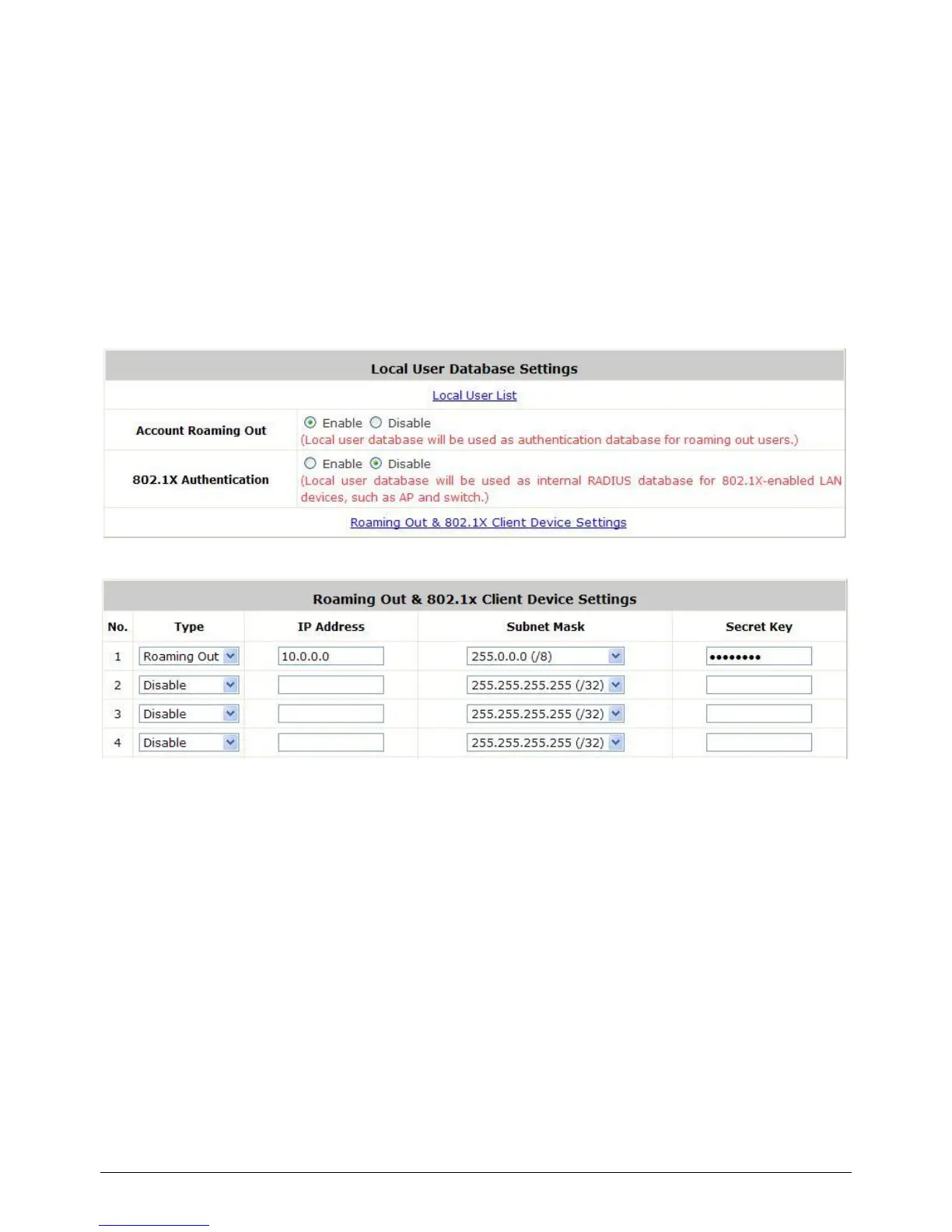
Account Roaming Out & 802.1X Authentication: When Account Roaming Out is enabled;
the link of Roaming Out & 802.1X Client Device Settings will be available to define the client
device authorized to roam by entering the IP address, Subnet Mask, and Secret Key.
Click the hyperlink Roaming Out & 802.1x Client Device Settings to enter the Roaming Out
& 802.1X Client Device Settings interface. Choose Roaming Out and key in the Roaming Out
client‟s IP address and network mask and then click Apply to complete the settings.
In the other system, such as another WHG-1000, setup it‟s RADIUS server to this WHG-1000
with same postfix, then the local user in this WHG-1000 can login success from another
WHG-1000 by RADIUS authentication.



 To Next Page