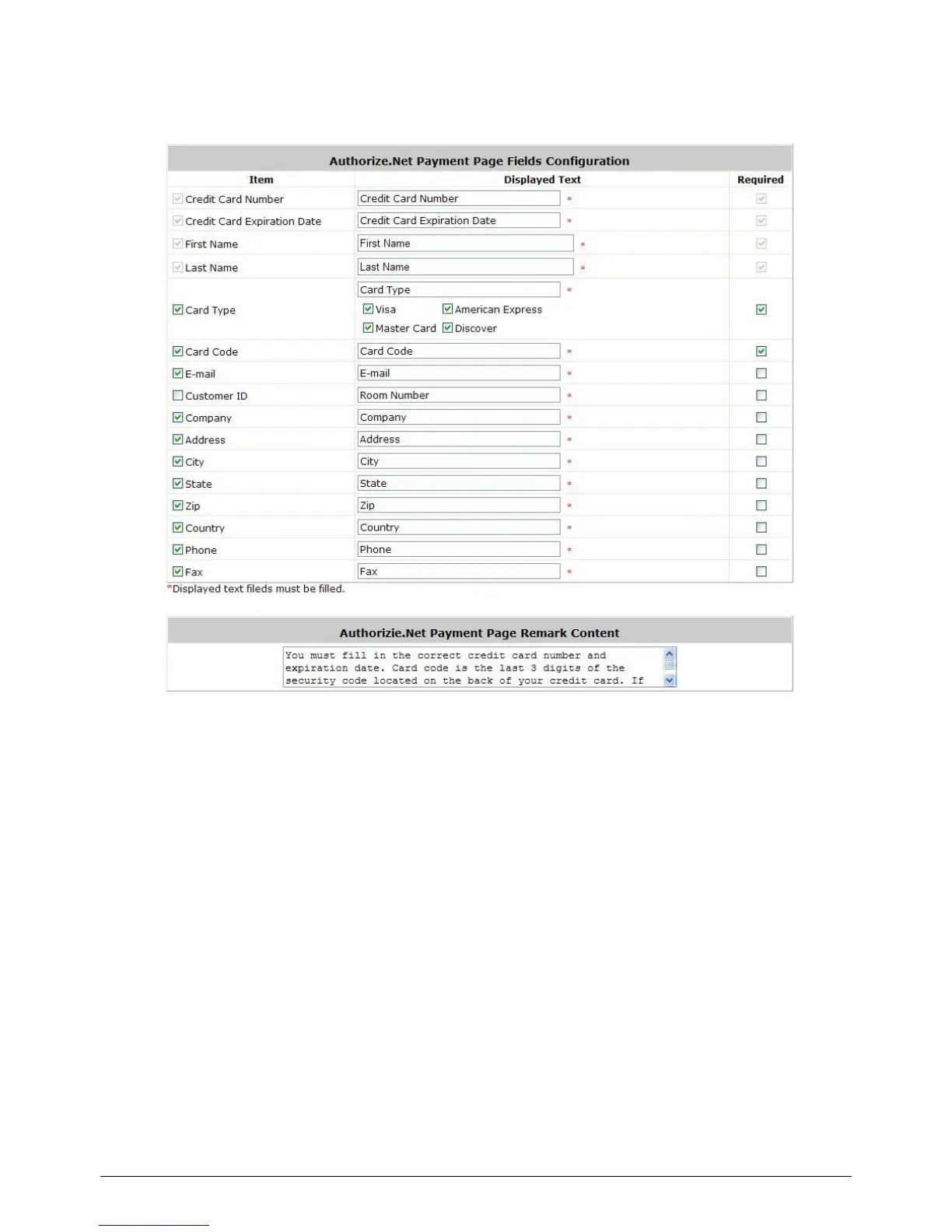
Authorize.Net Payment Page Fields Configuration/ Authorize.Net Payment Page
Remark Content
Authorize.Net Payment Page Fields Configuration
o Item: Check the box to show this item on the customer‟s payment interface.
o Displayed Text: Enter what needs to be shown for this field.
o Required: Check the box to indicate this item as a required field.
o Credit Card Number: Credit card number of the customer. The Payment Gateway will only
accept card numbers that correspond to the listed card types.
o Credit Card Expiration Date: Expiration date of the credit card. This should be entered in
the format of MMYY. For example, an expiration date of July September 2009 should be
entered as 0709.
o Card Type: This value indicates the level of match between the Card Code entered on a
transaction and the value that is on file with a customer‟s credit card company. A code and
narrative description are provided indicating the results returned by the processor.
o Card Code: The three- or four-digit code assigned to a customer‟s credit card number (at
the end of the credit card number found either on the front of the card or on the back of the
card).



 To Next Page