9
DESCRIPTION OF THE OPERATION
ENGLISH
DESCRIPTION OF THE OPERATION
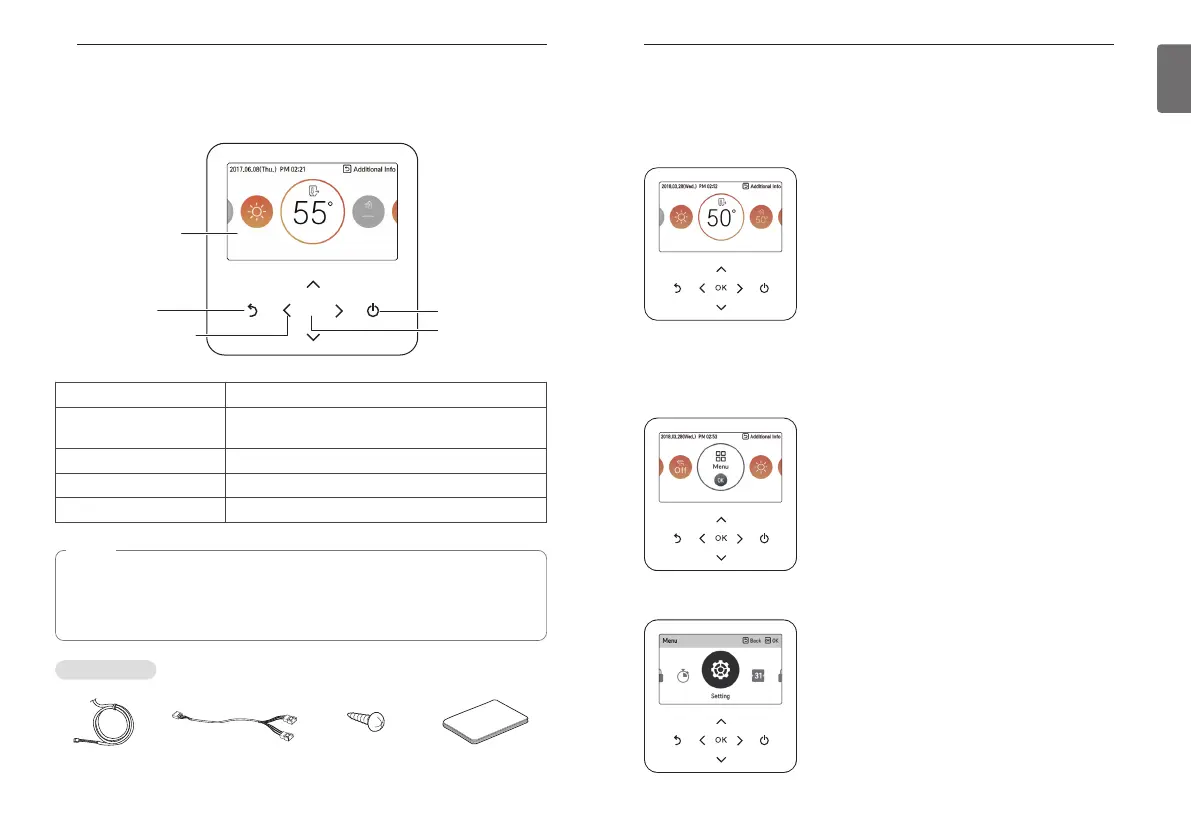
Main screen
In the main screen, press [<, >(left/right)] button to select the category to set, and you can
control by pressing [∧,∨ (up/down)] button.
Menu screen
In the main screen, press [<, >(left/right)] button to select the menu and press [OK] button to
move to menu screen.
In the menu screen, press [<, >(left/right)] button to select the category to set, and press [OK]
button to move to the detail screen.
8
DESCRIPTION
Connecting Cable 2-Remo cable Remote controller
fixing screws
(4 EA)
Quick Guide
DESCRIPTION
Remote controller
OK
On/Off button
OK button
Back button
Up/Down/Left/Right
button
Operation display
window
Operation display window Operation and Settings status display
Back button
When you move to the previous stage from the menu’s
setting stage
Up/down/left/right button
When you change the menu’s setting value
OK button
When you save the menu’s setting value
On/Off button When you turn ON/OFF the air conditioner
NOTE
• Some functions may not be operated and displayed depending on the product type.
• The actual product can be different from above contents depending upon model type.
• When using simultaneous operation system, whenever press remote controller button,
system will approximately operate after 1~2 minutes.
Accessories



 To Next Page