119
INSTALLER SETTING
ENGLISH
118
INSTALLER SETTING
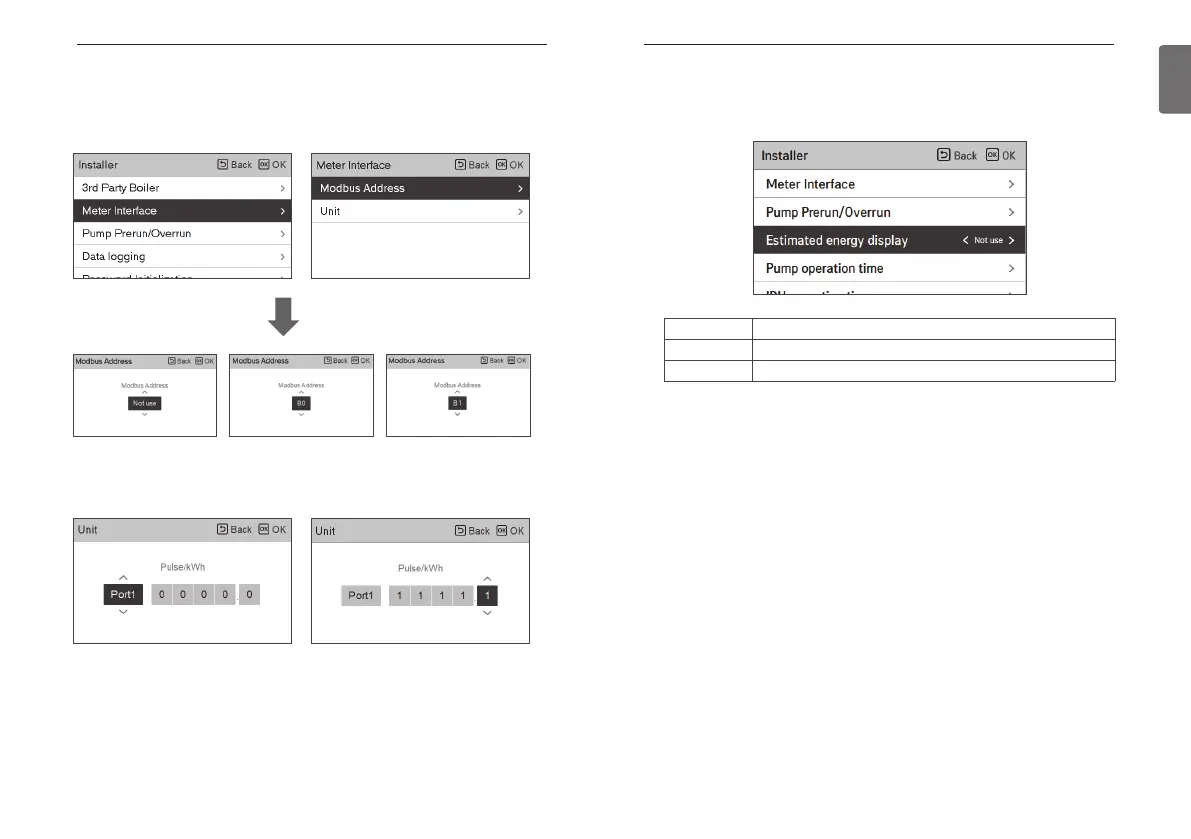
Meter Interface
It is the function that can check the status of energy and power on screen. It collects and
calculates power or calorie data to create data for energy monitoring and energy warning alarm
pop-ups. This function can be activated in installer mode.
There are 2 options, modbus address and unit, in this function. Activating the modbus address
option, you choose one address(B0 or B1) or don’t use. Then, you set the port and specification
in range of 0000.0~9999.9 [pulse/ kW] as shown in the figure below.
OK
Estimated energy display
This function can set to display energy data which outdoor unit estimated power consumption
data without wattmeter.
Setting value Description
Use Display energy consumption data which outdoor unit estimated
Not Use Not display energy consumption data which outdoor unit estimated



 To Next Page