115
INSTALLER SETTING
ENGLISH
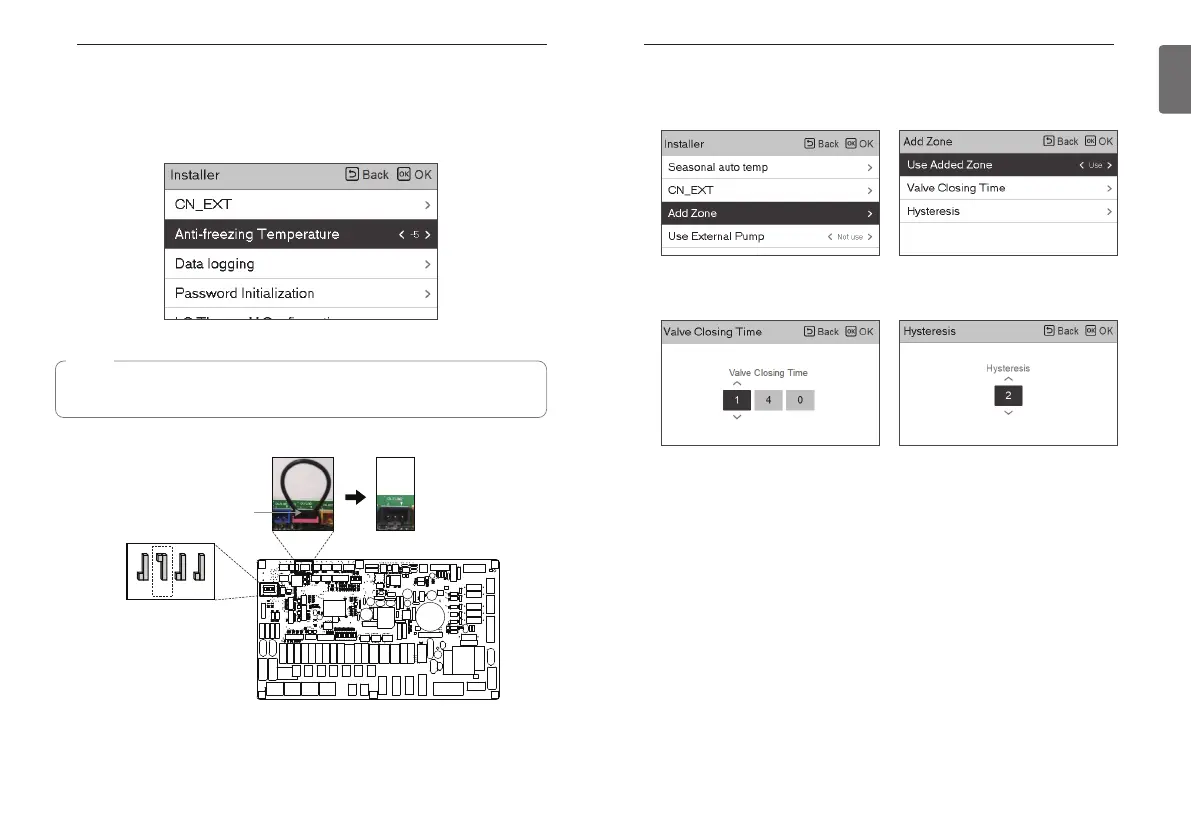
Add Zone
Function to set whether or not to use a installed 2nd circuit function using mixing kit.
You can set valve closing time[sec] and hysteresis temperature[ °C] on screen by yourself.
Activating this function, It allows 2 zones(Room1, Room2) temperature to be controlled,
separately.
- In case of heating, the temperature of Room1 can not be set higher than Room2 temperature.
- In case of cooling, the temperature of Room1 can not be set lower than Room2 temperature.
Setting range
- Add Zone (2nd Circuit function setting) : Use / Not Use
- Value Closing Time : 60~999 seconds (Default: 240)
- Hysteresis (Thermal On / Off ) : 1~5 °C (Default: 2)
114
INSTALLER SETTING
Anti-freezing Temperature
Anti-freeze temperature setting is available in installer mode. It prevents frostbite from happening
In the range of -25 to -5 degree celsius.
• Change setting values using [<, >(left/right)] button
NOTE
To use this function, the antifreeze short pin must be open and switch No.2 in Option SW 3
must be on.
Indoor PCB
OFF
ON
1 2 3 4
SW3
CN_FLOW2
Antifreeze
short Pin
1234
1234
12345678



 To Next Page