15
OPERATION SETTING
ENGLISH
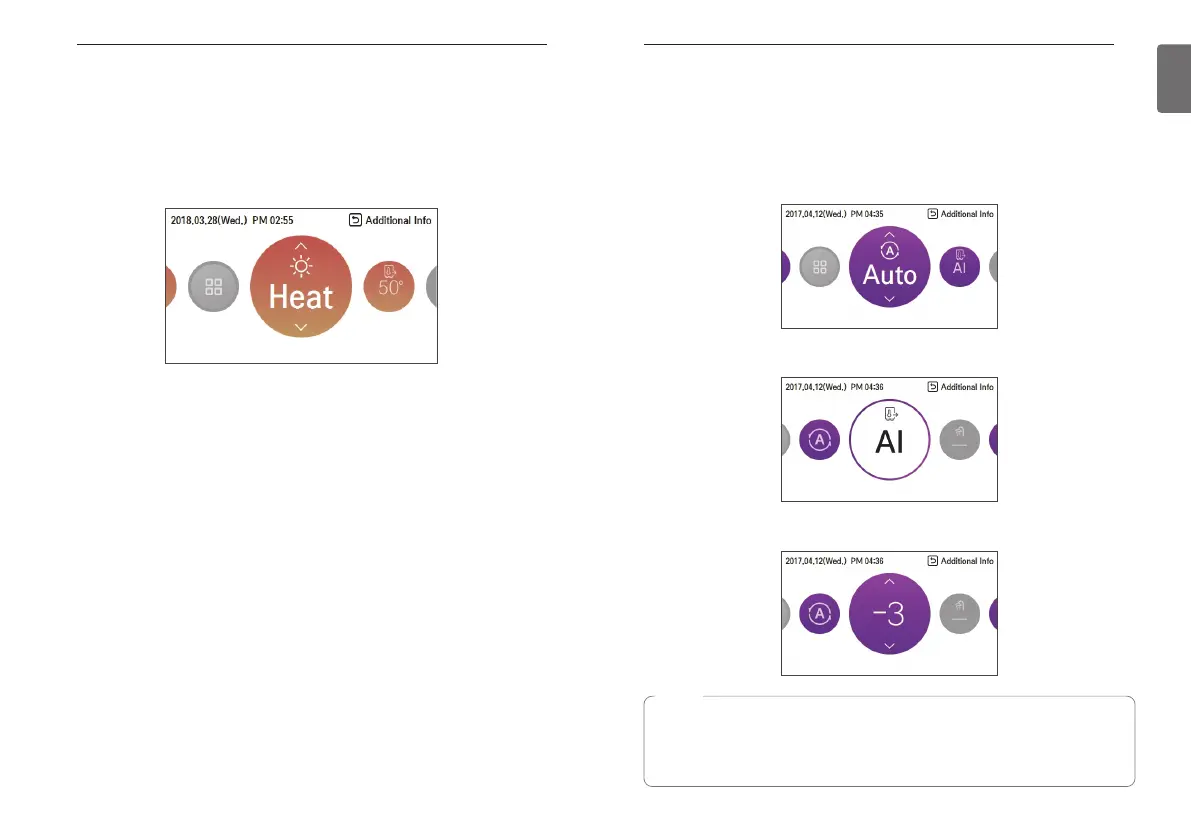
AI / Auto operation
This mode is only applied to heating.
In order to save energy and to give highest comfort, setting temperature will follow outside
temperature. If outdoor temperature decreases, heating capacity for the house will increase
automatically in order to keep same room temperature. All parameters will be set by installer
during start-up procedure and will be adapted to the site characteristic.
1. Select AI / Auto mode.
2. Select the desired temperature category
3. Adjust the desired temperature level by press [∧,∨(up/down)] button.
14
OPERATION SETTING
Heating operation
- Set the desired temperature higher than the water temperature.
- Water temperature is displayed on the default screen of the remote controller.
- When the desired temperature is set lower than the water temperature, warm water doesn't
come out.
- If your unit is operating in heating mode and you press the [On/Off] button the heatling
operation will shut off.
NOTE
Decreasing temperature profile by 3 °C (based on room air temperature)
<Temperature adjust step (unit : °C)>
-5, -4, -3, -2, -1, 0, 1, 2, 3, 4, 5
Cold Hot



 To Next Page