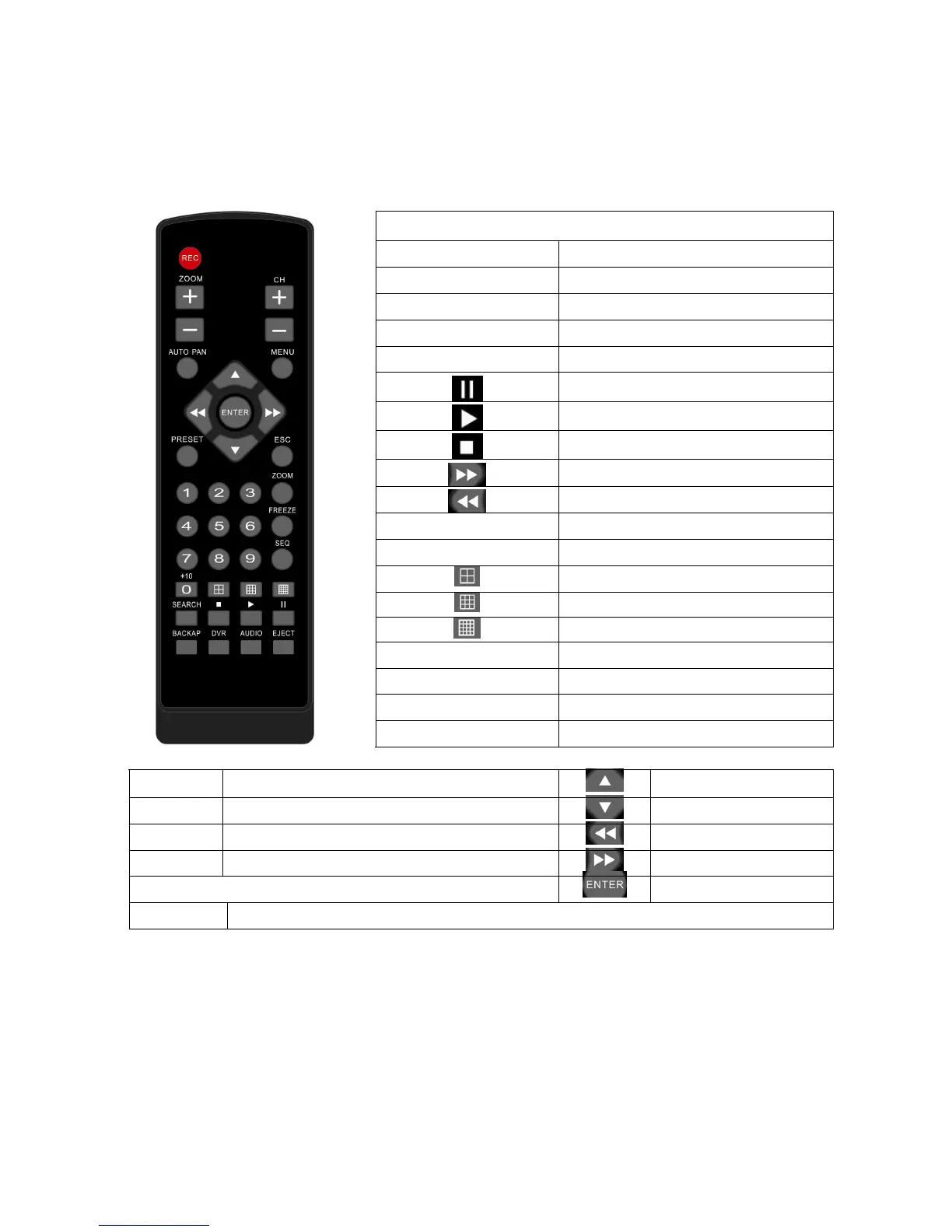
Chapter 1-4. Remote controller
The button arrangement of the remote controller is designed for easy-to-use purposes.
Buttons are separated in regions based on their features including DVR operational keys,
pan, tilt, and zoom camera device (PTZ) keys, numerical keys, and PTZ buttons.
DVR operational keys
MENU Setup menu
ESC Escape/exit/stop buzzer
ZOOM Digital video 5X or 9X zooming
REC Record/stop recording
FREEZE Live video freeze
Pause
Playback
Stop
Fast forward
Fast rewind
CH+
Next single channel
CH-
Previous single channel
4 split display
9 split display
16 split display
SEQ
Sequential display
AUDIO
Audio/mute
BACKUP
Video backup
DVR
Addressable DVR control
Auto Pan Perform auto pan feature
Move up/tilt up
Zoom in Zoom in of a fast dome camera Move down/tilt down
Zoom out
Zoom out of a fast dome camera Move left/pan left
Preset Call preset of a fast dome camera Move right/pan right
Enter/set
0 to 9 Numerical keys



 To Next Page