CHAPTER 3. PTZ CONTROL
PTZ device can be controlled in live monitoring mode and PTZ setup mode via the keypad
and/or the remote controller. The rest of the chapter describes the ways of controlling PTZ
devices using the keypad and a remove controller.
Chapter 3-1. Instant PTZ Controllable Mode
Instantly controllable PTZ camera (active camera) is shown in yellow color in live monitoring
mode indicating that the camera can be instantly controlled for PTZ operations. Moving the
active camera sequentially, one can simply press the Enter button on the remote controller.
Once a camera is in active mode (text in yellow), major PTZ features can be easily
performed.
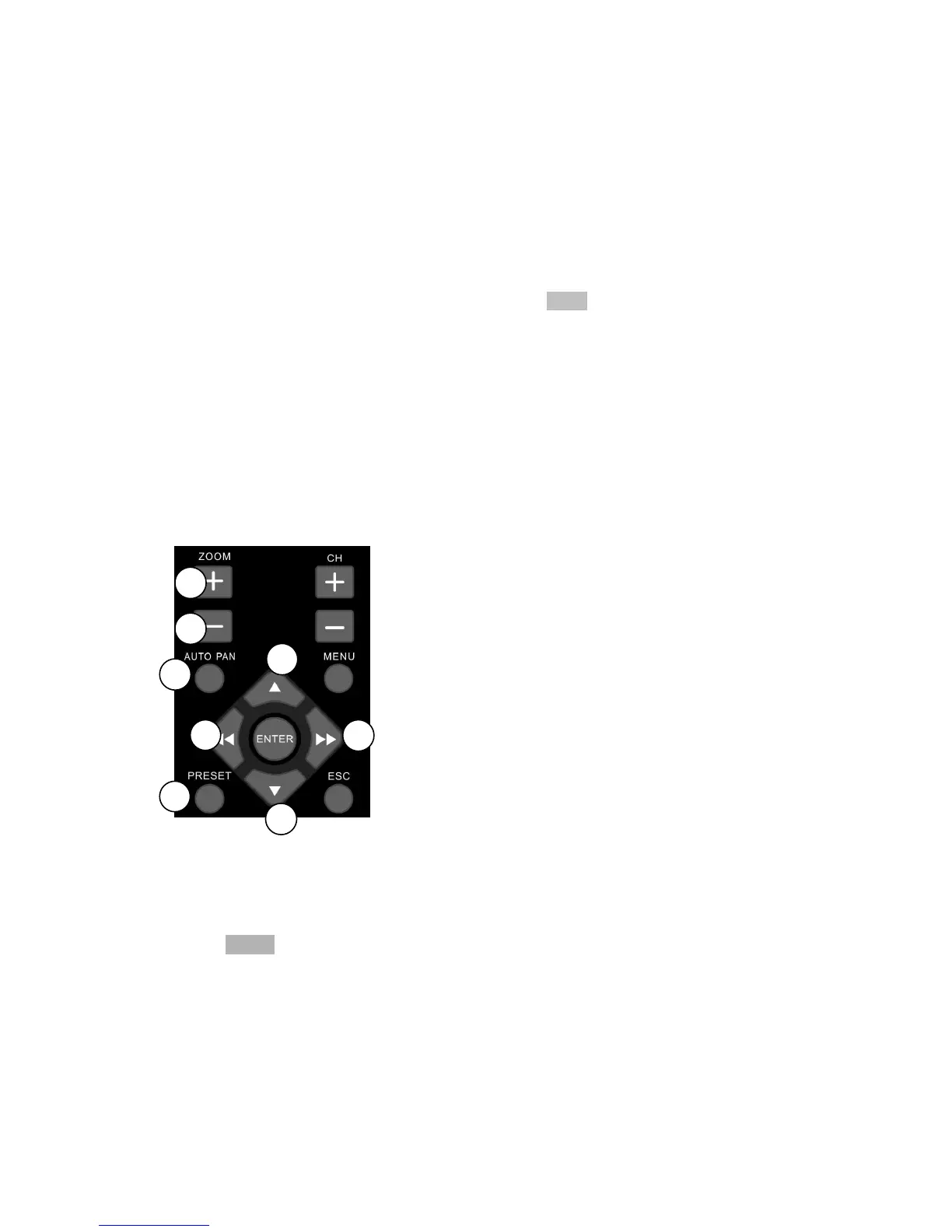
Chapter 3-2. Remote Controller & PTZ
PTZ buttons are framed in yellow that contain auto panning, zooming, and zooming out.
Other PTZ and DVR buttons are shown in blue on remote controller. The details are
described as below:
①
Tilting the PTZ device up
②
Tilting the PTZ device down
③
Panning the PTZ device left
④
Panning the PTZ device right
⑤
Perform auto panning of the PTZ device
⑥
Perform zooming in of the PTZ device
⑦
Perform zooming out of the PTZ device
⑧
Calling presets
Chapter 3-3. Recall Presets
To call a preset, please follow the following instructions:
Press Preset button to enable the calling preset mode.
In Preset mode, preset 01 to 64 directly to recall preset points of the PTZ device.



 To Next Page