LinMot
Configuration Software
User Manual V1.01 5-33
5.13.3 "Jump Back" curve
The last curve we define is the jump from 50 mm to 5 mm, which should be limited in
speed and acceleration.
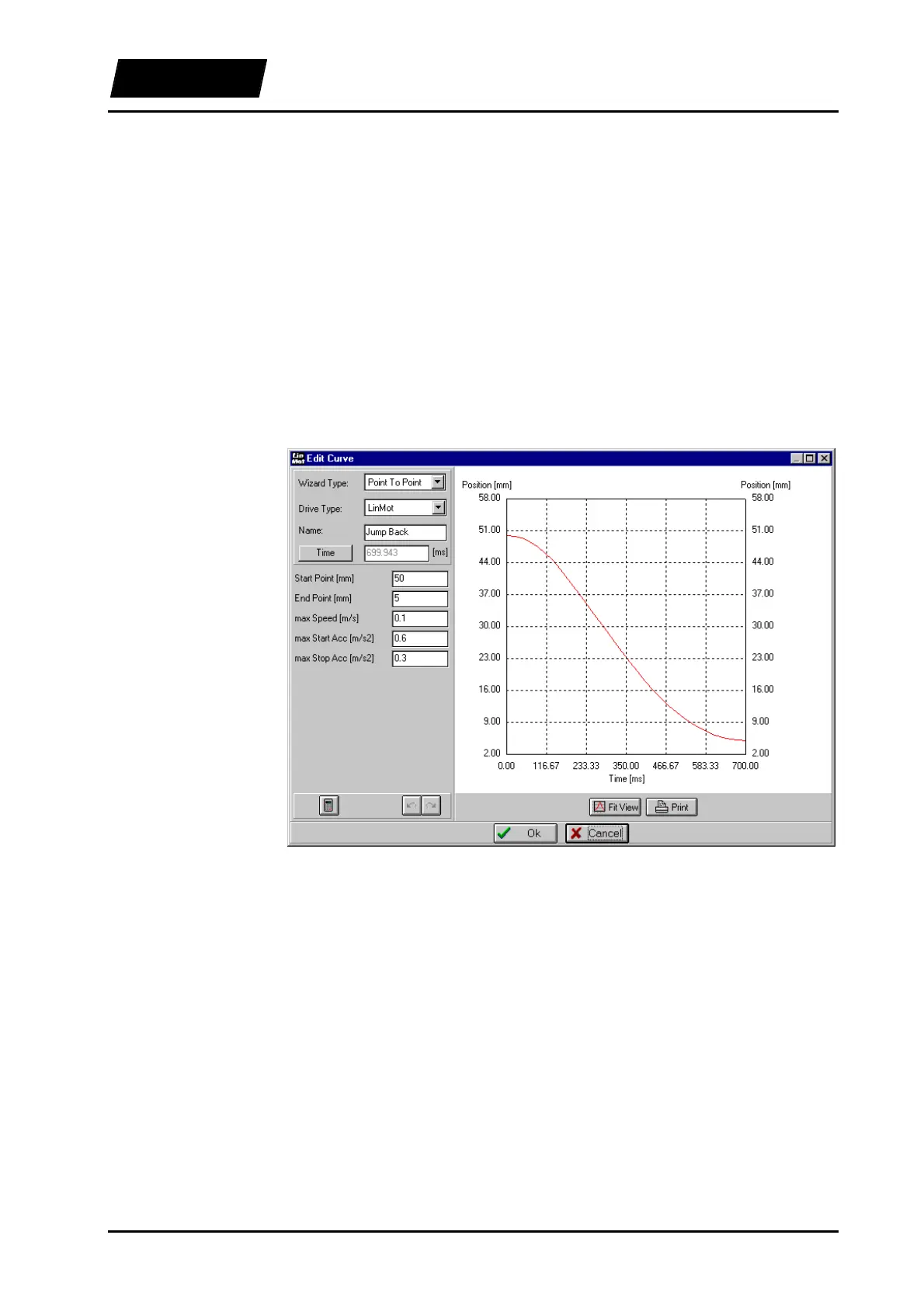
We open a new curve with “Create Curve” and set the “Wizard Type” to “Point to
Point”, “Drive Type” to “LinMot”and name the curve to “Jump Back”. We cannot edit
the time. The curve should bring the slider back, therefore we set the “Start Point” to 50
mm and the “End Point” to 5 mm. We then define the maximum allowed speed of 0.1
m/s. The maximum start and stop accelerations can be set separately. We set “max Start
Acc” to 0.6 m/s
2
and “max Stop Acc” to 0.3 m/s
2
. After clicking on the “Calculate”
button the Curve Inspector suggests 32 points for the curve, which we accept by clicking
“OK”. The time required for the execution of the curve is calculated automatically and
amounts to 700 ms. The “Jump Back” curve look then like this:
Figure 5-26: Curve "Jump Back"
We close the Curve Editor with the “OK” button. The curve window of the Curve
Inspector now lists the three curves we have defined.



 To Next Page