72
5 Operation
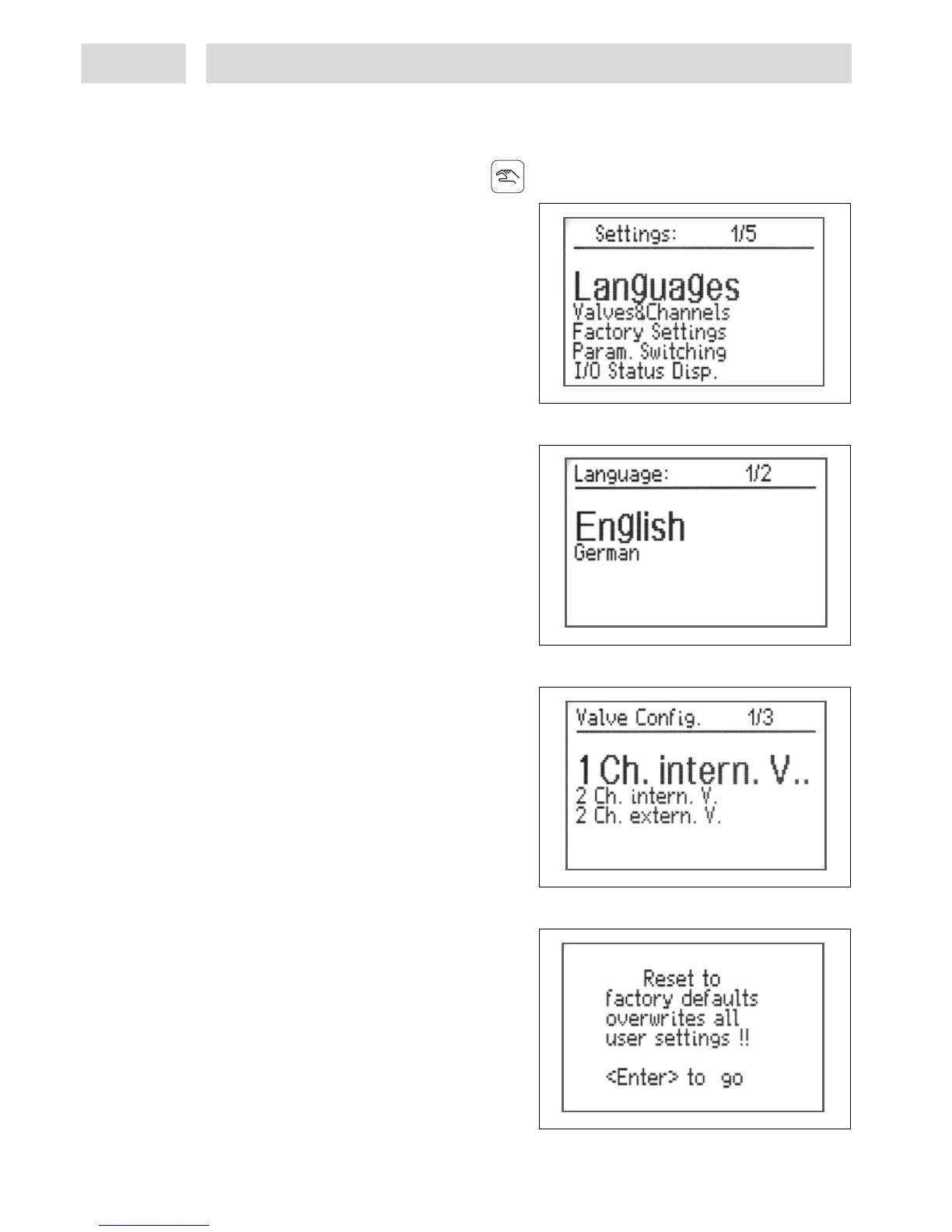
5.3 Menu "System setup"
The first step is to preconfigure the controller. For this purpose, the controller must be unlocked.
This menu is activated by pressing the key .
This is the menu for general setup of the
dispensing system.
Turn the button to select the desired entry
which will be displayed in large letters, and
confirm by pressing key 10 Enter.
Confirm any adjustments to settings by
pressing key 10 Enter.
Press key 11 ESC/Lock to leave the menu.
5.3.1 Language
Currently only English and German available.
5.3.2 Valves and channels:
This is the option for selecting the dispense
channels and valve modules to be used.
– 1 dispense channel (A), using the integrated
valve module.
– 2 dispense channels (A and B), using the
integrated valve module.
– 2 dispense channels (A / B), using the
external solenoid valve module 97204.
5.3.3 Reset to factory settings:
Press key 10 Enter to reset all setup
adjustments to the factory setting.
Programmed values and functions will be
deleted.
Press key 11 ESC/Lock to leave the menu
without deleting these values/functions.



 To Next Page