77
5 Operation
5.7 Menu "Online Flow Monitor"
5.7.1 Value setup
This menu is activated by pressing the keys or and .
Pressing the key 6 Monitoring without preselecting a channel will automatically switch Channel
A to active mode. Preselection of the dispense channel is required to call up the setup menu for
Channel B.
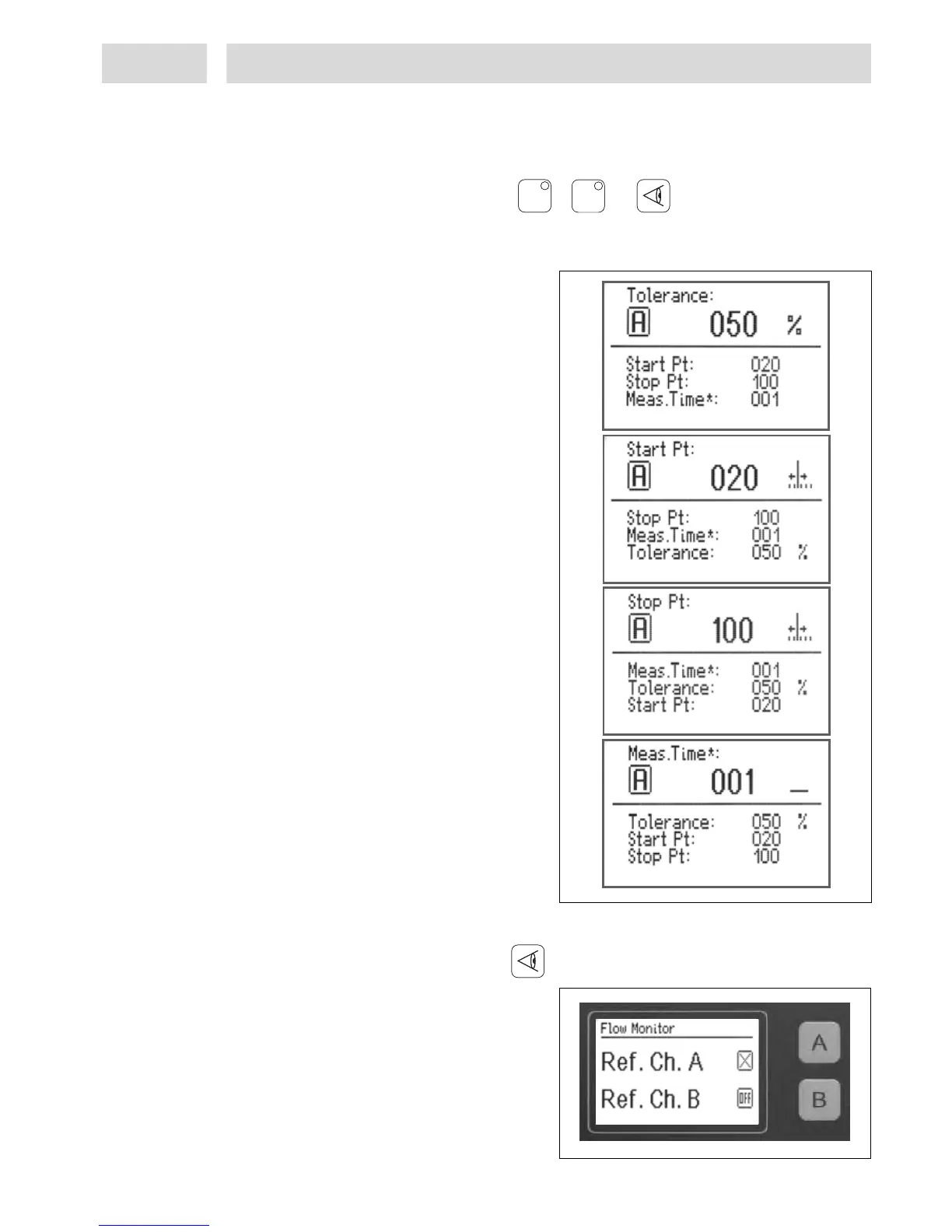
This is the option for selecting
– tolerance, 10% - 400%,
– evaluation start point,
– evaluation stop point, and
– measuring time factor value, 1- 10.
Use keys 4 Channel A or
5 Channel B to scroll through the menu.
Adjustments are made by turning the button.
For further information see section 5.11.
5.7.2 Activation of reference dispensing
This menu is activated by pressing the key .
In this menu, the reference measurement of
the Online Flow Monitor for dispense
channels A or B can be switched on or off. As
a first step, monitoring of the dispense
channel must be activated as described in
section 5.11.1. The display changes from OFF
to X. The channel keys for dispense channels
A and B are defined as switches. The relevant
key is used to switch the flow monitor
On () or Off (X).
AA
BB



 To Next Page