55
2 Description
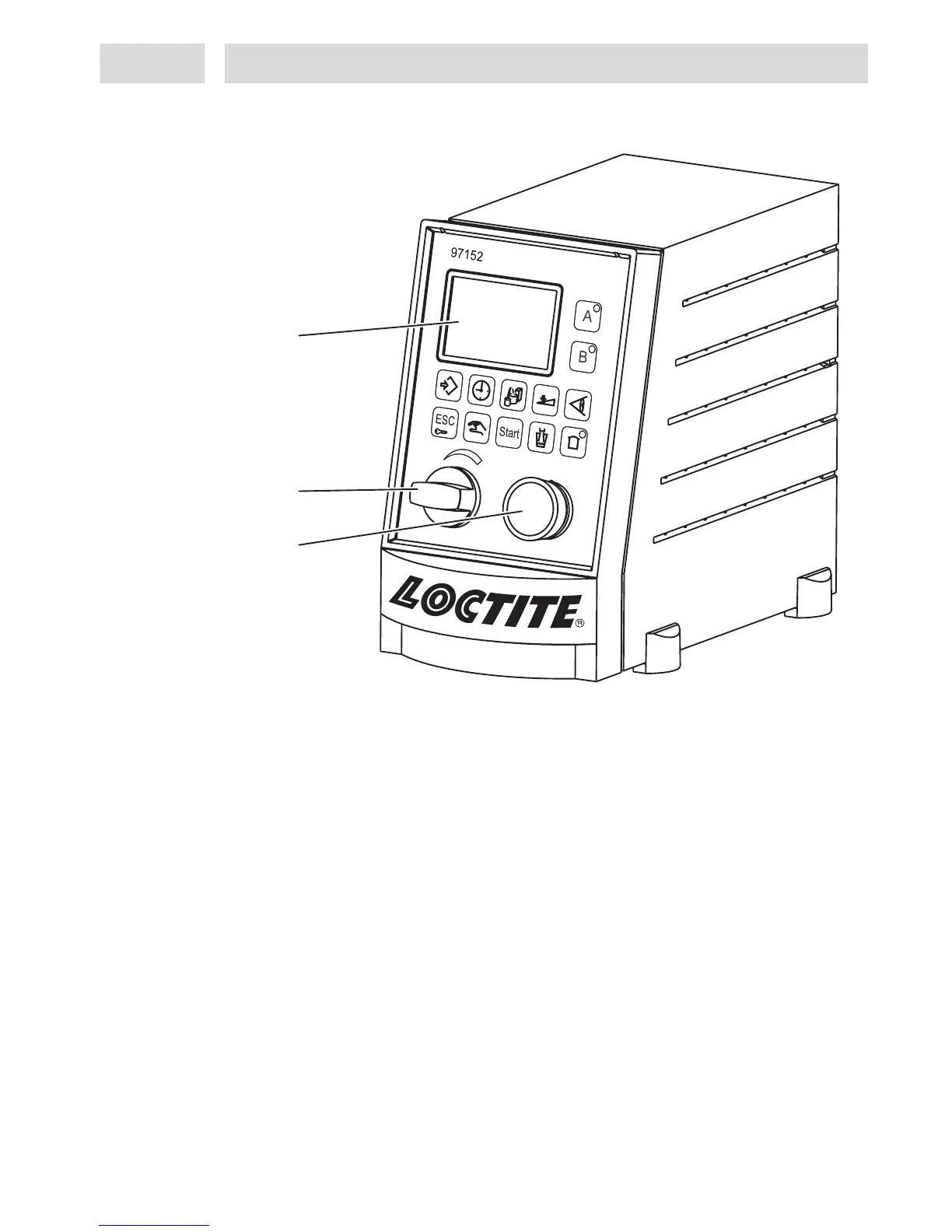
2.2 Displays, operating elements and connections
1
Display
Displays all information required for setup, status, etc., see section 2.3
2
Precision pressure regulator
Precision pressure regulator to regulate reservoir pressure.
Turn the regulator knob to adjust the dispense pressure within a range from 0.00 bar to
700 bar (0 to 100 PSI).
If error message “12 Supply? “ is displayed with a beep, the reservoir is either empty
or has been switched off.
If "-!-" is blinking and pressure is indicated with a beep, the dispense pressure setting
was changed by more than ± 10 %.
Press key 10 Enter to store the indicated dispense pressure as new comparison value
for automatic pressure monitoring. If no new dispense pressure is to be set, the old
dispense pressure setting must be restored. In both cases the error message and the
beep will disappear.
3
Selector / Confirm button
Turn the button to move from one menu option to the other or make settings such as
dispense time, start of flow monitoring, etc.
Push the button to confirm or store these settings.
It is recommended to press key 10 Enter to store the settings, as accidental turning of
the button may cause a change in the setting, so that the wrong value would be stored.
1
2
3


 To Next Page