75
5 Operation
5.5 Menu "Setup mode"
This menu is activated by pressing the keys or and .
Caution!
In this mode, all units connected to the controller or to the external valve module will be actuated.
For example, a connected advancing slide will move to its dispense position when the channel is
switched on ().
There must be no obstacles within this range.
Any unit switched on in this mode, although not activated in the channel system menu, will be
actuated.
This On/Off menu is provided for setup
operation of a dispense system.
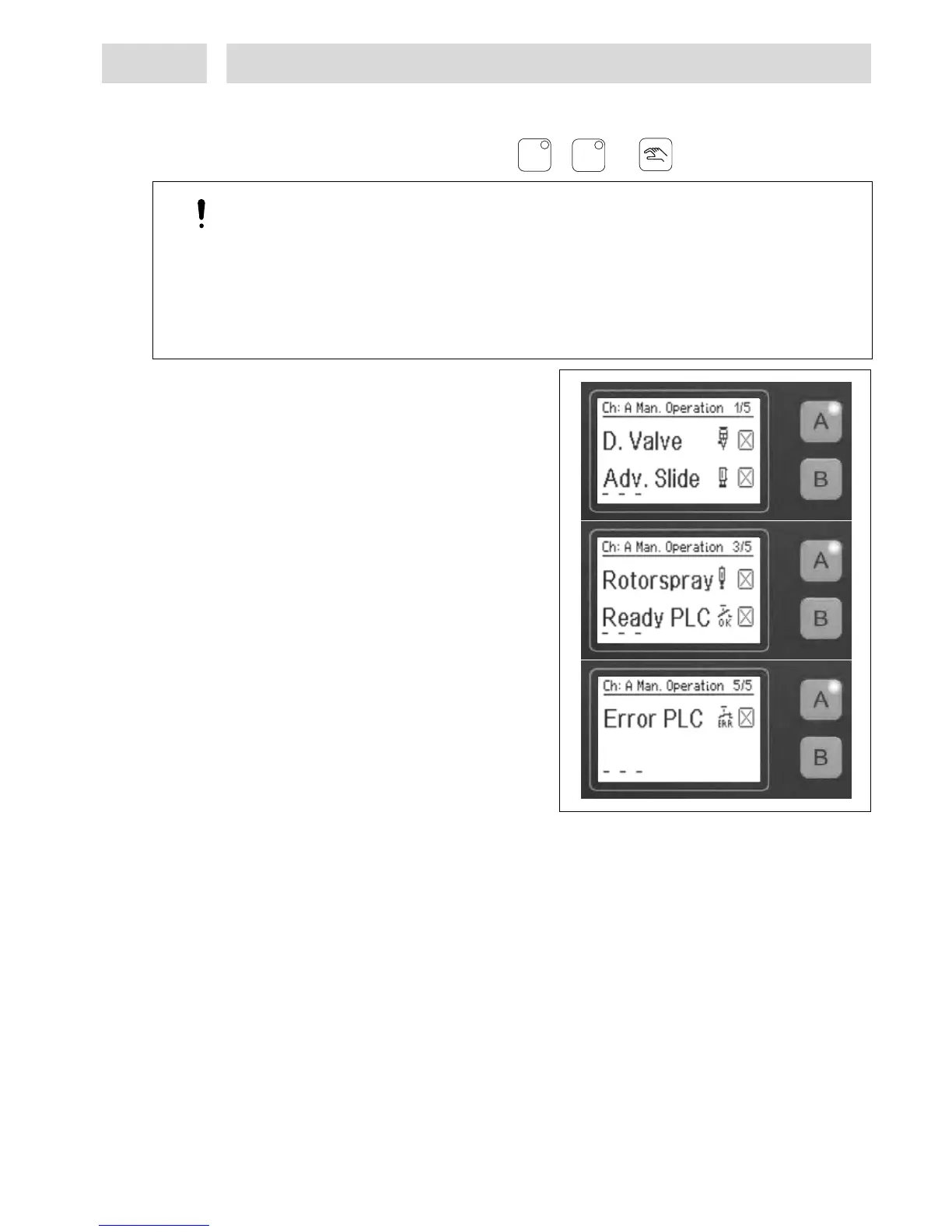
In this menu, the manual mode for dispense
channels A or Be can be switched on or off.
The channel keys for dispense channels A and
B are defined as switches. The relevant key is
used to switch the connected unit On () or
Off (X).
The three little bars in the display are
provided for advancing slide and rotor unit
status indication.
They have the following meaning:
– < – advancing slide in home position,
corresponding limit switch active.
– –
> advancing slide in dispensing position,
corresponding limit switch active.
R – – Rotor unit has reached preset speed.
Note!
As long as the setup mode has been activated for any one dispense channel, no dispensing cycle
can be started in the other dispense channel.
Malfunctions occurring during normal dispensing operating are ignored in manual mode.
AA
BB


 To Next Page