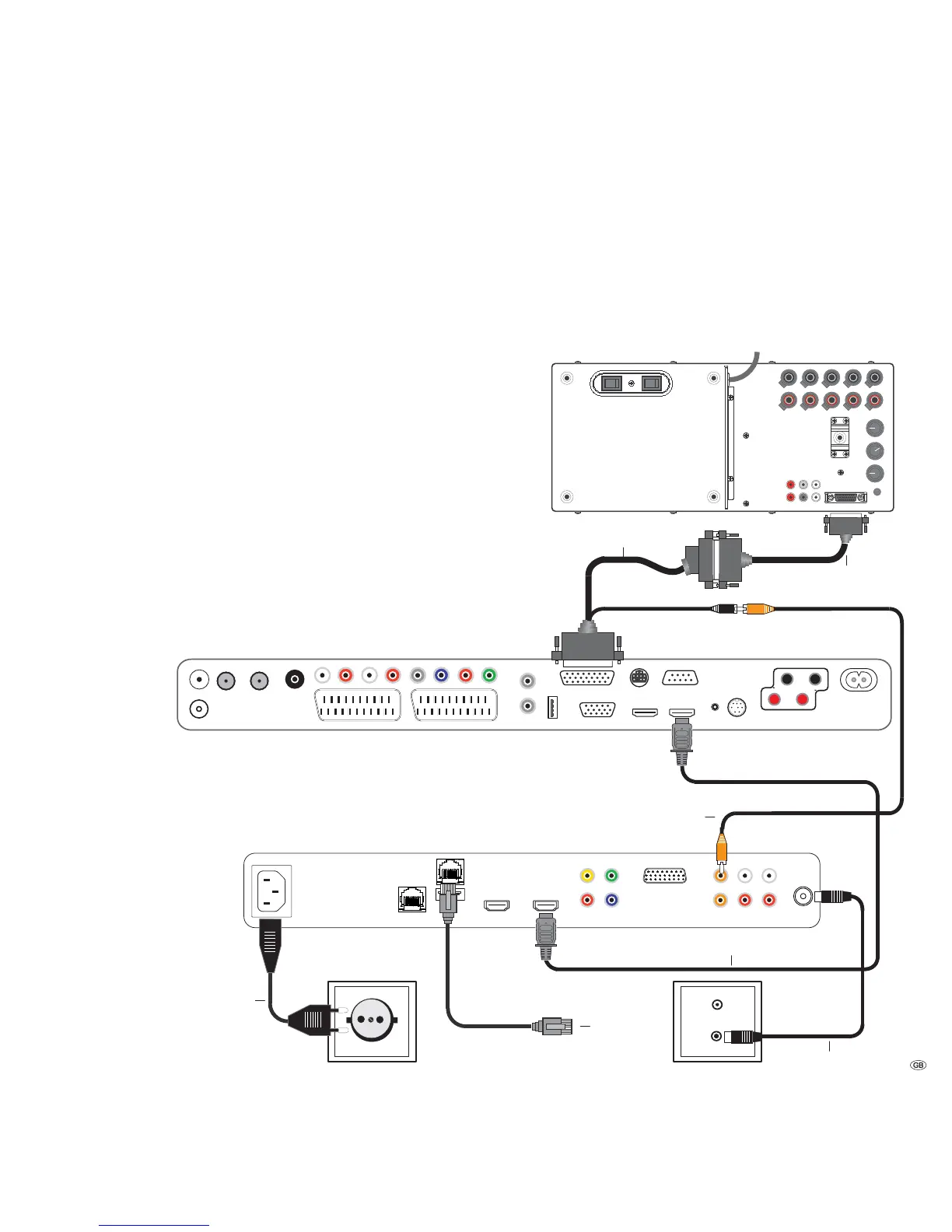
Connecting
Mediacenter in the integrated TV system
Use the supplied RJ-45 network cable to connect the Mediacenter to a network
connection (e.g. switch or DSL router) with a link to the Internet.
Use the supplied HDMI cable to connect the HDMI OUT socket of the Mediacenter
to the HDMI IN socket on your TV set.
If your TV set does not have an HDMI IN socket, use three video-capable cinch
cables to connect the three COMPONENT OUT sockets of the Mediacenter to the
COMPONENT IN sockets on your TV set.
Otherwise, using a cinch cable you can connect the VIDEO OUT socket on the
Mediacenter with the VIDEO IN socket on your TV set. But through this connection,
termed as Composite Video, you only receive a restricted picture quality. As far
as possible, you should use the earlier mentioned connection types.
Using the supplied cinch cable (digital audio cable: socket in orange colour) con-
nect the AUDIO DIGITAL IN socket of the Mediacenter with the cinch coupling
of the D-SUB/Cinch audio cable. (Loewe Art.No. 70529.001).
Connect the AUDIO LINK socket of the TV set to the D-SUB coupling of the audio
cable D-SUB/Cinch. You can connect a Loewe subwoofer available as an accessory
at the other end of the D-SUB coupling.
In the menu Sound components (page 26), set the option Sound via on the TV.
With the antenna cable, connect the ANT FM socket to an antenna socket. Plug
the mains cable into a 220-240V 50/60 Hz wall socket.
AudioLink
Line In
Speaker
Out
Power Mode
Left
Center
Right
Left Right Left Right
230V~50/60Hz
Left
Phase
Equalizer
Crossover
Frequency
Bass
Intensity
180°
-3dB
+6dB
50Hz
250Hz
min
max
0°
Subw Right
Rear
Front
OFF ON Auto Manu.
Front Rear
13 -
Loewe Flat TV set (from L271x)
Loewe Individual Mediacenter / DR+
Loewe Subwoofer Individual Sound Highline
Digital audio cable
FM Antenna
Audio link cable
Network
Cable
Mains cable
HDMI cable
Audio cable D-SUB/Cinch



 To Next Page