Connecting up
Mediacenter with Loewe Sound Projector
and Loewe Flat TV Set
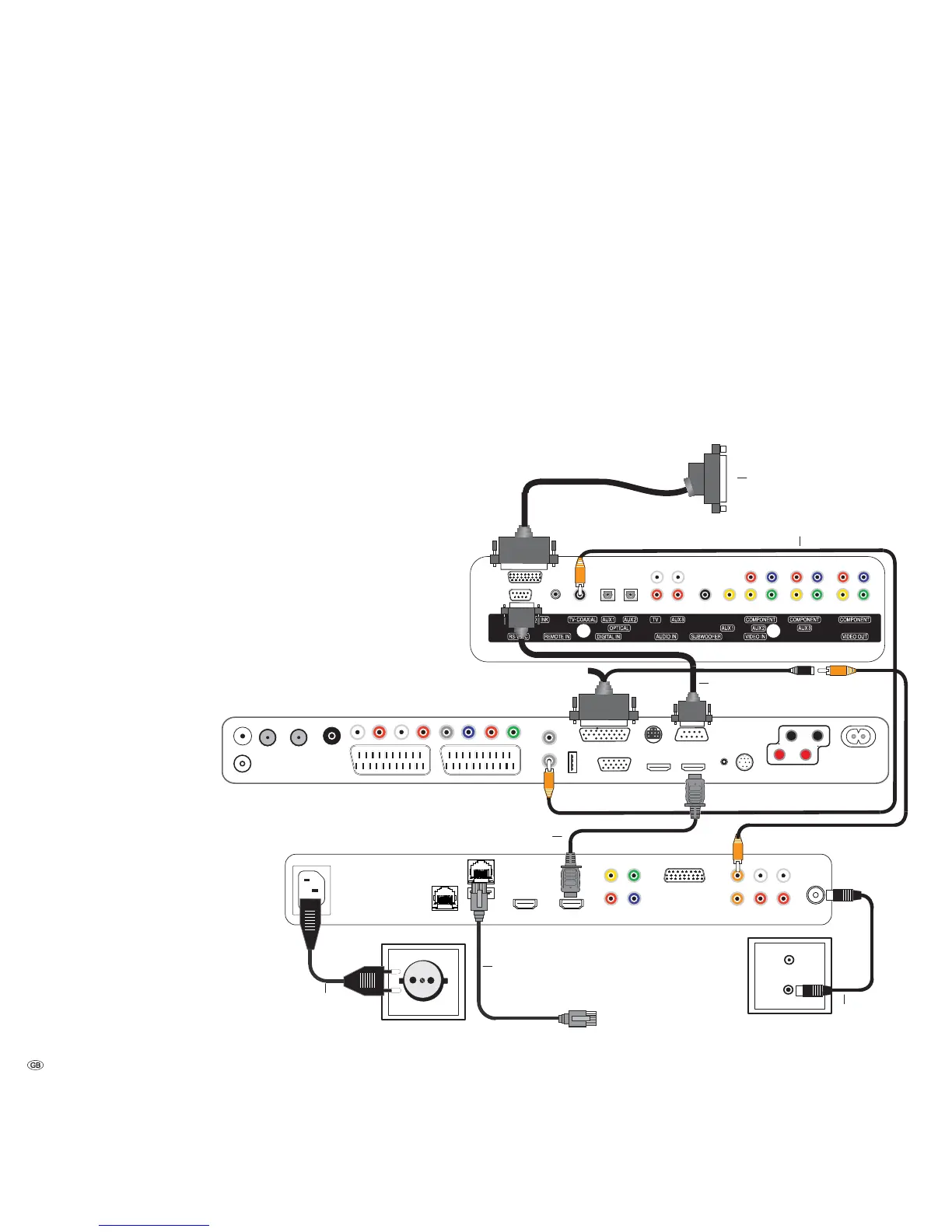
Use the supplied RJ-45 network cable to connect the Mediacenter to a network
connection (e.g. switch or DSL router) with a link to the Internet.
Use the supplied HDMI cable to connect the HDMI OUT socket of the Mediacenter
to the HDMI IN socket on your TV set.
Connect, using the supplied audio cable D-SUB/Cinch, the D-SUB plug with the
socket AUDIO-LINK on the Loewe TV set.
Using the supplied cinch cable (digital audio cable: socket in orange colour) con-
nect the AUDIO DIGITAL IN socket of the Mediacenter with the cinch coupling
of the D-SUB/Cinch audio cable. (Loewe Art.No. 70529.001).
Connect the AUDIO LINK socket of the TV set to the D-SUB coupling of the audio
cable D-SUB/Cinch. You can connect a Loewe subwoofer available as an accessory
at the other end of the D-SUB coupling.
Use a cinch cable (digital audio cable: connector is orange in colour) to connect
the AUDIO DIGITAL OUT socket of the TV set to the TV-COAXIAL socket of the
Sound Projector.
In the menu Sound components (page 26), set the option System amplifier
on the TV.
With the antenna cable, connect the ANT FM socket to an antenna socket. Plug
the mains cable into a 220-240V 50/60 Hz wall socket.
Connect the sound projector to the TV set and subwoofer as shown.
- 14
Mains cable
Loewe at TV set (above L27x1)
Loewe Individual Mediacenter / DR+
Digital audio cable
FM Antenna
Network
Cable
HDMI cable
Digital audio cable
RS-232C
Audio cable D-SUB/Cinch
Loewe Sound Projector
Connection to the Subwoofer


 To Next Page