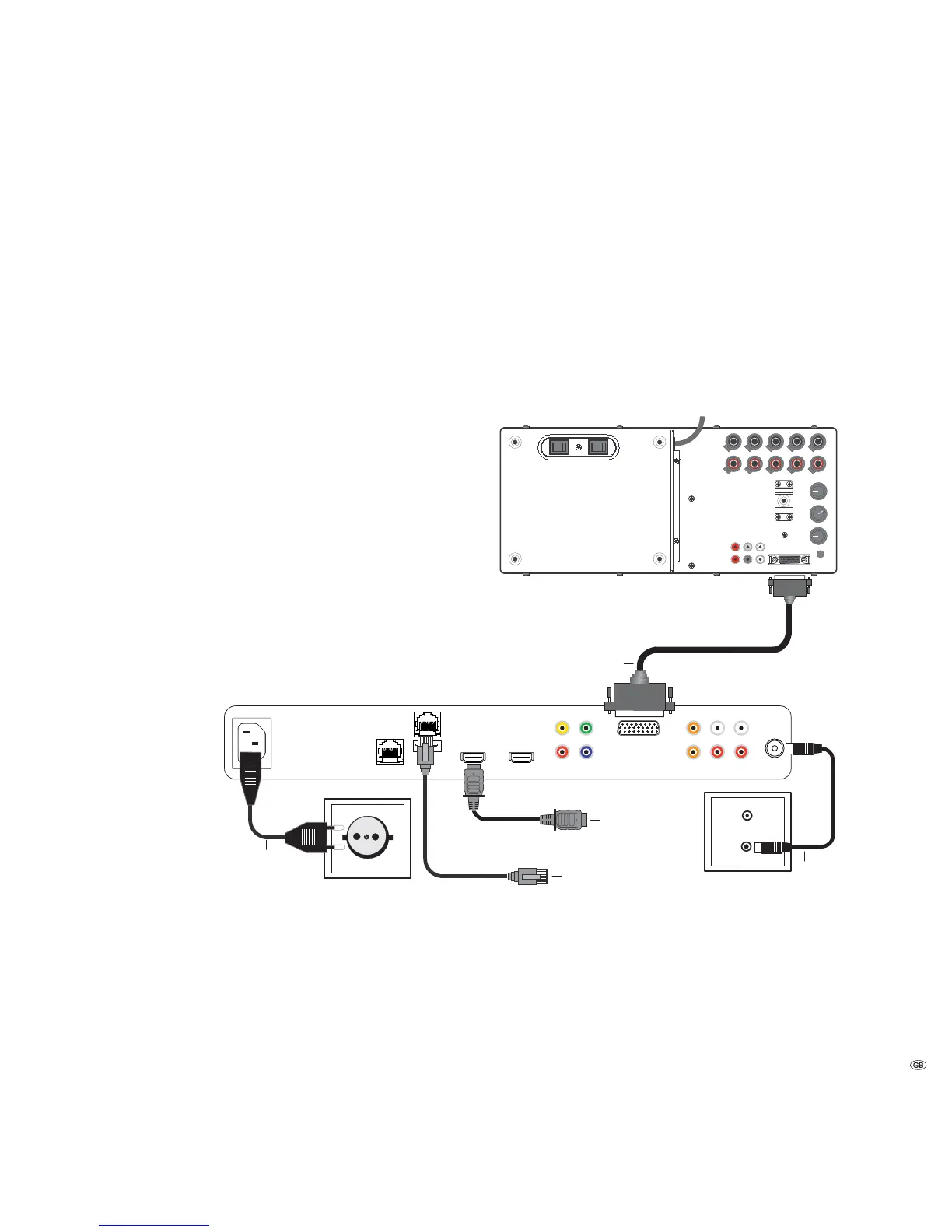
Connecting up
Mediacenter as a Standalone Solution
Use the supplied RJ-45 network cable to connect the Mediacenter to a network
connection (e.g. switch or DSL router) with a link to the Internet.
➠ In order to be able to carry out settings (see from Page 18 onwards) it is
necessary to connect the Mediacenter with a TV set (Page 13) in order to be
able to operate the relevant menus. This is also recommended for operation
of the Mediacenters.
Using the Audio Link Cable connect the AUDIO-LINK socket of the mediacenter
to the AUDIO-LINK socket of the Loewe subwoofer.
In the menu Sound components (page 26) set the option System amplifier on
the Mediacenter.
With the antenna cable, connect the ANT FM socket to an antenna socket.
Plug the mains cable into a 220-240V 50/60 Hz wall socket.
AudioLink
Line In
Speaker
Out
Power Mode
Left
Center
Right
Left Right Left Right
230V~50/60Hz
Left
Phase
Equalizer
Crossover
Frequency
Bass
Intensity
180°
-3dB
+6dB
50Hz
250Hz
min
max
0°
Subw Right
Rear
Front
OFF ON Auto Manu.
Front Rear
15 -
Mains cable
FM Antenna
Network
Cable
Audio link cable
Loewe Subwoofer Individual Sound Highline
HDMI cable
to TV set
Loewe Individual Mediacenter / DR+


 To Next Page