Play from iPod
You can connect your iPod to the Mediacenter and thus enjoy your music in high
quality. The Mediacenter has an integrated iPod Dock, which you can simply
detach from the top if necessary.
Connecting iPod
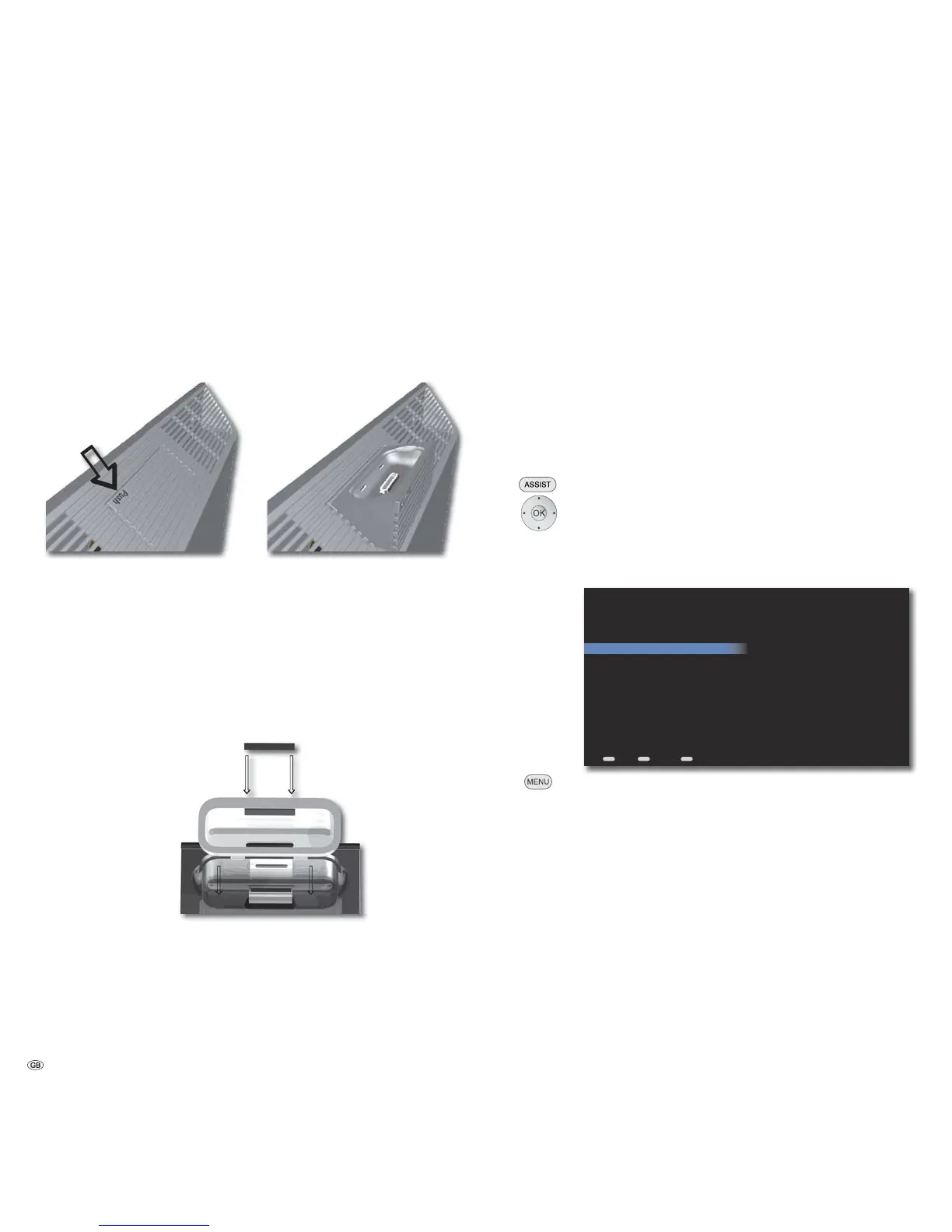
Press the position marked with PUSH on the iPod dock until it unlocks and de-
taches on its own.
Insert the dock adapter supplied with your iPod into the charging slot of the iPod
dock. Then, place your iPod in the Dock.
➠ See to it that only a small force is used for insertion and handling of the iPod
in the Dock so that the sensitive plug connection is not damaged.
In order to ensure correct retention of an iPod Touch when using the Mediacenter
in combination with the optional Table Stand Individual Mediacenter, you
need to fit the self-adhesive spacer (included with in the delivery) to the iPod
Dock-Adapter (included in the delivery of the iPod Touch).
Remove the protective strip from the back of the self-adhesive spacer and place it (as
shown) onto the iPod Dockadapter. Fix the spacer in position using light pressure.
Menu iPod
The iPod menu provides you access to the music on your connected iPod. The
menu is only shown when the Mediacenter detects the iPod. This is followed by
synchronisation of the tracks available on the iPod with the Mediacenter. You
can have your music displayed sorted according to different criteria, such as e.g.
according to artist, album, Genres, Covers etc.
Now Playing (iPod)
In the Now Playing menu, the currently played Track, album and other information
are displayed. The functions are identical to the Now Playing menu on page 37.
Playlists (iPod)
You can retrieve and edit the Playlists on the iPod.
Call up Main Menu.
Select option iPod.
Confirm OK.
Select option Playlists.
Confirm OK.
MENU
ASSIST
END
Playlists
Back Options Home
Jukebox Loewe Mediacenter
Playlist 1
Call up Options menu.
Replace the Queue The current playlist is replaced by a new one
Play as next title The selected playlist is played back at the end
of the current track
Play Next Playing the selected playlist as the next title
Adding Music The selected one is added into a new playlist
to Queue
Clear queue The queue is emptied (no data is deleted)
- 42


 To Next Page