- 12
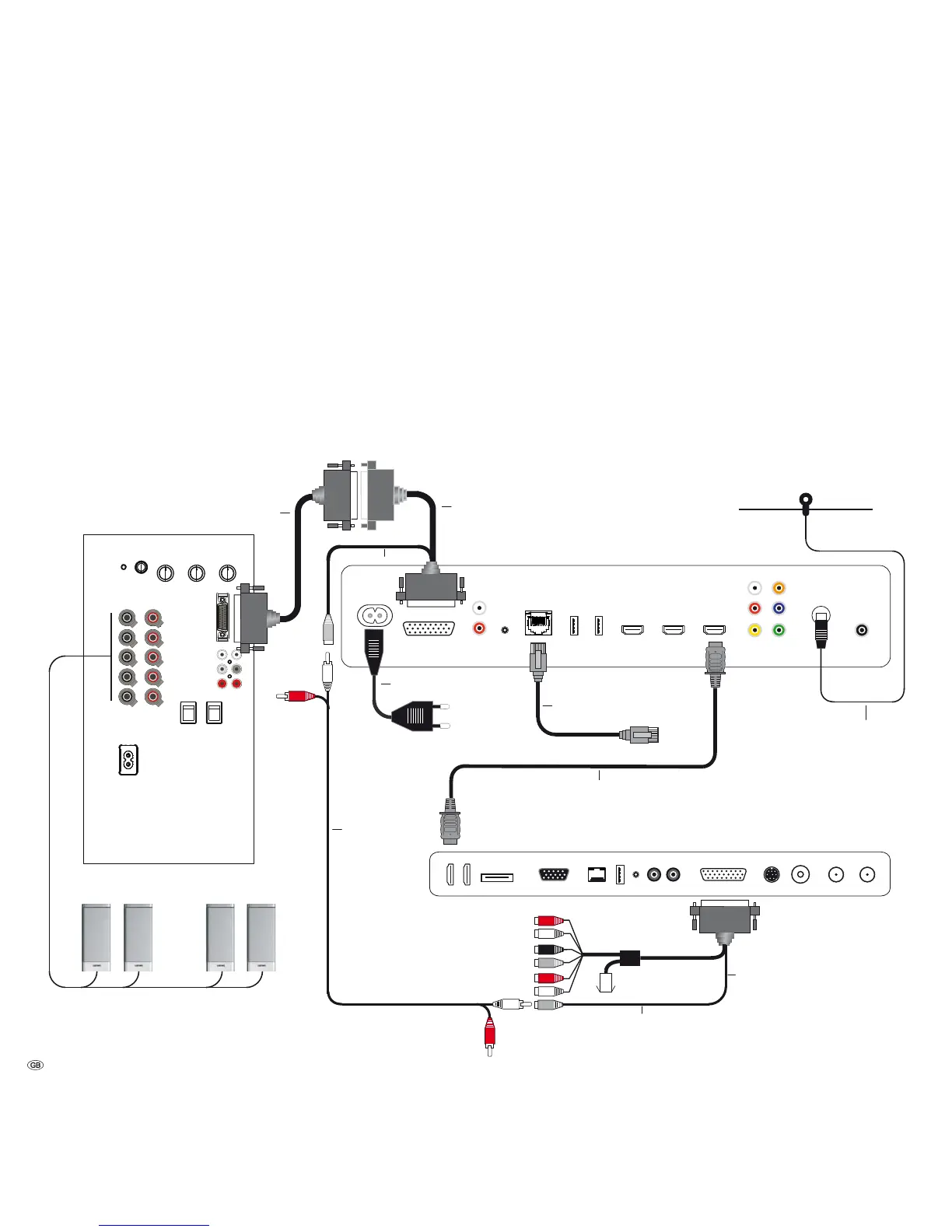
MediaVision 3D as an audio system (SL155)
This is the recommended configuration with MediaVision 3D as an audio system
in conjunction with Loewe Connect ID (chassis SL155; TV as centre and with
HDMI-ARC: Audio Return Channel). The audio signals are processed via Medi-
aVision in this configuration.
Connect the HDMI OUT socket of the MediaVision 3D to an HDMI 1 socket on
your Loewe TV set using the HDMI cable provided.
Use an RJ-45 network cable to connect MediaVision 3D to a network connec-
tion (e.g. Switch or DSL router) with a connection to the Internet/Homenetwork.
Connect the ANTENNA FM socket of the MediaVision 3D to the antenna provided.
Use an Audio-Link cable to connect the AUDIO-LINK socket of your Media-Vision
3D to a compatible socket of the Loewe subwoofer. Should you wish to reproduce
the centre channel through your TV set, use the adapters provided (art. no. 009-
70784.001 / 009-71387.001). Connect the adapter 009-70784.001 to the AUDIO-
LINK socket of MediaVision 3D and the AUDIO-LINK cable to the subwoofer, as
well as the Centre-IN socket of the adapter 009-71387.001 on the TV set.
To be able to reproduce the sound of the TV set, e.g. DVB radio, via your MediaVisi-
on/subwoofer system, set the option TV input to HDMI output -ARC (page 21).
Plug the small plug of the mains cable into the rear of the unit (page 7) and
then plug the large plug of the mains cable into a 220-240V 50/60 Hz socket.
Connection
CENTER
IN
SR
R
SUB
C
L
SL
MediaVision 3D
Loewe Subwoofer
Loewe Connect ID
(Chassis SL155)
HDMI
AUDIO-LINK
HDMI1
HDMI OUT
ANTENNA
LAN
AUDIO-LINK
AUDIO-LINK
Adapter cable
(009-70784.001)
Network cable
Mains cable
FM Radio
Antenna
HDMI cable
Centre channel
Adapter cable
(009-71387.001)
Center-IN
Speaker
Center-OUT
Audio-Link



 To Next Page