13 -
MediaVision 3D as an audio system (SL2xx)
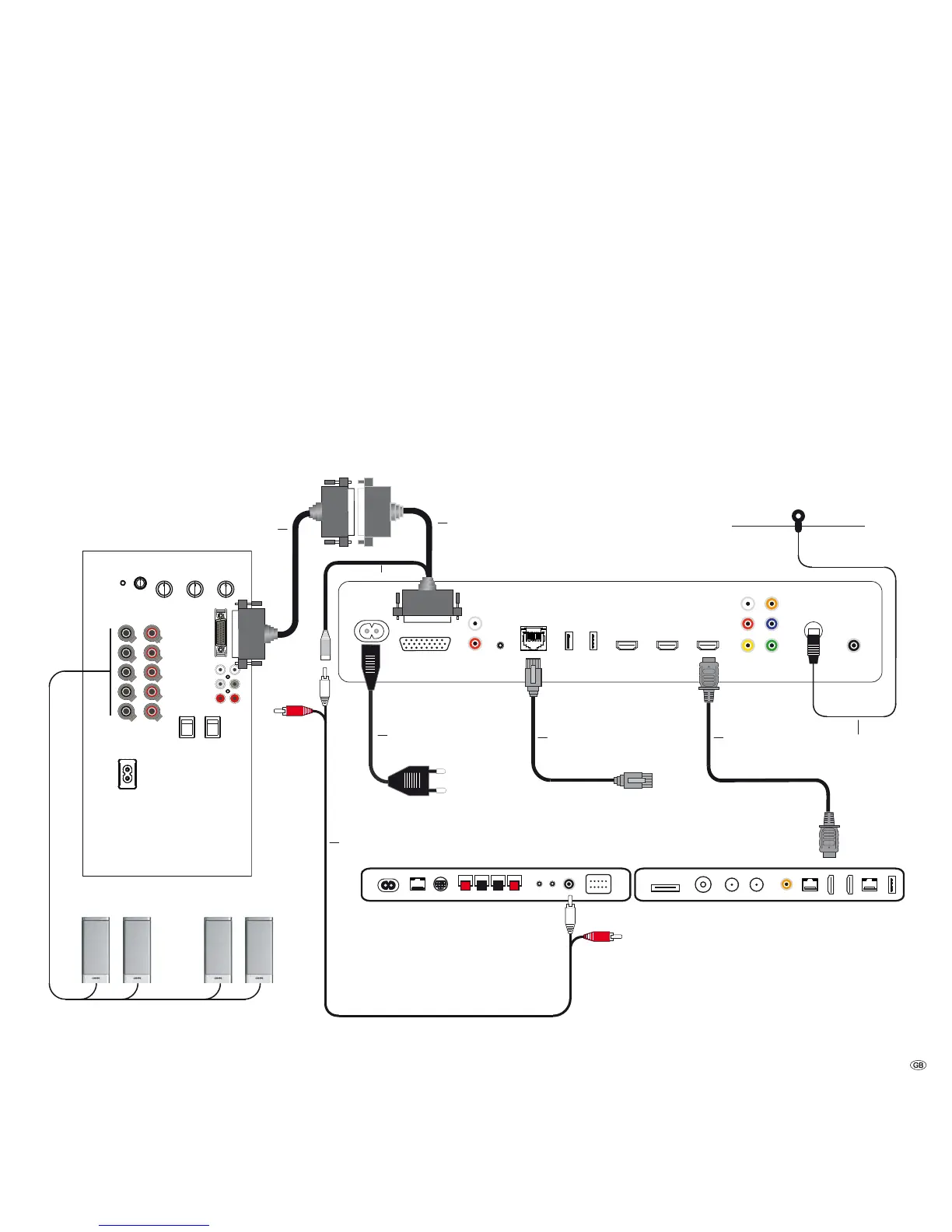
This is the recommended configuration with MediaVision 3D as an audio system
in conjunction with Loewe TV sets with chassis SL2xx (TV as centre and with HDMI-
ARC: Audio Return Channel). The audio signals are processed via MediaVision
in this configuration.
Connect the HDMI OUT socket of the MediaVision 3D to an HDMI 1 socket on
your Loewe TV set using the HDMI cable provided.
Use an RJ-45 network cable to connect MediaVision 3D to a network connec-
tion (e.g. Switch or DSL router) with a connection to the Internet/Homenetwork.
Connect the ANTENNA FM socket of the MediaVision 3D to the antenna provided.
Use an Audio-Link cable to connect the AUDIO-LINK socket of your Media-
Vision 3D to a compatible socket of the Loewe subwoofer. Should you wish to
reproduce the centre channel through your TV set, use the adapter provided (art.
no. 009-70784.001). Connect it to the AUDIO-LINK socket of MediaVision 3D
and the AUDIO-LINK cable to the subwoofer, as well as the Centre-IN socket of
the TV set. (page 21).
To be able to reproduce the sound of the TV set, e.g. DVB radio, via your MediaVisi-
on/subwoofer system, set the option TV input to HDMI output -ARC (page 21).
Plug the small plug of the mains cable into the rear of the unit (page 7) and
then plug the large plug of the mains cable into a 220-240V 50/60 Hz socket.
Connection
MediaVision 3D
Loewe Subwoofer
Loewe TV
(Chassis SL2xx)
HDMI1
Center IN
HDMI OUT
ANTENNA
LAN
AUDIO-LINK
AUDIO-LINK
Center-OUT
Adapter cable
(009-70784.001)
Network cable
Mains cable
FM Radio
Antenna
HDMI cable
Centre channel
Audio-Link
Speaker



 To Next Page