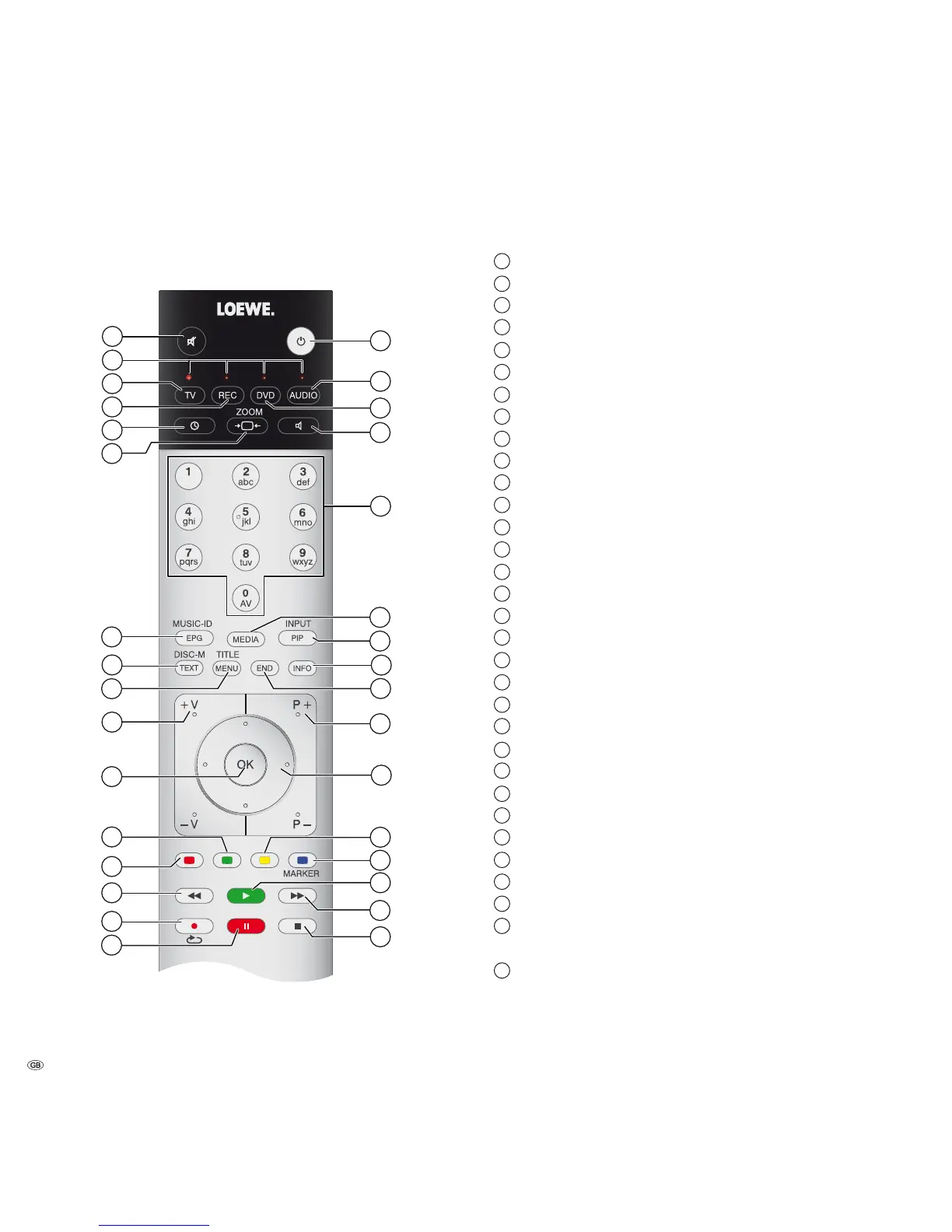
Assist remote control – MediaVision 3D Mode
1
Sound Mute/On
2
LED indicator light for current operating mode
3
Switch over to TV mode
4
Switch over to operate recorder
(1
5
Sleep Timer
6
Zoom function
7
Title recognition
8
DISC: Disc Menu (DVD)
9
Menu settings; DISC:
Pop-up menu (Blu-ray Disc™)
10
V+/V– volume up / down
11
(MSGDLDMT"NMÆQLB@KKTO
12
Green coloured button: Title/Chapter selection
13
Red coloured button: Camera angle
14
short: Select title down
15
Repeat
16
Pause
17
Stop
18
short: Select title up
19
Playback
20
!KTDBNKNTQDCATSSNMRGNQS2DSÇ@FKNMF%K@FRD@QBGA@Q
21
8DKKNVBNKNTQDCATSSNM%K@F,DMT#DKDSDÇ@F
22
Select/set
23
P+/P– Select title/radio station up/down
24
Close menu/back
25
Title Menu
26
Source selection
27
Main Menu
28
Enter numbers or letters
29
Sound functions
30
Switch over to operate DVD player
(1
31
MediaVision: Switch on / Replay last music source
(1
KNMFOQDRR%,1@CHN,NCD
32
2VHSBG.-.%%HM2S@MCAXLNCD
(1
The assignment of these buttons can be changed (page 15). The description refers to the standard
setting.
1
2
3
4
5
6
7
8
9
10
11
12
13
14
15
16
32
18
19
20
21
22
23
24
25
26
27
28
29
30
31
17
- 4



 To Next Page