1.1 Methods
Oxygen, dissolved
with Vacu-vials
®
K-7553 (see Notes)
10 – 800 μg/l O
2
Insert the adapter for 13 mm Ø round vials.
1. Place the blank in the sample chamber. The blank is part
of the test kit.
2. Press ZERO key.
3. Remove the blank from the sample chamber.
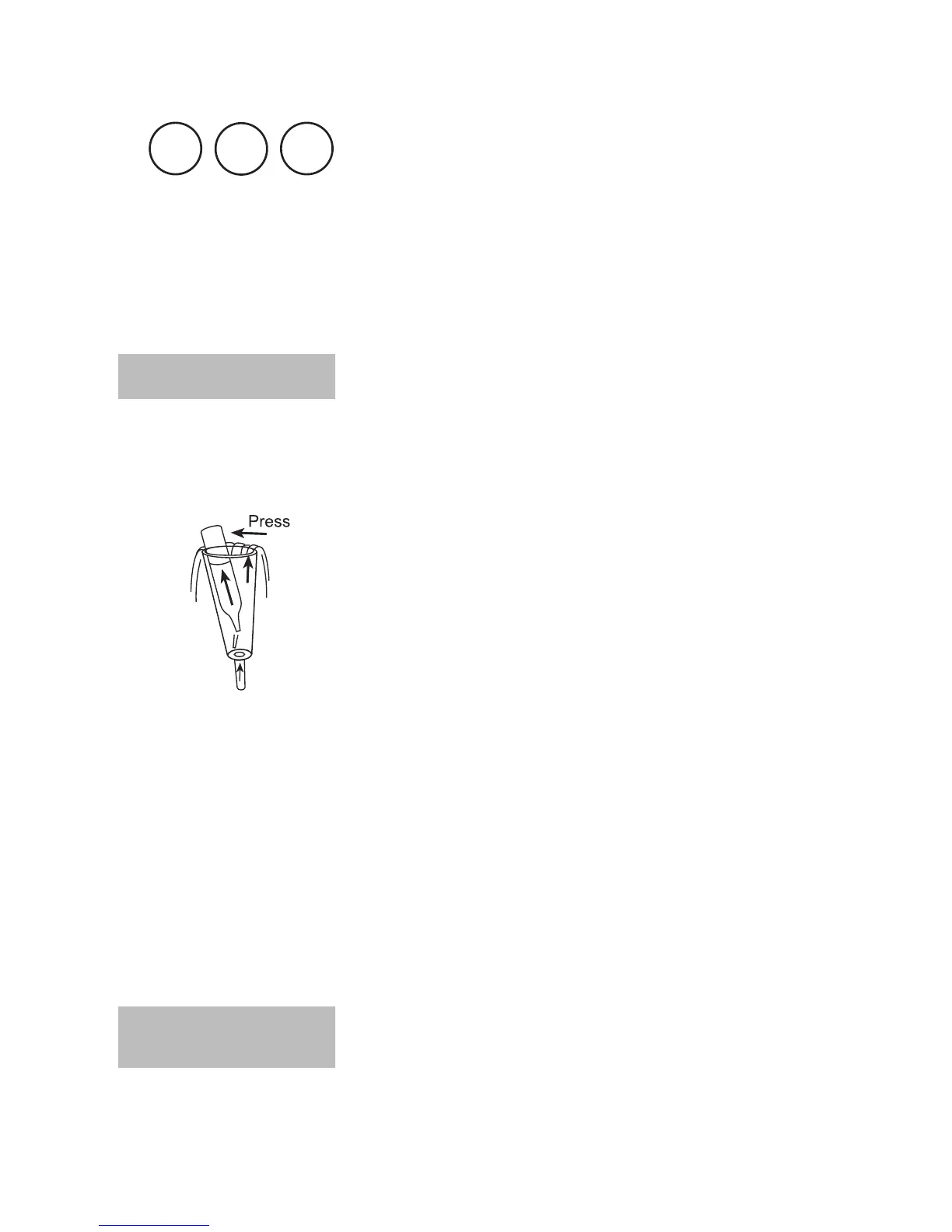
4. Water should flow through the special sample container
for several minutes to remove any air bubbles sticking
at the surface.
The water must flow from the bottom to the top.
5. When the sample container is bubble-free press one
Vacu-vial
®
into the lower edge of the sample contai-
ner. The Vacu-vial
®
breaks at the neck and the vial fills
automatically.
A small volume of inert gas remains in the Vacu-vial
®
.
6. Remove the Vacu-vial
®
point downwards from the
sample container immediately.
As the contents of the vial has a higher density than
water, it is important to remove the vial from the sam-
ple container within 5 seconds to prevent any loss of
reagent.
7. The Vacu-vial
®
is closed with one finger (covered with
a glove) to prevent entry of air. Invert the vial several
times. Dry the outside of the vial.
8. Place the Vacu-vial
®
in the sample chamber.
9. Press TEST key.
The result is shown in the display in μg/l Oxygen.
9
2
2
prepare Zero
press ZERO
Zero accepted
prepare Test
press TEST











 To Next Page