Service Manual – 48 / 63
XE_ABS_MT_AN_200224
13. UPGRADE OF THE INTEL GRAPHICS DRIVER
The ABSolu application may crash when accessing to the exam screen, or by starting an
exam. In this case, the problem is probably due to the “Intel ® HD Graphics 520” driver, which
is not compatible with ABSolu resources. It occurs when the driver version is “25.20.100.6323”.
13.1. Checking of the Intel HD Graphics 520 driver version
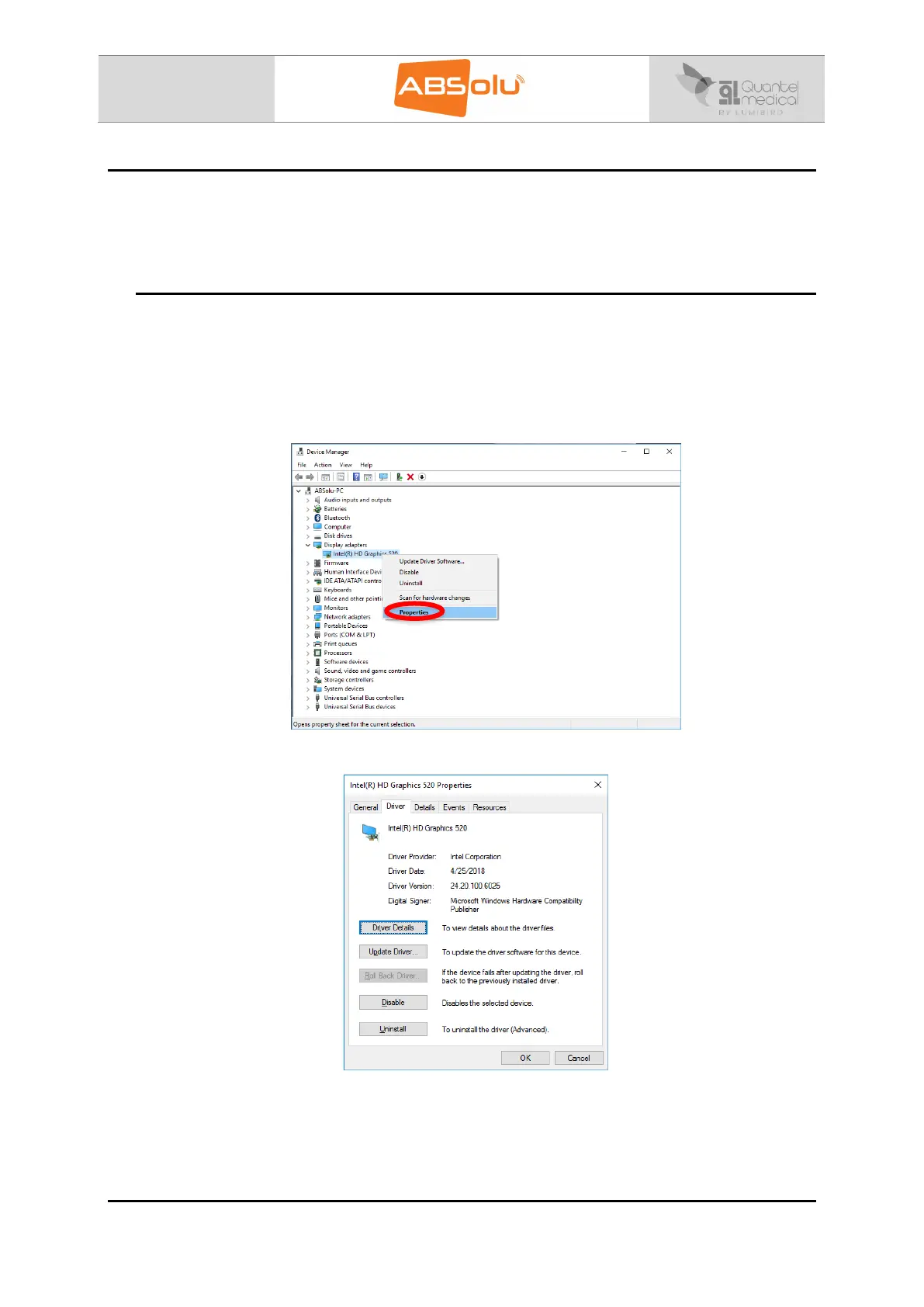
1. Select the “Device Manager” Window,
2. Click on “Display adapters”,
3. Select “Intel ® HD Graphics 520”,
4. Right click and select “Properties”:
5. Select “Driver” menu and check the driver version:
Note: if the “25.20.100.6323” driver is installed, please install the recommended driver version
(“24.20.100.6025”).
Please contact Quantel Medical Service Department, to get the recommended Intel driver.



 To Next Page